

Microsoft is to simplify the user experience of its Skype mobile and desktop apps, with the aim of returning the platform's focus to core services like calling and messaging.
In announcing the decision in a blog post, Microsoft acknowledged that the Snapchat-style redesign it introduced last year "didn't resonate with a majority of users" and had "overcomplicated" the platform, and said it hoped the new changes would make the service faster to learn and easier to use.
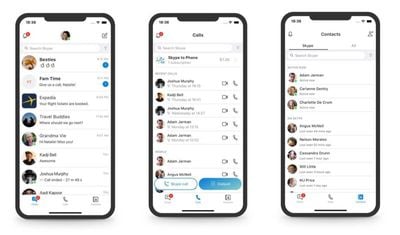
As a result, the Highlights and Capture features are being removed from the mobile app, leaving options for Chats, Calls, and Contacts at the bottom of the interface. Microsoft says users can download any Highlights they have posted in Skype until September 30, 2018.
Meanwhile over on desktop, buttons for Chats, Calls, Contacts, and Notifications are being moved to the top left of the application window, which should make more sense for veteran Skype users. In addition, contacts are being "updated for simplicity" to make them easier to discover.

Visually, Microsoft says it has "toned down" the range of the gradients available in the light and dark themes, and it's also reintroducing the simplified Skype "Classic" blue theme, with subtle adjustments for contrast and readability.
Lastly, some decorative elements have been removed from the Skype interface to provide users with "a more elegant experience" that brings the focus back to content.
"This is only the beginning and you can expect many more updates over the next several months as we continue to simplify and improve the core experiences around calling, chat, and contacts," said Skype design director Peter Skillman. "While we have plenty of work left to do, we hope you find these changes simplify your experience and bring you closer to those who matter."












































![Apple Pulls Keynote, Pages and Numbers From App Store [Update: Back]](https://images.macrumors.com/t/Okb7kitB_gNr6qe5Pex9nQIysD8=/112x112/article-new/2026/01/Apple-Creator-Studio-iWork-suite.jpg)


Top Rated Comments
Google isn't committed to any one thing long enough for it to take hold. It's a literal (figuratively speaking) see what sticks scenario 'cept they don't stay around long enough to see if anything stuck.
Hey MS: Just make the calls work, contact list readable, and have buttons with icons that convey some idea of what they might do! Million dollar idea, I know...
Why is it so complicated to make a group call with someone from skype and a phone number? Even though I synced my entire contacts it often does not work or is really complicated to set up.