Apple Seeds Seventh Beta of macOS Mojave to Developers [Update: Public Beta Available] - MacRumors
Skip to Content

Apple Seeds Seventh Beta of macOS Mojave to Developers [Update: Public Beta Available]

Apple today seeded the seventh beta of an upcoming macOS Mojave update to developers for testing purposes, one week after releasing the sixth beta and more than two months after introducing the software at the Worldwide Developers Conference.

macOS Mojave introduces a new method of installing software updates, so after you've installed the initial beta using the appropriate profile from the Developer Center, additional betas can be downloaded through opening up System Preferences and choosing the "Software Update" icon.


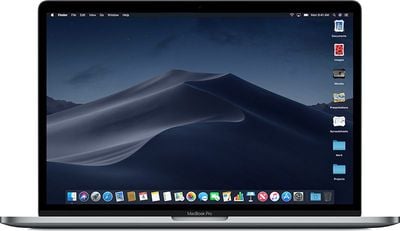
Apple's macOS Mojave update introduces a systemwide Dark Mode, with Mojave users able to choose between a light theme or the new dark theme, which changes the color of the dock, menu bar, apps, and other elements. Dark Mode is accompanied by Dynamic Desktops, aka wallpapers that subtly change throughout the day. Additional wallpapers were introduced in the fourth and fifth betas.

Stacks, a new desktop organization system, keeps all of your desktop files neat and organized, while Finder has been enhanced with a Gallery View, a Sidebar, a revamped Quick Look option and Quick Actions, so you can do more in the Finder window than ever before.

Screenshots can now be edited using Markup tools and a new management options that also allow for easy screen recording, while Continuity camera, a new feature, allows you to import photos and document scans directly from an iPhone or iPad to the Mac.
macosmojavestacks
The Apple News, Stocks, Home, and Voice Memos apps have been ported from iOS to macOS as part of a multiyear project Apple is working on to make it easier to bring iOS apps to Macs, and Apple has introduced several new privacy protections to keep your data safer than ever.

Apple is also making it harder for websites to track you with a range of new Safari tools, and it's also easier to make and store secure, hard-to-guess passwords for each and every website.

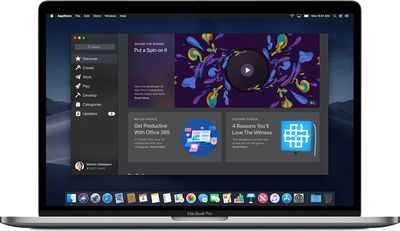
Apple has added an entirely revamped Mac App Store to macOS Mojave that makes it easier to discover apps with a featured section and specific categories for games, creative apps, productivity apps, apps for developers, and more.
macosmojavemacappstore
macOS Mojave is available to developers and public beta testers to work out bugs and other issues ahead of an upcoming fall public release.

Update: According to Apple's release notes, today's macOS Mojave beta removes the Group FaceTime feature, which is no longer slated for release when macOS Mojave launches. Apple says Group FaceTime will be coming in an update set to be released "later this fall."

Update 2: Apple has also seeded a new beta of macOS Mojave for public beta testers.

Related Forum: macOS Mojave

Popular Stories

imac video apple feature

Apple Released Yet Another New Product Today

Friday March 20, 2026 2:39 pm PDT by
Apple has unveiled a whopping nine new products so far this March, including an iPhone 17e, iPad Air models with the M4 chip, MacBook Air models with the M5 chip, MacBook Pro models with M5 Pro and M5 Max chips, the all-new MacBook Neo, an updated Studio Display, a higher-end Studio Display XDR, AirPods Max 2, and now the Nike Powerbeats Pro 2. iPhone 17e features the same overall design as...
HomePod mini and Apple TV Sage

New Apple TV and HomePod Mini Remain 'Ready' to Launch

Sunday March 22, 2026 6:33 am PDT by
Apple has unveiled nine new products this month, but the wait continues for the next-generation Apple TV 4K and HomePod mini models. In his Power On newsletter today, Bloomberg's Mark Gurman said new versions of the Apple TV and HomePod mini have been "ready" since last year, but he reiterated that Apple has held off on releasing them until the more personalized version of Siri and other...
ios 26 4 pastel

iOS 26.4: Top 10 New Features Coming to Your iPhone

Friday March 20, 2026 2:44 pm PDT by
iOS 26.4 isn't the major update with new Siri features that we hoped for, but there are some useful quality of life improvements, and a little bit of fun with an AI playlist generator and new emoji characters. Playlist Playground - Apple Music has a Playlist Playground option that lets you generate playlists from text-based descriptions. You can include moods, feelings, activities, or...

Top Rated Comments

mikeboss Avatar
99 months ago
Build 18A365a
Score: 3 Votes (Like | Disagree)
chucker23n1 Avatar
99 months ago
Onyx turns on dark mode in High Sierra:

https://www.titanium-software.fr/en/onyx.html
That's misleading. Dark Mode in High Sierra is quite incomplete.
Score: 2 Votes (Like | Disagree)
99 months ago
Printing is working again :)
Score: 1 Votes (Like | Disagree)
PBG4 Dude Avatar
99 months ago
I have not yet downloaded Mojave on my 2017 MBP for fear of stabilization. Apple has done a great job thus far with the beta releases of iOS 12, Mojave seems hit or miss. I really just want to use Dark Mode.
Install it on an external or temporary partition then. :-) Nothing says you can’t have multiple OSes on multiple partitions.
Score: 1 Votes (Like | Disagree)
Fangio Avatar
99 months ago
Seed note says printing issue is fixed in beta 7.
Nice.
Here's a question for you from the Mac Pro subforum
... is there any mention of anything cMP-specific in the [s]release[/s] seed notes?
Score: 1 Votes (Like | Disagree)
MacHiavelli Avatar
99 months ago
I have not yet downloaded Mojave on my 2017 MBP for fear of stabilization. Apple has done a great job thus far with the beta releases of iOS 12, Mojave seems hit or miss. I really just want to use Dark Mode.
Onyx turns on dark mode in High Sierra:

https://www.titanium-software.fr/en/onyx.html
Score: 1 Votes (Like | Disagree)