Amazon Testing Collaborative Shopping List Feature on iOS App and Website - MacRumors
Skip to Content

Amazon Testing Collaborative Shopping List Feature on iOS App and Website

by

Amazon has begun testing a small but useful new feature across its iOS app and mobile/desktop websites, allowing users to invite friends and family members to collaborate on a shopping list together. Amazon customers have long been asking for such a feature, and it seems like a small set of them have been selected to test it out ahead of a potential wider launch in the future (via Android Police).
amazon sharing list
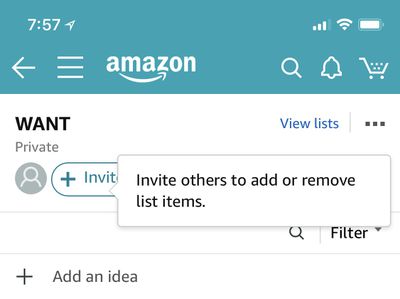
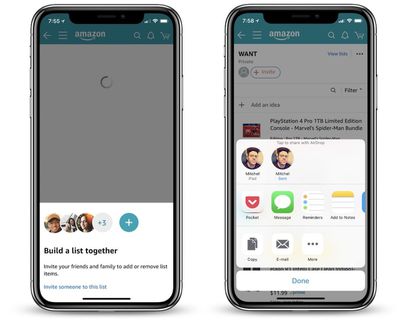
On iOS, after you open the Amazon app and navigate to one of your wish lists, you'll see a new prompt that says "Invite others to add or remove list items." If you tap this, you'll get the usual iOS sharing sheet with options like AirDrop, Message, E-Mail, and simply copying a URL to share with someone.

Once the recipient gets the list invite, Amazon will open up in a browser (both mobile and desktop appear to work), and your list will now effectively appear as one of their own in their Amazon account. They'll be able to view it, add items to it, remove items, edit quantity, and edit comments. Collaborative lists will be designated as such at the top of the list near its name with two user icons and a "Shared" banner.
amazon sharing lists 3
Once multiple members are sharing a list, a new conversation icon will appear on the right of the list's page and act as a hub for users to send messages and discuss items on the list. Above this is an ellipsis icon that lets the list's original owner manage members and remove any they don't want to be able to access the list anymore. It appears that a few of these features are missing for some users at the time of writing, likely due to the feature still being in a testing phase.

The feature is in testing on iOS and Amazon.com on mobile and desktop websites, but Android Central reports that it does not appear to be on the native Android app yet. As with all feature tests, it's unclear when -- or if -- collaborative shopping lists on Amazon will roll out to all users.


Tag: Amazon

Top Rated Comments

104 months ago
Key is that it allows for collaboration where as Amazon already allowed people to view their friend and family’s wish lists.

Score: 3 Votes (Like | Disagree)
Kaibelf Avatar
104 months ago
This would be handy for say, couples who both need to buy things for the house. It would be MORE handy if either side would be able to actually make the purchase rather than just the "owner." From this write-up that doesn't appear to be the case, however.

Score: 1 Votes (Like | Disagree)
104 months ago
You shop for me and I’ll shop for you... ShopingMan! Gotta’ shop them all!

o_O~
^^
Score: 1 Votes (Like | Disagree)

Popular Stories

iphone 16 teal

'Siri AI' Lawsuit Update: Apple to Pay Owners of These iPhone Models

Thursday July 9, 2026 7:08 am PDT by
In May, Apple agreed to pay $250 million to settle a U.S. class action lawsuit over Siri AI's delayed launch, and eligible iPhone users could receive up to a $95 payout. This week, the California court overseeing the case held a hearing regarding preliminary approval of the settlement, but the judge has not yet issued a ruling. It will likely be at least a few more months before eligible...
Apple TV Thumb 3

Everything Coming in the 2026 Apple TV 4K

Wednesday July 8, 2026 4:51 pm PDT by
The Apple TV 4K hasn't been updated since 2022, and it's due for a refresh. An update is planned for 2026, but Apple is likely going to wait to launch it after Siri AI launches in iOS 27. Design Apple TV design updates don't happen often, and that's not changing. The next Apple TV is going to have the same squircle shape as the current model, and it'll continue to be made from a black...
apple wallet drivers license feature iPhone 15 pro

Apple Says iPhone Driver's Licenses Will Expand to These 6 U.S. States

Thursday July 9, 2026 7:29 am PDT by
In select U.S. states, residents can add their driver's license or state ID to the Apple Wallet app on the iPhone and Apple Watch, and then use it to display proof of identity or age at select airports and businesses, and in select apps. To set up the feature, open the Wallet app on the iPhone and tap on the plus sign in the top-right corner. Next, tap on Driver's License and ID Cards,...