Apple Seeds Sixth Beta of tvOS 11.2.5 to Developers and Public Beta Testers - MacRumors
Skip to Content

Apple Seeds Sixth Beta of tvOS 11.2.5 to Developers and Public Beta Testers

Apple today seeded the sixth beta of an upcoming tvOS 11.2.5 update to developers for testing purposes, one week after seeding the fifth beta and more than a month after the release of tvOS 11.2.1, an update that introduced a fix for a HomeKit vulnerability.

Designed for the fourth and fifth-generation Apple TV models, the new tvOS 11.2.5 developer beta can be downloaded onto the Apple TV via a profile that's installed using Xcode.
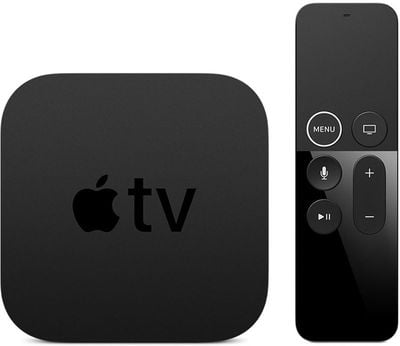
appletv4k2
We don't yet know what features or changes might be included in the tvOS 11.2.5 update, but it likely focuses primarily on bug fixes and performance improvements rather than major outward-facing changes.

There were no outward-facing changes discovered in the first five developer betas, but we'll update this post should new features be found in the sixth beta.

Related Roundup: Apple TV
Buyer's Guide: Apple TV (Don't Buy)

Popular Stories

Where is the New Apple TV Feature

Next Apple TV's Chip Revealed in Latest Leak

Tuesday September 8, 2026 10:19 am PDT by
The next Apple TV 4K will be equipped with an A19 or A19 Pro chip, according to evidence in Apple's code uncovered by MacRumors contributor Aaron Perris. In particular, the device's model identifier points towards the A19 generation of chips. Accordingly, the next Apple TV would have 8GB or 12GB of RAM, up from 4GB in the current 2022 model with the A15 Bionic chip. Other rumored upgrades for...

iOS 27 Feature Cool

Apple Releases New iOS 27, iPadOS 27, macOS 27, and tvOS 27 Public Betas

Monday August 31, 2026 2:13 pm PDT by
Apple today released the sixth public betas of iOS 27, iPadOS 27, tvOS 27, and macOS Golden Gate, allowing anyone with a compatible device to download and test the new software. The sixth betas come a week after Apple seeded the fifth betas and a few hours after the eighth developer betas. You can get started by signing up on Apple's beta website and then opting in to the public beta by...

Apple TV Remote Icon

iOS 27 to Upgrade Apple TV Remote App in Two Ways

Thursday September 10, 2026 2:33 am PDT by
Apple has updated the design of the virtual Apple TV Remote for the iOS 27 Release Candidate, which was released yesterday, and there are two new features that have been added to the iPhone app's interface. First up, Apple has added a new button to the top-right corner of the Remote UI with a glyph showing four squares. Pressing the button pops out an app menu similar to the Apple TV home...

Top Rated Comments

KazKam Avatar
113 months ago
I've never understood why they can't/won't/don't add an iTunes-style visualizer to the ATV as a screensaver option for when playing music. You're playing music through a box connected to your TV, and blurry cover art is the best they can come up with to fill that giant screen?!
Score: 6 Votes (Like | Disagree)
113 months ago
I am anxiously awaiting the update where they have Single Sign-In for my cable provider, to authorize all the channel apps. It seems silly that I need to periodically re-authorize them individually...
Score: 2 Votes (Like | Disagree)
113 months ago
I wonder if the day will ever come when they fix the issue with Apple Music skipping songs on the Apple TV? Constantly.:mad:
Never had that happen. Sucks
Score: 2 Votes (Like | Disagree)
HobeSoundDarryl Avatar
113 months ago
Historically, I have found that the best approach with :apple:TV is to periodically unplug-wait-restart from time to time. I've suspected memory leaks or similar that eventually impact performance and this clears that kind of thing out (if it's actually a problem).

However, when that doesn't do it, the good old factory restore maneuver becomes the ultimate fall back. That clears out everything that might have hogged space, corrupted memory, etc. Puzzling problems not solved by the cold reboot, swapping cables, experimenting to be sure it's not wifi or ethernet connections, cold rebooting any middle man hardware (like a receiver) can leave seemingly all fault pointing back to the little box. Factory restore puts it back to it's original state before any apps can have any lasting ill effects.
Score: 1 Votes (Like | Disagree)
Zimmy68 Avatar
113 months ago
I have a sneaking suspicion that Atmos would require a rewrite of the main code.
I don't see it happening even though they said it is coming.
Score: 1 Votes (Like | Disagree)
4jasontv Avatar
113 months ago
10 Fixes and upgrades I want in 2018:

1. Let me use Up Next when Disney Now is installed.
2. Let me mark individual up next episodes as watched or unwatched.
3. Let me select the preferred network for up next.
4. Get Netflix working with up next.
5. Add mute when I hold down the down button.
6. Use the Wi-Fi as an airport when ethernet is plugged in.
7. Use iPhone Bluetooth to identify who is watching so multiple people can watch a series in order at their own pace. This way it promotes my stuff when I'm alone, her stuff when she's alone, and our stuff when we are together. Kid friendly stuff when the kids home.
8. Split screen multitask so I can watch two things at the same time regardless of the app. (For example I can't watch my local team and home team in the same app because of blackouts. Let me watch directv now and Sunday ticket at the same time.)
9. Add Safari.
10. Add a Sleep timer.
Bonus: make up next mandatory for all apps.

(Sure, some are developer issues, but Apple could deny the app for being broken.)
Score: 1 Votes (Like | Disagree)













































