

Popular podcast player Overcast has reached its long-awaited third iteration on the iOS App Store, with improvements to episode management and a slew of other UI enhancements.

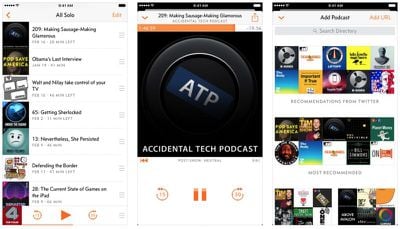
Designed by Instapaper developer Marco Arment, Overcast 3's most obvious change is that it adopts the design language of iOS 10, such as the use of stacked views which Apple introduced in Apple Music, so screens including Now Playing, settings, downloads, and recommendations, now appear as stacks that slide up from the bottom of the interface. There's also a redesigned Now Playing view, in which users swipe right to adjust audio settings, and swipe left to view episode information.
Screen Shot 7
A new episode action tray features in the app, grouping actions that were previously hidden behind swipe gestures or other menus. Tapping an episode in a list now displays buttons to share, star, play, add to queue, and delete the selected podcast episode.

Elsewhere, Peek and Pop 3D Touch gestures are now supported in episode list screens, allowing users to quickly preview episode contents and access play and delete shortcuts by sliding up the Peek card. An Overcast 3 widget for the home screen has also been developed, which allows users to see what's playing, resume playback, and see upcoming episodes in their Up Next queue.
2017 02 19 22 25 28
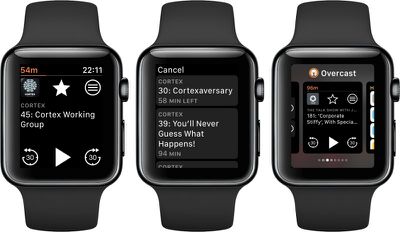
Also included in Overcast 3 is a redesign of its Apple Watch component, with the ability to view upcoming episodes from the wrist.

Overcast 3 is available as a free ad-supported app, while an optional $9.99 in-app purchase gets users a premium ad-free version. Overcast 3 is available for iPhone and iPad from the App Store. [Direct Link]


Top Rated Comments

118 months ago
I don't know if its my favorite app, but it certainly my most used one. Nice to see the update to match iOS10. Still wish I could download episodes to my watch so that I could listen while i run without having to take my phone with me
Score: 5 Votes (Like | Disagree)
118 months ago
Unfortunately it is a $9.99/year subscription.

I would happily pay $10 to unlock the full version even if it meant paying another $10 next year for version 4, but I'm unwilling to be perpetually held hostage with a subscription for certain app categories when there's no guarantee that the developer will do anything with the fees I pay. .
This developer has a bad past with respect to that, Accepting a payment for a permanent ad free version, then putting the ads back in a while later, seems misleading. He keeps changing the model to try and monetise more. I think he's just a bit too greedy when you consider what the competition; pocketcasts, downcast can do for a single payment.

I use the iOS podcast app myself, after trying all the rest, because it finally works reliably and I prefer the design. $10 a year actually gets you very little extra when you look at what the free app does.
Score: 2 Votes (Like | Disagree)
JNGold Avatar
118 months ago
Do you have "continuous playback" toggled on or off under settings?
I have that toggled on and I have found that something I mark to "play next" doesn't play at all unless you are in the Queue playlist. This functionality is terrible and I'm not sure how this got past a beta. Like most apps, including Apple's (which actually does it well), Play next should auto play the marked episode regardless of what playlist you're in. I hope this gets corrected ASAP.

I have been an Apple Podcast app user for a long time and EOD it just works. It's simple and does what I need and includes video podcasts as well. Also, because it's Apple's app, it works great with Siri (more important now that I am using AirPods), and CarPlay is rock solid. I'm not holding much hope for Overcast staying on my iDevices for long.

Update: This app is a buggy mess. A couple of crashes so far this morning, Widget doesn't show currently playing podcast. Overcast started out as with clean and simple UI and was FAST. Over time, it has become an unreliable and inconsistent performer and I am not sold on Arment's design choices and beta testing capability.
Score: 2 Votes (Like | Disagree)
118 months ago
I've been a Overcast user for a year or so now and I used the playlist feature for the first time this morning. I thought I must have done something wrong when the next podcast didn't start playing after the first one on the playlist finished.

Why does it not do this?! Strange
I did a quick test where i was listening to a podcast in a playlist, i manually moved it to about 30 seconds from end. it play that part then stopped.

it makes the app a non starter for me.

oh well, i am happy with apple podcasts, have tried them all but for me, it works for me the best.
Do you have "continuous playback" toggled on or off under settings?
Score: 1 Votes (Like | Disagree)
118 months ago
wait.

so if you have a playlist and you are playing your podcasts in a row, like you are driving or something, this app does auto play the next podcast after you complete one?

i am missing something right?
I've been a Overcast user for a year or so now and I used the playlist feature for the first time this morning. I thought I must have done something wrong when the next podcast didn't start playing after the first one on the playlist finished.

Why does it not do this?! Strange
Score: 1 Votes (Like | Disagree)
dwman Avatar
118 months ago
I wish he included video podcasts as an option. I could ditch my video podcasting app.
Score: 1 Votes (Like | Disagree)

Popular Stories

iphone 16 apple intelligence

Apple Aiming to Release 'Breakthrough' New iPhone Accessory

Wednesday February 18, 2026 12:43 pm PST by
Apple is looking for a "breakthrough" with its push into wearable AI devices, including an "AirTag-sized pendant," according to Bloomberg's Mark Gurman. In a report this week, he said the pendant is reminiscent of the failed Humane AI Pin, but it would be an iPhone accessory rather than a standalone product. The pendant would feature an "always-on" camera and a microphone for Siri voice...
Apple Watch 15 Tips Every Owner Needs to Know Feature

Apple Watch: 15 Tips Every Owner Needs to Know

Thursday February 19, 2026 7:38 am PST by
Apple Watch is now eleven generations in, and packed with useful features that are easy to miss at first glance. To help you get more out of your new device, we've rounded up 15 practical tips you might not have discovered yet, including a few that long-time users often overlook. Bounce Between Two Apps On your Apple Watch, double-press the Digital Crown to see a deck of all currently...
Dynamic Island iPhone 18 Pro Feature

10 Reasons to Wait for Apple's iPhone 18 Pro

Wednesday February 18, 2026 5:12 am PST by
Apple's iPhone development roadmap runs several years into the future and the company is continually working with suppliers on several successive iPhone models at the same time, which is why we often get rumored features months ahead of launch. The iPhone 18 series is no different, and we already have a good idea of what to expect for the iPhone 18 Pro and iPhone 18 Pro Max. One thing worth...
Multicolored Low Cost A18 Pro MacBook Feature

Low-Cost MacBook Expected on March 4 in These Colors

Wednesday February 18, 2026 5:42 am PST by
Apple will announce its rumored low-cost MacBook at its event on March 4, with the device coming in a selection of bold color options, according to a known leaker. Earlier this week, Apple announced a "special Apple Experience" for the media in New York, London, and Shanghai, taking place on March 4, 2026 at 9:00am ET. Posting on Weibo, the leaker known as "Instant Digital" said that the...
iphone 17 pro green

iPhone 17 Pro Max Curiously Becomes Most Traded-In Smartphone

Wednesday February 18, 2026 9:13 am PST by
New trade-in data indicates that Apple's iPhone 17 Pro Max has rapidly become the single most traded-in smartphone. According to a new report from SellCell, Apple's latest flagship iPhone has quickly risen to the top of the independent trade-in market, accounting for 11.5% of all devices appearing in the top-20 trade-in rankings just months after release. The analysis is based on SellCell...












































