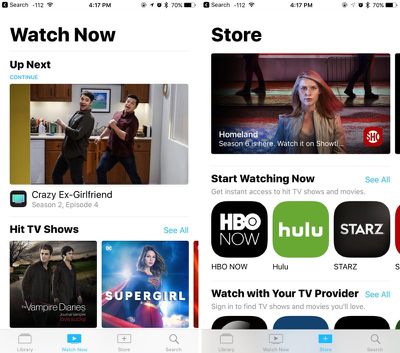
In iOS 10.2, released on December 12, Apple introduced the new "TV" app, which serves as an Apple-designed TV guide that aims to simplify the television watching experience and help users discover new TV and movie content.

In the United States, the TV app replaces the standard "Videos" app and serves as a television hub on iOS devices, but it appears the new app doesn't work well with content that's been ripped from DVDs.
ios102tvapp
According to an ongoing discussion on Apple's Support Communities that dates back to December, some customers who have videos ripped from DVDs are no longer able to view them in the TV app. The same videos previously worked fine in the now-replaced Videos app. A user who is having issues describes the problem:

Prior to iOS 10.2 I was able to view video I had ripped on the Videos app in iOS. The process I used was to rip the video and then import them into iTunes. Then I synced my iPhone with iTunes and my movies were download and viewed using the Videos app.

iOS 10.2 no longer includes the Video app and the new TV app will not allow me to watch these ripped videos. Does someone have a solution or am I simply missing something?

Other iPhone users have been unable to sync home videos and other content to their devices with the current version of iTunes, receiving a message that movies or TV shows can't be synced because the Videos app is not installed.

Some users have been able to get around the problem with already-transferred videos by using the TV widget on their iOS devices, which apparently causes the TV app to display the ripped videos after the widget is activated. Others can get the ripped videos to play by setting the videos to be "Home Videos."

That the widget allows some users to access their videos suggests this is perhaps a bug that will be resolved in a future update, but it is not entirely clear what's going on with the TV app and content acquired outside of the iTunes Stores.

Affected users who want to get non-Apple video content onto their iOS devices will need to use a third-party solution like Infuse or VLC.


Related Forum: iOS 10

Top Rated Comments

profets Avatar
116 months ago
Ripping DVDs, importing to iTunes, syncing manually to an iOS device. Why not just use Plex already (or another media manager like VLC that allows you to make a local copy wirelessly)?
Score: 21 Votes (Like | Disagree)
panjandrum Avatar
116 months ago
Like we have had to do all too frequently over the past few years; just switch away from Apple's software and use something else (I've had very good luck with Stream to Me and Serve to Me, and no longer use iTunes, Music, etc. etc. for anything at all other than occasionally ripping a CD or manually managing iThing backups and media). That solution also supports playback on various media-players outside the Apple ecosystem (for example, a PS3 will find the Serve to Me server on your network and work properly with it). Unlike Plex, Stream to Me / Serve to Me is extremely simple to setup (it also lacks some of the advanced features, but overall I've certainly been very happy with it). Oh, and VLC will also pick up Stream to Me servers.

I hope that someday those currently running Apple will figure out that the worse their software gets, the more we move away from it. The more we move away from it, the less incentive we have to stay with Apple hardware. The less we stay with Apple hardware, the less we recommend Apple hardware to other and the less visibility Apple hardware has. It's a vicious cycle they can put a stop to by getting their software usability, features, and QA back up to what it used to be...
Score: 12 Votes (Like | Disagree)
OS X Dude Avatar
116 months ago
How do I watch my movies on a plane with Plex?
Plex allows caching.
Score: 9 Votes (Like | Disagree)
Andreas56938 Avatar
116 months ago
You are ripping it wrong.
Score: 8 Votes (Like | Disagree)
MallardDuck Avatar
116 months ago
Ripping DVDs, importing to iTunes, syncing manually to an iOS device. Why not just use Plex already (or another media manager like VLC that allows you to make a local copy wirelessly)?
Because moving 200+ GB of files wirelessly takes forever.
[doublepost=1484704175][/doublepost]The TV app is a complete disaster - massive number of bugs.


* If you have a DTS passthrough track, it won't play the file
* It's unreliable in airplane mode - sometimes doesn't work (as I found out the hard way)

* shoves the cloud/streaming stuff into your face, no longer hideable

* shows blank seasons and cloud icons even in downloaded section
* search doesn't work offline
* doesn't sync properly with itunes - doesn't add episodes and doesn't delete them
* manual delete is no longer a swipe, it's something related to force touch, but it doesn't work reliably

and on and on. Apple should put the videos app up in the app store.

There's no third party option that plays DRM'd content, so we're stuck.
Score: 8 Votes (Like | Disagree)
Glassed Silver Avatar
116 months ago
Great idea Apple, keep incentivizing people to move away from your vertically integrated products to platform-agnostic alternatives.

And be sure to keep messing with the value to price ratio on ALL your products!

What's the worst that could happen? After all you have so many great new products in the mighty pipeline!

Glassed Silver:win
Score: 7 Votes (Like | Disagree)

Popular Stories

iOS 26

15 New Things Your iPhone Can Do in iOS 26.2

Friday December 5, 2025 9:40 am PST by
Apple is about to release iOS 26.2, the second major point update for iPhones since iOS 26 was rolled out in September, and there are at least 15 notable changes and improvements worth checking out. We've rounded them up below. Apple is expected to roll out iOS 26.2 to compatible devices sometime between December 8 and December 16. When the update drops, you can check Apple's servers for the ...
ios 18 to ios 26 upgrade

Apple Pushes iPhone Users Still on iOS 18 to Upgrade to iOS 26

Tuesday December 2, 2025 11:09 am PST by
Apple is encouraging iPhone users who are still running iOS 18 to upgrade to iOS 26 by making the iOS 26 software upgrade option more prominent. Since iOS 26 launched in September, it has been displayed as an optional upgrade at the bottom of the Software Update interface in the Settings app. iOS 18 has been the default operating system option, and users running iOS 18 have seen iOS 18...
iOS 26

Apple Seeds iOS 26.2 and iPadOS 26.2 Release Candidates to Developers and Public Beta Testers

Wednesday December 3, 2025 10:33 am PST by
Apple today seeded the release candidate versions of upcoming iOS 26.2 and iPadOS 26.2 updates to developers and public beta testers, with the software coming two weeks after Apple seeded the third betas. The release candidates represent the final versions of iOS 26.2 and iPadOS 26.2 that will be provided to the public if no further bugs are found during this final week of testing....
Photos App Icon Liquid Glass

John Gruber Shares Scathing Commentary About Apple's Departing Software Design Chief

Thursday December 4, 2025 9:30 am PST by
In a statement shared with Bloomberg on Wednesday, Apple confirmed that its software design chief Alan Dye will be leaving. Apple said Dye will be succeeded by Stephen Lemay, who has been a software designer at the company since 1999. Meta CEO Mark Zuckerberg announced that Dye will lead a new creative studio within the company's AR/VR division Reality Labs. On his blog Daring Fireball,...
Intel Inside iPhone Feature

Apple's Return to Intel Rumored to Extend to iPhone

Friday December 5, 2025 10:08 am PST by
Intel is expected to begin supplying some Mac and iPad chips in a few years, and the latest rumor claims the partnership might extend to the iPhone. In a research note with investment firm GF Securities this week, obtained by MacRumors, analyst Jeff Pu said he and his colleagues "now expect" Intel to reach a supply deal with Apple for at least some non-pro iPhone chips starting in 2028....
iOS 26

When Will Apple Release iOS 26.2?

Monday December 1, 2025 4:37 pm PST by
We're getting closer to the launch of the final major iOS update of the year, with Apple set to release iOS 26.2 in December. We've had three betas so far and are expecting a fourth beta or a release candidate this week, so a launch could follow as soon as next week. Past Launch Dates Apple's past iOS x.2 updates from the last few years have all happened right around the middle of the...
maxresdefault

iPhone Fold: Launch, Pricing, and What to Expect From Apple's Foldable

Monday December 1, 2025 3:00 am PST by
Apple is expected to launch a new foldable iPhone next year, based on multiple rumors and credible sources. The long-awaited device has been rumored for years now, but signs increasingly suggest that 2026 could indeed be the year that Apple releases its first foldable device. Subscribe to the MacRumors YouTube channel for more videos. Below, we've collated an updated set of key details that ...
ive and altman

Jony Ive's OpenAI Device Barred From Using 'io' Name

Friday December 5, 2025 6:22 am PST by
A U.S. appeals court has upheld a temporary restraining order that prevents OpenAI and Jony Ive's new hardware venture from using the name "io" for products similar to those planned by AI audio startup iyO, Bloomberg Law reports. iyO sued OpenAI earlier this year after the latter announced its partnership with Ive's new firm, arguing that OpenAI's planned "io" branding was too close to its...
iphone air camera

iPhone Air's Resale Value Has Dropped Dramatically, Data Shows

Thursday December 4, 2025 5:27 am PST by
The iPhone Air has recorded the steepest early resale value drop of any iPhone model in years, with new data showing that several configurations have lost almost 50% of their value within ten weeks of launch. According to a ten-week analysis published by SellCell, Apple's latest lineup is showing a pronounced split in resale performance between the iPhone 17 models and the iPhone Air....
iPhone 17 Pro Cosmic Orange

iPhone 17 Pro Lost a Camera Feature Pro Models Have Had Since 2020

Thursday December 4, 2025 5:18 am PST by
iPhone 17 Pro models, it turns out, can't take photos in Night mode when Portrait mode is selected in the Camera app – a capability that's been available on Apple's Pro devices since the iPhone 12 Pro in 2020. If you're an iPhone 17 Pro or iPhone 17 Pro Max owner, try it for yourself: Open the Camera app with Photo selected in the carousel, then cover the rear lenses with your hand to...