

Third-party accessory manufacturer ZENS today launched the two-in-one iPhone/Apple Watch Power Bank, letting users recharge their Apple devices while on the go. The rectangular case has an integrated induction charger for the Apple Watch -- which is Apple MFi Certified -- and a USB-A port on one side for charging any other device connected to the bank.
The Power Bank has an included battery rated at 4,000 mAh and a 2A output, which ZENS said "guarantees fast charging of the Apple Watch and iPhone or iPad." Its battery falls in line with another portable Apple Watch/iPhone charging pack made by Kanex, which can recharge an Apple Watch six times over on one life.
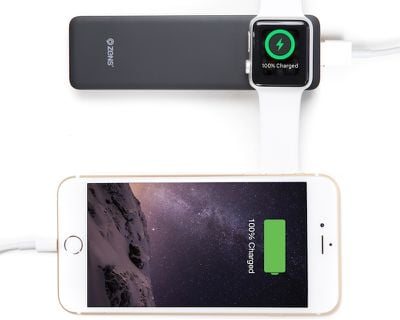
The two-in-one ZENS Power Bank is developed especially for Apple Watch and iPhone/iPad. As is the case with other ZENS products, the innovative new power bank stands out for its sleek, ultra-slim design. It offers a space-saving way to charge your Apple iPhone and/or Apple Watch at home, in the office or on the go, without the need to bring along a cumbersome charging dock while you’re underway.
The Apple MFi Certified module that is incorporated in the ZENS Power Bank eliminates the need to add your own Apple Watch Charger. While you are wirelessly charging your Apple Watch, you can use the reversible micro USB cable, that is impossible to plug in wrong, to charge your iPhone or iPad.
ZENS says the Power Bank is ideal for travel as well as home and office use, because "the all-in-one charging and battery solution requires little space on your desk or in your bag" thanks to its ultra-slim design, which is about 5 inches long and just 1.5 inches wide.
The company has released an integrated charging puck accessory before for the Apple Watch, with the small Apple Watch Power Bank that focused on portability and had a 1,300 mAh battery. That cheaper option, which runs for $56, didn't offer simultaneous iPhone or iPad charging with an additional USB-A port, however.
Those interested can purchase the ZENS iPhone/Apple Watch Power Bank from the company's website for €69.99 or about $78.00, and it will ship to the United States and several other countries from the Netherlands.

















Top Rated Comments