Photo Editing App 'Prisma' Now Supports Offline Picture Processing - MacRumors
Skip to Content

Photo Editing App 'Prisma' Now Supports Offline Picture Processing

by

Popular photo manipulation app Prisma has been updated to allow offline processing of images for the first time.

The photo app recreates images in the style of famous artists and gives shots a painterly aesthetic using neural networks, but up until now users needed an internet connection and had to wait for the app's Moscow-based servers to process their pictures.
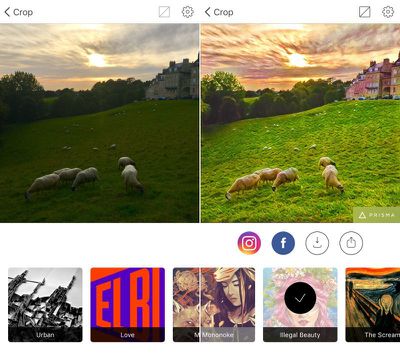
prisma
The latest update doesn't bring offline mode to the whole collection of Prisma's filters, but the developers say more is to come on that front, and the change means server-side video manipulation is just around the corner.

"Now that we've implemented neural networks right to the smartphones, we have enough server capacity to run full videos on them in the near future," said the Prisma team.

Prisma Labs says "repainting" times have been reduced to five seconds on Apple's latest iPhones and that there should be no increase in handset battery usage.

Prisma is a free download on the App Store for iPhone and iPad. [Direct Link]
Top Rated Comments

Telos101 Avatar
129 months ago
That's pretty neat looking app. What exactly do they mean by neural networks here?
It's similar to what Google did with their DeepDream stuff: https://en.wikipedia.org/wiki/DeepDream


Attachment Image
Score: 5 Votes (Like | Disagree)
rhoydotp Avatar
129 months ago
What exactly do they mean by neural networks here?
It's pretty interesting ... here's a good very basic read

http://www.dummies.com/how-to/content/how-predictive-analysis-neural-networks-work.html

it sounds like that the bulk of the processing can be done directly on the device as supposed to a background task in their servers.

this is my guess ... anybody else can elaborate?
Score: 2 Votes (Like | Disagree)
rhett7660 Avatar
129 months ago
It's a really nice photo filter app. I got it a few weeks ago when I first saw it on here. I just wish you could do photos in native rectangular format instead of only Instagram square. Also, no logo on the finished photo would be nice.
For the logo, open the app, click on the gear icon in the upper right hand corner, and disable the "enable watermarks". No more watermarks.
Score: 1 Votes (Like | Disagree)
129 months ago
It's a really nice photo filter app. I got it a few weeks ago when I first saw it on here. I just wish you could do photos in native rectangular format instead of only Instagram square. Also, no logo on the finished photo would be nice.
Score: 1 Votes (Like | Disagree)
macduke Avatar
129 months ago
This is a pretty neat app, actually. Since it uses neural networks, many of the effects don't look like a typical computer filter as they're much smarter than that. My only gripe is that I wish I could touch it up. There was one area on my chin where it lost contrast from the rest of my beard and made a bunch of hairy brush strokes anyway which really looked out of place. But overall it's great and a lot of fun!
Score: 1 Votes (Like | Disagree)

Popular Stories

Apple TV Thumb 3

Everything Coming in the 2026 Apple TV 4K

Wednesday July 8, 2026 4:51 pm PDT by
The Apple TV 4K hasn't been updated since 2022, and it's due for a refresh. An update is planned for 2026, but Apple is likely going to wait to launch it after Siri AI launches in iOS 27. Design Apple TV design updates don't happen often, and that's not changing. The next Apple TV is going to have the same squircle shape as the current model, and it'll continue to be made from a black...
iphone 16 teal

'Siri AI' Lawsuit Update: Apple to Pay Owners of These iPhone Models

Thursday July 9, 2026 7:08 am PDT by
In May, Apple agreed to pay $250 million to settle a U.S. class action lawsuit over Siri AI's delayed launch, and eligible iPhone users could receive up to a $95 payout. This week, the California court overseeing the case held a hearing regarding preliminary approval of the settlement, but the judge has not yet issued a ruling. It will likely be at least a few more months before eligible...
apple wallet drivers license feature iPhone 15 pro

Apple Says iPhone Driver's Licenses Will Expand to These 6 U.S. States

Thursday July 9, 2026 7:29 am PDT by
In select U.S. states, residents can add their driver's license or state ID to the Apple Wallet app on the iPhone and Apple Watch, and then use it to display proof of identity or age at select airports and businesses, and in select apps. To set up the feature, open the Wallet app on the iPhone and tap on the plus sign in the top-right corner. Next, tap on Driver's License and ID Cards,...