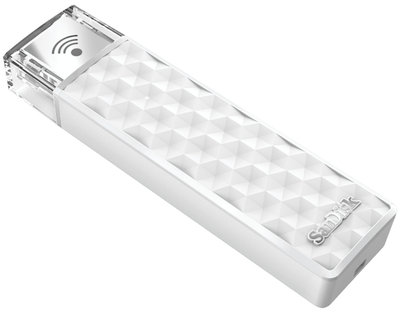
SanDisk today announced that its Connect Wireless line of flash drives is getting a capacity boost to 200GB, giving users who want portable wireless storage even more space for their files.
sandiskconnect

“With the explosion of content, people need more advanced storage solutions to keep up with the volume and quality of the photos, videos and files they’re creating on their mobile devices,” said Dinesh Bahal, vice president, product marketing, SanDisk. “Our goal is to deliver innovative, intuitive offerings that help them capture life’s great moments without worrying about storage limitations.”

The Connect Wireless line of flash drives uses the SanDisk Connect app and a password-protected Wi-Fi connection to allow users to transfer data between the flash drive and their iOS and Android devices as well as PCs and Macs. The free app [Direct Link] has also recently been updated with the ability to AirPlay content to an Apple TV and the ability to save Live Photos to the flash drive.

The 200GB SanDisk Connect Wireless Stick is available now at Amazon and SanDisk's website for $119.99.

Top Rated Comments

erinsarah Avatar
129 months ago
Please forgive my confusion. If I want to use this with my MacBook Air, do I have to go through a separate app to access the drive, or will it just show up like any other network drive on my desktop?
Assuming it works the same as previous versions, when plugged into your computer it works just like any normal flash drive. Store files on it through the Finder just like normal. The magic happens when you unplug and turn on the wireless. It acts as its own little wifi device to which you can connect your mobile device to access content. In that case you either use a Sandisk app or a mobile browser.

We use it to stream movies on long drives; we don't have to worry about putting movies on each individual iDevice. Kids just connect their device to the Sandisk wireless network open the app and select the movie.

Two caveats; we've found that the app often locks up, however using the browser instead works pretty flawlessly (you browse to something like sandisk.com/wfd to get to the file manager). The second is that this is really only useful for watching movies; the interface for viewing pictures is clunky and slow. So if you're dreaming of putting your photo library on it, visiting grandma's house and whipping out the iDevice to browse through the gazillion photos of the grandkids with her, good luck.
Score: 2 Votes (Like | Disagree)
jimthing Avatar
129 months ago
He means binary: 1-2-4-8-16-32-64-128-256.

Is this an issue though?
Score: 2 Votes (Like | Disagree)
TheRealTVGuy Avatar
129 months ago
Multiply 100 x 2 and tell us what you come up with.
Score: 2 Votes (Like | Disagree)
jdillings Avatar
129 months ago
That's a lot of porn to lose if it dies
Score: 1 Votes (Like | Disagree)
doctor-don Avatar
129 months ago
200GB and wireless.
Hope it works.
Also hope the price decreases throughout the year.
Looking for reviews from the early adopters ... but I don't mean the reviews that Amazon lumps together for ALL the various sizes.
Score: 1 Votes (Like | Disagree)

Popular Stories

iOS 26

15 New Things Your iPhone Can Do in iOS 26.2

Friday December 5, 2025 9:40 am PST by
Apple is about to release iOS 26.2, the second major point update for iPhones since iOS 26 was rolled out in September, and there are at least 15 notable changes and improvements worth checking out. We've rounded them up below. Apple is expected to roll out iOS 26.2 to compatible devices sometime between December 8 and December 16. When the update drops, you can check Apple's servers for the ...
ios 18 to ios 26 upgrade

Apple Pushes iPhone Users Still on iOS 18 to Upgrade to iOS 26

Tuesday December 2, 2025 11:09 am PST by
Apple is encouraging iPhone users who are still running iOS 18 to upgrade to iOS 26 by making the iOS 26 software upgrade option more prominent. Since iOS 26 launched in September, it has been displayed as an optional upgrade at the bottom of the Software Update interface in the Settings app. iOS 18 has been the default operating system option, and users running iOS 18 have seen iOS 18...
iOS 26

Apple Seeds iOS 26.2 and iPadOS 26.2 Release Candidates to Developers and Public Beta Testers

Wednesday December 3, 2025 10:33 am PST by
Apple today seeded the release candidate versions of upcoming iOS 26.2 and iPadOS 26.2 updates to developers and public beta testers, with the software coming two weeks after Apple seeded the third betas. The release candidates represent the final versions of iOS 26.2 and iPadOS 26.2 that will be provided to the public if no further bugs are found during this final week of testing....
Photos App Icon Liquid Glass

John Gruber Shares Scathing Commentary About Apple's Departing Software Design Chief

Thursday December 4, 2025 9:30 am PST by
In a statement shared with Bloomberg on Wednesday, Apple confirmed that its software design chief Alan Dye will be leaving. Apple said Dye will be succeeded by Stephen Lemay, who has been a software designer at the company since 1999. Meta CEO Mark Zuckerberg announced that Dye will lead a new creative studio within the company's AR/VR division Reality Labs. On his blog Daring Fireball,...
iOS 26

When Will Apple Release iOS 26.2?

Monday December 1, 2025 4:37 pm PST by
We're getting closer to the launch of the final major iOS update of the year, with Apple set to release iOS 26.2 in December. We've had three betas so far and are expecting a fourth beta or a release candidate this week, so a launch could follow as soon as next week. Past Launch Dates Apple's past iOS x.2 updates from the last few years have all happened right around the middle of the...
maxresdefault

iPhone Fold: Launch, Pricing, and What to Expect From Apple's Foldable

Monday December 1, 2025 3:00 am PST by
Apple is expected to launch a new foldable iPhone next year, based on multiple rumors and credible sources. The long-awaited device has been rumored for years now, but signs increasingly suggest that 2026 could indeed be the year that Apple releases its first foldable device. Subscribe to the MacRumors YouTube channel for more videos. Below, we've collated an updated set of key details that ...
Intel Inside iPhone Feature

Apple's Return to Intel Rumored to Extend to iPhone

Friday December 5, 2025 10:08 am PST by
Intel is expected to begin supplying some Mac and iPad chips in a few years, and the latest rumor claims the partnership might extend to the iPhone. In a research note with investment firm GF Securities this week, obtained by MacRumors, analyst Jeff Pu said he and his colleagues "now expect" Intel to reach a supply deal with Apple for at least some non-pro iPhone chips starting in 2028....
ive and altman

Jony Ive's OpenAI Device Barred From Using 'io' Name

Friday December 5, 2025 6:22 am PST by
A U.S. appeals court has upheld a temporary restraining order that prevents OpenAI and Jony Ive's new hardware venture from using the name "io" for products similar to those planned by AI audio startup iyO, Bloomberg Law reports. iyO sued OpenAI earlier this year after the latter announced its partnership with Ive's new firm, arguing that OpenAI's planned "io" branding was too close to its...
iphone air camera

iPhone Air's Resale Value Has Dropped Dramatically, Data Shows

Thursday December 4, 2025 5:27 am PST by
The iPhone Air has recorded the steepest early resale value drop of any iPhone model in years, with new data showing that several configurations have lost almost 50% of their value within ten weeks of launch. According to a ten-week analysis published by SellCell, Apple's latest lineup is showing a pronounced split in resale performance between the iPhone 17 models and the iPhone Air....
iPhone 17 Pro Cosmic Orange

iPhone 17 Pro Lost a Camera Feature Pro Models Have Had Since 2020

Thursday December 4, 2025 5:18 am PST by
iPhone 17 Pro models, it turns out, can't take photos in Night mode when Portrait mode is selected in the Camera app – a capability that's been available on Apple's Pro devices since the iPhone 12 Pro in 2020. If you're an iPhone 17 Pro or iPhone 17 Pro Max owner, try it for yourself: Open the Camera app with Photo selected in the carousel, then cover the rear lenses with your hand to...