YouTube iOS App Updated With New Design, In-App Editing Tools - MacRumors
Skip to Content

YouTube iOS App Updated With New Design, In-App Editing Tools

by

After several months of testing and tweaking, YouTube has finally released the redesigned version of its iOS app, taking cues from its Material Design-inspired Android counterpart. The updated app also comes with in-app video editing tools to make videos.
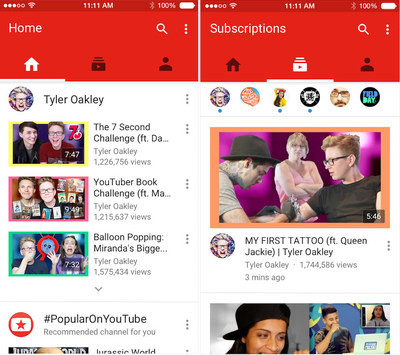
newyoutube

The redesigned YouTube app makes it easier to find what you love. Now your recommended videos, favorite channels, and subscriptions can be accessed by tapping each icon or swiping your screen. You can also create fun videos on the fly with new in-app editing tools.

The new app is divided into three sections: Home, Subscriptions and Account. Home, like the YouTube web homepage, delivers suggestions and features videos from YouTube accounts that a user may have viewed recently. Subscriptions is a stream of videos from YouTube accounts a user may subscribe to and Account allows you to access History, Likes, the Watch later feature and Playlists.

While the app was updated today, it's slowly propagating through the App Store.

YouTube for iOS is available in the App Store for free. [Direct Link]

Top Rated Comments

138 months ago
WHY DO THEY DO THAT!??!!??! THIS IS iOS!!!!!!! NOT ANDROID!!!!!! I hate this!!!!!!!!!!
Score: 18 Votes (Like | Disagree)
Asarien Avatar
138 months ago
Ugh, that obnoxious neon red bar is atrocious.
Score: 18 Votes (Like | Disagree)
adammusic Avatar
138 months ago
Ugh, that obnoxious neon red bar is atrocious.
That red top bar is huge & unnecessary. Still no option to auto open to Subscriptions Tab. Still no swipe to delete option in Watch Later.

Terrible pointless update.
Score: 16 Votes (Like | Disagree)
skwood Avatar
138 months ago
I dislike the design but even putting that aside. No support for PiP, no support for SlideOver/Side-by-Side and burying playlists and favourites even deeper are all sins I cannot forgive.
Score: 15 Votes (Like | Disagree)
TMRJIJ Avatar
138 months ago
They did this ugly redesign but no Picture in Picture support?
Even worse is that I'm Colorblind. All of this crap is brown!!
Score: 15 Votes (Like | Disagree)
Spink10 Avatar
138 months ago
No split view - no PIP. Go home YouTube.
Score: 11 Votes (Like | Disagree)

Popular Stories

macOS 27 on MacBook Pro

macOS 27 Will Mark the End of an Era

Saturday April 18, 2026 6:45 am PDT by
During its Platforms State of the Union segment at WWDC 2025, Apple revealed that macOS 26 Tahoe is the final major macOS version for Intel-based Macs. The upcoming macOS 27 release will be compatible with Apple silicon Macs only, meaning that you will need a Mac with an M-series chip or a MacBook Neo with an A18 Pro chip in order to install the software update. macOS 27 should be available...
macworld iphone 18 pro colors

iPhone 18 Pro's Four Rumored Colors Revealed, Including 'Dark Cherry'

Friday April 17, 2026 3:50 am PDT by
A source said to be familiar with Apple's supply chain today revealed the color options Apple is planning for the iPhone 18 Pro, iPhone 18 Pro Max, and the upcoming foldable iPhone. Image via Macworld. The information comes from Macworld, which says the signature new color for this year's Pro models will be Dark Cherry, a deep wine-like red. While other sources had previously reported on a...
Aston Martin CarPlay Ultra Screen

Apple Says CarPlay Ultra is Coming to These Vehicle Brands

Saturday April 18, 2026 5:59 am PDT by
Last year, Apple launched CarPlay Ultra, the long-awaited next-generation version of its CarPlay software system for vehicles. Nearly a year later, CarPlay Ultra is still limited to Aston Martin's latest luxury vehicles, but that should change fairly soon. In May 2025, Apple said many other vehicle brands planned to offer CarPlay Ultra, including Hyundai, Kia, and Genesis. CarPlay Ultra...