Apple Store App for iOS Updated With Touch ID Support, Two-Step Verification - MacRumors
Skip to Content

Apple Store App for iOS Updated With Touch ID Support, Two-Step Verification

by

Apple today updated its Apple Store app for iOS to version 3.3, adding additional security and convenience features to the app. There's now a "Touch ID" option in the Account section of the app that allows users to enable Touch ID for viewing orders, accessing EasyPay receipts, and making reservations at an Apple Store.

Previously, these sections of the app required an Apple ID password to be input whenever they were accessed, but now the app will ask for Touch ID verification in lieu of a password when Touch ID is toggled on. Before the update, Touch ID usage was limited to Apple Pay for making purchases, but with the expanded Touch ID capabilities, accessing various sections of the app to get order information is much quicker.
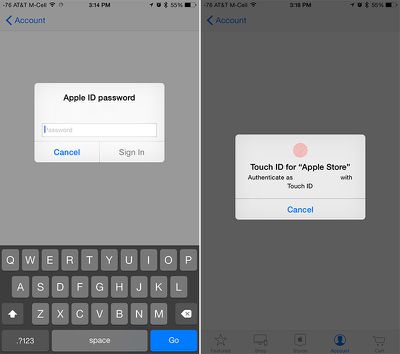
applestoretouchid

Accessing features like EasyPay Receipts before update on left, after on right

Today's update also adds support for two-step verification within the Apple Store app.

What's New in Version 3.3
- Use Touch ID to view orders, access EasyPay receipts, and make reservations at an Apple Store.
- Support for two-step verification, giving you extra security for your Apple ID.

Apple's Apple Store app can be downloaded from the App Store for free. [Direct Link]

Update 4:35 AM PT: The app is also now available in additional countries, including Czech Republic, Denmark, Singapore, Turkey and United Arab Emirates.


Top Rated Comments

145 months ago
About time!
Score: 8 Votes (Like | Disagree)
145 months ago
But can they give us an option for it to use location services when the app is open, so I can use it to buy stuff in-store easily, but not run constantly in the background for the 362 days a year that I'm *not* going to an Apple store?
Score: 7 Votes (Like | Disagree)
mdelvecchio Avatar
145 months ago
yeah i am a bit perplexed that apple wouldnt have done this at the onset of the Touch ID APIs, to lead the way.

it's unfortunate for me because its been implemented after my Watch shipped, which had me checking the app dozens of times for no good reason. dah. tho it was needless anyway, the app pushes a notice when items ship, as it did today. ah well.
Score: 6 Votes (Like | Disagree)
145 months ago
This is how it should have been in the first place, when Touch ID was introduced. It is better late than never.
Score: 6 Votes (Like | Disagree)
145 months ago
This would have been useful when I was checking my Apple Watch order every day.
Score: 3 Votes (Like | Disagree)
145 months ago
They should have done this months ago so that overzealous users would impulse-buy the new MacBook so they'd actually get some sales.

Score: 1 Votes (Like | Disagree)

Popular Stories

iphone 16 teal

'Siri AI' Lawsuit Update: Apple to Pay Owners of These iPhone Models

Thursday July 9, 2026 7:08 am PDT by
In May, Apple agreed to pay $250 million to settle a U.S. class action lawsuit over Siri AI's delayed launch, and eligible iPhone users could receive up to a $95 payout. This week, the California court overseeing the case held a hearing regarding preliminary approval of the settlement, but the judge has not yet issued a ruling. It will likely be at least a few more months before eligible...
Apple TV Thumb 3

Everything Coming in the 2026 Apple TV 4K

Wednesday July 8, 2026 4:51 pm PDT by
The Apple TV 4K hasn't been updated since 2022, and it's due for a refresh. An update is planned for 2026, but Apple is likely going to wait to launch it after Siri AI launches in iOS 27. Design Apple TV design updates don't happen often, and that's not changing. The next Apple TV is going to have the same squircle shape as the current model, and it'll continue to be made from a black...
apple wallet drivers license feature iPhone 15 pro

Apple Says iPhone Driver's Licenses Will Expand to These 6 U.S. States

Thursday July 9, 2026 7:29 am PDT by
In select U.S. states, residents can add their driver's license or state ID to the Apple Wallet app on the iPhone and Apple Watch, and then use it to display proof of identity or age at select airports and businesses, and in select apps. To set up the feature, open the Wallet app on the iPhone and tap on the plus sign in the top-right corner. Next, tap on Driver's License and ID Cards,...