

Philips Shows Off Prototype Hue Notification Center Widget for iOS 8 - MacRumors
Skip to Content

Philips Shows Off Prototype Hue Notification Center Widget for iOS 8

by

Philips today tweeted an image demonstrating how the Philips Hue app for its iPhone-controlled line of lights might look when integrated into iOS 8's Notification Center.

As seen in the image, adding a Hue widget to the Notification Center would potentially give users direct access to an off switch and a selection of light scenes.
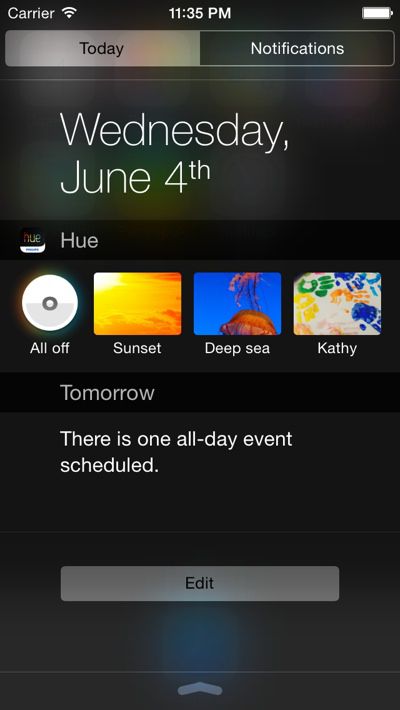
philipshuewidget

Currently, the Philips Hue line of lights, which includes various bulbs and accent lights, is controlled through the Philips Hue app and through various third-party apps. Access to Hue controls in Notification Center would make it much simpler for users to turn off lights or choose their favorite scenes, as it would not require an app to be launched.

As described during Apple's annual Worldwide Developers Conference, iOS 8's Notification Center allows third-party apps to create widget extensions to display information directly in the "Today" view. Right now, Apple limits Today view to integration with its own stock apps like Calendar, Stocks, and Weather, but with iOS 8, users will be given far more customization options thanks to third-party integration.


Top Rated Comments

somethingelsefl Avatar
158 months ago
Apple should have just replaced the "Missed" panel with a "Dashboard" or "Wdigets" panel. A dedicated widgets panel would have made more sense.

There are going to be way too many widgets lined up one after another. It's going to be too busy.
Score: 7 Votes (Like | Disagree)
Moonlight Avatar
158 months ago
As a Hue owner, The app was ugly until they did an iOS7 update to it. Now it is fine. For those saying it doesn't work, I disagree. It works pretty flawlessly for me.
Score: 5 Votes (Like | Disagree)
158 months ago
Looks pretty ugly, but functional I guess.

"concept prototype"
Score: 5 Votes (Like | Disagree)
158 months ago
I like my Hue lamps, but I don't like the software. Philips need to hire a new team of people to do the user interface. Is has been a lost cause for too long. I no longer believe time will fix it. The problem seems to be Philips themselves think their software is great.
Score: 4 Votes (Like | Disagree)
flottenheimer Avatar
158 months ago
Philips makes some pretty cool products, but my god, their user interfaces are ugly.

Dear Philips, please hire some professionals to do your UI/UX/GUI — it is what your products deserve.
Score: 4 Votes (Like | Disagree)
bacaramac Avatar
158 months ago
Holy awesome batman. I really can't wait for Homekit to be fully up and running. Can't wait to tell Siri I'm going to bed, then bam: Doors locked, garage door closed, alarm set and my hue lights shut off inside house.


Score: 4 Votes (Like | Disagree)

Popular Stories

Apple TV Thumb 3

Everything Coming in the 2026 Apple TV 4K

Wednesday July 8, 2026 4:51 pm PDT by
The Apple TV 4K hasn't been updated since 2022, and it's due for a refresh. An update is planned for 2026, but Apple is likely going to wait to launch it after Siri AI launches in iOS 27. Design Apple TV design updates don't happen often, and that's not changing. The next Apple TV is going to have the same squircle shape as the current model, and it'll continue to be made from a black...
iphone 16 teal

'Siri AI' Lawsuit Update: Apple to Pay Owners of These iPhone Models

Thursday July 9, 2026 7:08 am PDT by
In May, Apple agreed to pay $250 million to settle a U.S. class action lawsuit over Siri AI's delayed launch, and eligible iPhone users could receive up to a $95 payout. This week, the California court overseeing the case held a hearing regarding preliminary approval of the settlement, but the judge has not yet issued a ruling. It will likely be at least a few more months before eligible...
apple wallet drivers license feature iPhone 15 pro

Apple Says iPhone Driver's Licenses Will Expand to These 6 U.S. States

Thursday July 9, 2026 7:29 am PDT by
In select U.S. states, residents can add their driver's license or state ID to the Apple Wallet app on the iPhone and Apple Watch, and then use it to display proof of identity or age at select airports and businesses, and in select apps. To set up the feature, open the Wallet app on the iPhone and tap on the plus sign in the top-right corner. Next, tap on Driver's License and ID Cards,...








































