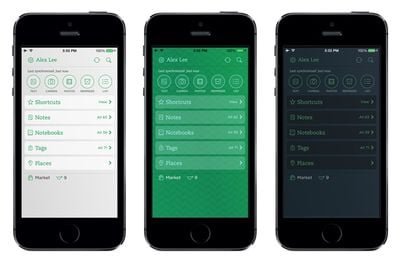
Evernote today updated its iOS app to version 7.3.0, adding several new home screen customization options including three new color themes in light, dark, and classic green.
evernote
Users have also gained the option to rearrange and hide unnecessary sections on the home screen, add a sync status bar, and display recently viewed items in Notes, Notebooks, Shortcuts, and Tags.

Along with customization options, the app has been made both snappier and more responsive. Frequently used features in the note editor are easier to find and titling and retitling notes, for example, is now quicker.


Business card scanning has also been improved, with scanned cards able to be added directly to contacts, and several bug fixes and performance enhancements have been added. Earlier this week, Evernote improved its synchronization platform, allowing its iOS and desktop apps to sync four times faster.

Evernote can be downloaded from the App Store for free. [Direct Link]

Top Rated Comments

Patriks7 Avatar
157 months ago
Love it. Just keeps getting better and better.
Score: 5 Votes (Like | Disagree)
MacDawg Avatar
157 months ago
It syncs with Penultimate, so I can have my handwritten notes right in Evernote
I can clip web pages and articles directly into a notebook
I can organize all my notes in notebooks and stacks
I can share notebooks with my wife or coworkers

And have all of it available in one place on any device, any OS, any where, any time

I keep everything I need in Evernote and it works insanely great for me
I can't tell you times someone has asked me about something and I was able to pull out my phone, pull it up on Evernote and either answer them or send it to them

Sure, there are other apps that do these things
But this one is the best for what I do all in one

If it doesn't work for you... no big deal... don't force it
But I wouldn't want to be without it

Evernote + Dropbox = happy Dawg
Score: 2 Votes (Like | Disagree)
157 months ago
After a slightly bumpy transition to iOS 7, I am LOVING the app now...they slowly got their footing back after a little tumble.
Score: 2 Votes (Like | Disagree)
ron7624 Avatar
157 months ago
This update has made Evernote awesome again! Really didn't like the home screen layout.

I won't try justify it to anyone. If you don't need it don't use it!

Here Here. No need to justify.
I use Evernote a lot. I hand write notes on my ipad mini during meetings and save them in Evernote. They are even serchable - yet another and unmentioned feature that keeps me using Evernote - the notes are searchable.

....and on a side note, cool handle.. username I wish I had thought of that!!
Score: 1 Votes (Like | Disagree)
157 months ago
It'd be nice if they had UI coloring consistency. I have my home screen the dark theme, I click on a notebook and its got the green top so the "classic", then I click on a note and it's to the "light" theme. Seriously.. whatever theme I choose, make it throughout the whole program. I'm just a freak'n hardware engineer and even I notice this crap.
Score: 1 Votes (Like | Disagree)
157 months ago
Thanks for the answer, but I can also do all that already (minus the all-under-one-roof aspect) with the stock apps in Mavericks and iCloud (for when I'm on a Windows machine).

FYI: I'm not trying to be difficult, I'm interested, but I don't see how this does anything better than what Apple already offers. Except, again, the all-in-one app approach. It's such a popular app I feel like I must be missing the obvious on this one.

+1 somehow I don't see this as WOW factor.
Score: 1 Votes (Like | Disagree)

Popular Stories

m5 macbook pro deal

Why You Shouldn't Buy the Next MacBook Pro

Tuesday February 10, 2026 4:27 pm PST by
Apple is planning to launch new MacBook Pro models as soon as early March, but if you can, this is one generation you should skip because there's something much better in the works. We're waiting on 14-inch and 16-inch MacBook Pro models with M5 Pro and M5 Max chips, with few changes other than the processor upgrade. There won't be any tweaks to the design or the display, but later this...
iOS 26

Apple Releases iOS 26.3 and iPadOS 26.3

Wednesday February 11, 2026 10:07 am PST by
Apple today released iOS 26.3 and iPadOS 26.3, the latest updates to the iOS 26 and iPadOS 26 operating systems that came out in September. The new software comes almost two months after Apple released iOS 26.2 and iPadOS 26.2. The new software can be downloaded on eligible iPhones and iPads over-the-air by going to Settings > General > Software Update. According to Apple's release notes, ...
Apple Logo Zoomed

Apple Expected to Launch These 10+ Products Over the Coming Months

Tuesday February 10, 2026 6:33 am PST by
It has been a slow start to 2026 for Apple product launches, with only a new AirTag and a special Apple Watch band released so far. We are still waiting for MacBook Pro models with M5 Pro and M5 Max chips, the iPhone 17e, a lower-cost MacBook with an iPhone chip, long-rumored updates to the Apple TV and HomePod mini, and much more. Apple is expected to release/update the following products...
iPhone 16e Bottom Crop

Apple Reportedly Unveiling a New iPhone Next Week

Tuesday February 10, 2026 1:51 pm PST by
Apple plans to announce the iPhone 17e on Thursday, February 19, according to Macwelt, the German equivalent of Macworld. The report said the iPhone 17e will be announced in a press release on the Apple Newsroom website, so do not expect an event for this device specifically. The iPhone 17e will be a spec-bumped successor to the iPhone 16e. Rumors claim the device will have four key...
Apple Logo Black

Apple Acquires New Database App

Wednesday February 11, 2026 6:44 am PST by
Apple acquired Canadian graph database company Kuzu last year, it has emerged. The acquisition, spotted by AppleInsider, was completed in October 2025 for an undisclosed sum. The company's website was subsequently taken down and its Github repository was archived, as is commonplace for Apple acquisitions. Kuzu was "an embedded graph database built for query speed, scalability, and easy of ...