

Popular 3D planet weather simulator Living Earth - Clock & Weather has received a major update today, featuring a refreshed design for iOS 7, additional support for weather conditions such as visibility, and background app refreshing for up-to-date Earth rendering. The update also includes parallax effects for devices running iOS 7 and general performance enhancements throughout the app.
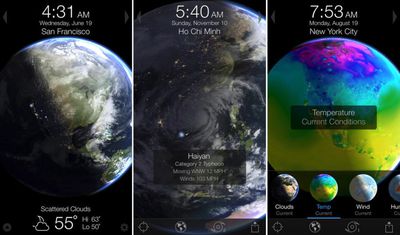
What's New in Version 3.0
Living Earth 3.0 features a beautiful new icon and refreshed design for iOS7!- Support for additional weather conditions. Swipe top conditions bar in the forecast view to display Dew Point, Visibility, Barometric pressure & UV Index.
- Feels Like temp is now displayed in the forecast view.
- Parallax effects for a touch of depth (iOS7 only).
- Background fetch, updates multitasking thumbnail for more up to date Earth rendering and weather (iOS7 only).
- Ability to enable and disable alarms in the alarm list view.
- Speed improvements throughout.
- Numerous bug fixes (but we won't bore you with all those details).
- Numerous small tweaks that you probably won't notice but we spent a lot of time on.
- Living Earth is now fully localized for German, Spanish, French, Italian, Russian, Chinese, Japanese, Korean and Portuguese.
Living Earth has been noted on multiple occasions, including being chosen by Apple as the best iPhone and iPad utility in its 2011 App Store Rewind, being named by the New York Times as a top 10 iPad app, and featured by Starbucks as an "App Pick of the Week" earlier this year.
Living Earth - Clock & Weather is currently on sale at $2.99 for a limited time (increasing to $4.99 after the launch sale) and can be downloaded through the App Store. [Direct Link]















































Top Rated Comments
The interface is clean and presents just the right amount of pertinent weather information, something many other weather apps could learn from. And when you want more or different information, all the clickeable areas just seem to be in the right spot.
While it can't compete on radar mapping, it does have a couple other features that most other weather apps either don't have, get wrong, or bury too deep in their interfaces. Those are the current temperature badge (you have to enable it, it's disabled by default - a smart choice) and the location aware-temperature. The latter is fantastic when you are travelling. If if you don't turn that feature on (disabled by default also), the 'current location' icon is only two taps away.
This is not an ad, I am not affliated with the app in any ways, I carry at least a dozen weather apps with me (I love to feature compare, especially weather apps for some reason) and I appreciate MacRumors posting an update about this.