

 Quip, a mobile word processor designed by ex-Google Maps and Facebook executive Bret Taylor, launched today on iOS. The app includes features such as a mobile-friendly interface and integrated to-do lists for tasks, as well as collaborative features that enable multiple users to edit and work on documents in real time.
Quip is a modern word processor that enables you to create beautiful documents on any device, including the iPad, iPhone, and the desktop. It combines documents and messages into a single chat-like “thread” of updates — making collaboration easy.
TechCrunch has more on Quip:
So what makes Quip different?
First it adapts documents to whatever size or shape screen you’re working on. If you’re on an iPhone, an embedded photo could appear full-width, but on an iPad it would appear on the right surrounded by text.
The collaboration tools might be the most exciting part. You can share any document with another user, and when they first open it you’ll get a notification. Taylor says this lets you jump in and walk them through the doc using Quip’s internal messaging system. “It feels like sitting at a desk with someone around a piece of paper” Taylor tells me.
With a free membership, Quip allows up to five users to download and collaborate through the app, with capabilities such as offline access to documents, shared folders and cross-platform syncing through its official website. Quip also offers a premium business membership for $12 a month per user and enables 250 users to collaborate at once, and includes additional features like remote device management and single sign on capabilities.
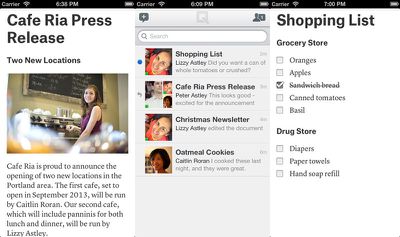
Quip is available as a free download on iOS devices and can be downloaded through the App Store. [Direct Link]




















Top Rated Comments
I rarely diss a product launch. When I do, I try to discover which if the Three Monkeys (see no evil, hear no evil, do no evil) are disobeyed.
For this one, my take is Do No Evil. After the NSA scandal, people are taking their shared docs off line more and more. Not said much, but cloud use is not at the same acceptance rate.
What cost advantage of this is over a shared folder and desktop? Unless they are doing massive data mining on the docs written and selling off the demographics, I don't see a solvency here.