
twitterlogoTwitter has announced a complete redesign of its website and apps, starting with new mobile apps for iOS and Android.

Today we introduce a new version of Twitter. We’ve simplified the design to make it easier than ever to follow what you care about, connect with others and discover something new. You’ll see this new design both on Twitter.com and mobile phones, so that you’ll have a familiar experience any time, anywhere.

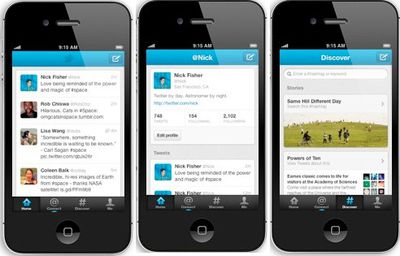
The Twitter 4.0 app has four main navigation tabs:

twitter primitives 4up

- Home is where you start from: a personal collection of Tweets from the sources you care about. The Tweet details show rich information such as replies, retweets and embedded images.

- Connect is the place to see who followed or mentioned you, retweeted or favorited one of your Tweets. It’s where you keep the conversation flowing.

- Discover is where you can tap into the stories and trends people are talking about in your world. You can also find friends, browse interests, and explore hashtags here.

- Me puts you and your interests front and center. From here you can exchange Direct Messages with your followers.
twitterscreen
Twitter 4.0 is available for iPhone, free on the App Store [Direct Link]. An updated iPad app will be coming down the road.


Top Rated Comments

kylebshr Avatar
183 months ago
A lot of people are complaining, but I like the new interface better.
Score: 3 Votes (Like | Disagree)
DJAKO Avatar
183 months ago
I wondered why I was suddenly getting twitter follow requests, when I don't even use it.

They're probably just spam accounts anyways.
Score: 3 Votes (Like | Disagree)
GollumBoy Avatar
183 months ago
Got new app, but website hasn't changed.
Guess it takes a while - looks great the new design though from the pictures.
Score: 2 Votes (Like | Disagree)
firestarter Avatar
183 months ago
I've just switched to Tweetbot - and it's so much better it's unreal.

Strongly recommended!
Score: 1 Votes (Like | Disagree)
chairguru22 Avatar
183 months ago
No way to change the font size is a FAIL. It looks cool but so much of the screen is wasted since it's unused. Who cares about borders and outlines? Just give me the most content that can fit on the already small handheld sized screen!
Score: 1 Votes (Like | Disagree)
DavidLeblond Avatar
183 months ago
I couldn't find it either. I can't blame Loren Brichter for quitting Twitter. This redesign isn't the worst thing I've seen, but they ripped the guts of what made Tweetie so great right out of this app. Removing the swipe gesture was not a smart move. Adding extra taps to get to things is never a good design move.

To get back to the front of your timeline, just tap the home tab (even if you're already on the home tab)
Score: 1 Votes (Like | Disagree)

Popular Stories

iOS 26

iOS 26.2 Coming Soon With These 8 New Features on Your iPhone

Thursday December 11, 2025 8:49 am PST by
Apple seeded the second iOS 26.2 Release Candidate to developers earlier this week, meaning the update will be released to the general public very soon. Apple confirmed iOS 26.2 would be released in December, but it did not provide a specific date. We expect the update to be released by early next week. iOS 26.2 includes a handful of new features and changes on the iPhone, such as a new...
iOS 26

iOS 26.4 and iOS 27 Features Revealed in New Leak

Friday December 12, 2025 10:56 am PST by
Macworld's Filipe Espósito today revealed a handful of features that Apple is allegedly planning for iOS 26.4, iOS 27, and even iOS 28. The report said the features are referenced within the code for a leaked internal build of iOS 26 that is not meant to be seen by the public. However, it appears that Espósito and/or his sources managed to gain access to it, providing us with a sneak peek...
iOS 26

Apple Releases iOS 26.2 With Alarms for Reminders, Lock Screen Changes, Enhanced Safety Alerts and More

Friday December 12, 2025 10:10 am PST by
Apple today released iOS 26.2, the second major update to the iOS 26 operating system that came out in September, iOS 26.2 comes a little over a month after iOS 26.1 launched. ‌iOS 26‌.2 is compatible with the ‌iPhone‌ 11 series and later, as well as the second-generation ‌iPhone‌ SE. The new software can be downloaded on eligible iPhones over-the-air by going to Settings >...
AirPods Pro Firmware Feature

Apple Releases New Firmware for AirPods Pro 2 and AirPods Pro 3

Thursday December 11, 2025 11:28 am PST by
Apple today released new firmware designed for the AirPods Pro 3 and the prior-generation AirPods Pro 2. The AirPods Pro 3 firmware is 8B30, up from 8B25, while the AirPods Pro 2 firmware is 8B28, up from 8B21. There's no word on what's include in the updated firmware, but the AirPods Pro 2 and AirPods Pro 3 are getting expanded support for Live Translation in the European Union in iOS...
macOS Tahoe 26 Thumb

Apple Releases macOS Tahoe 26.2 With Edge Light

Friday December 12, 2025 10:08 am PST by
Apple today released macOS Tahoe 26.2, the second major update to the macOS Tahoe operating system that came out in September. macOS Tahoe 26.2 comes five weeks after Apple released macOS Tahoe 26.1. Mac users can download the macOS Tahoe update by using the Software Update section of System Settings. macOS Tahoe 26.2 includes Edge Light, a feature that illuminates your face with soft...
AirTag 2 Mock Feature

Apple AirTag 2: Four New Features Found in iOS 26 Code

Thursday December 11, 2025 10:31 am PST by
The AirTag 2 will include a handful of new features that will improve tracking capabilities, according to a new report from Macworld. The site says that it was able to access an internal build of iOS 26, which includes references to multiple unreleased products. Here's what's supposedly coming: An improved pairing process, though no details were provided. AirTag pairing is already...
ipados 26 1 slide over

Apple Releases iPadOS 26.2 With Multitasking Improvements

Friday December 12, 2025 10:09 am PST by
Apple today released iPadOS 26.2, the second major update to the iPadOS 26 operating system released in September. iPadOS 26.2 comes a month after iPadOS 26.1. The new software can be downloaded on eligible iPads over-the-air by going to Settings > General > Software Update. iPadOS 26.2 continues with the multitasking improvements that were added with iPadOS 26.1. You can now drag and...
bug security vulnerability issue fix larry

Update Now: iOS 26.2 Fixes 20+ Security Vulnerabilities

Friday December 12, 2025 11:11 am PST by
Apple today released iOS 26.2, iPadOS 26.2, and macOS 26.2, all of which introduce new features, bug fixes, and security improvements. Apple says that the updates address over 20 vulnerabilities, including two bugs that are known to have been actively exploited. There are a pair of WebKit vulnerabilities that could allow maliciously crafted web content to execute code or cause memory...