'Find My iPhone' App Updated With Driving Directions to Device Location - MacRumors
Skip to Content

'Find My iPhone' App Updated With Driving Directions to Device Location

by

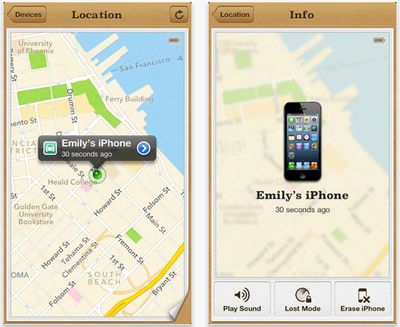
FindmyiphonelogoApple has updated its Find My iPhone iOS app with the ability to display driving directions to the lost device's location.

Find My iPhone is a free service built into iCloud. It allows users to lock, find, or erase a lost or stolen iPhone, iPad, iPod touch, or Mac.

If you misplace your iPhone, iPad, iPod touch, or Mac, the Find My iPhone app will let you use another iOS device to find it and protect your data. Simply install this free app on another iOS device, open it, and sign in with your Apple ID. Find My iPhone will help you locate your missing device on a map, play a sound, display a message, remotely lock your device, or erase all the data on it.

If the iPhone, iPad, or iPod touch you want to locate is running iOS 6, Find My iPhone also includes Lost Mode. Lost Mode locks your missing device with a 4-digit passcode and can display a contact phone number right on the lock screen. And while in Lost Mode, your device will keep track of where it has been and display its recent location history when you check in with the Find My iPhone app.

Please note that Find My iPhone must be enabled in the iCloud settings on your device for you to locate it with this app.
Findmyiphonescreenshot
Find My iPhone is a free download from the App Store. [Direct Link]

Top Rated Comments

RoelJuun Avatar
180 months ago
...so you'll get yourself misplaced too.
Score: 22 Votes (Like | Disagree)
180 months ago
Just hope it's not in Mildura, Australia.
Score: 18 Votes (Like | Disagree)
180 months ago
YOU: "Siri, give me the directions to my stolen iPhone!"

SIRI: "Ok, here are the directions to the nearest store that sells iPhones."
Score: 10 Votes (Like | Disagree)
MasterHowl Avatar
180 months ago
But, you'll never get to the thief's house following Maps D:
Score: 10 Votes (Like | Disagree)
180 months ago
Drive directly to the thieves. Exciting.
Score: 9 Votes (Like | Disagree)
snorkelman Avatar
180 months ago
when setting off on a trip you first post your phone to the desired destination, then you just use find my iphone to guide you to there :p
Score: 4 Votes (Like | Disagree)

Popular Stories

8 CarPlay Features in iOS 27 Feature

Which iOS 27 CarPlay Features Actually Work in Your Car?

Thursday September 17, 2026 4:17 am PDT by
In iOS 27, available now, CarPlay gets its biggest update in years, but some features depend on what type of car you have rather than your iPhone model. Some of the biggest additions won't do anything in the vast majority of vehicles on the road today. Here's how the new features pan out. Works in Any CarPlay Vehicle Custom widgets: In iOS 27, CarPlay is no longer limited to Apple's handful ...
Apple Watch New Charging Puck

Here's Why a New Apple Watch Charging Puck Was Just Released

Wednesday September 16, 2026 8:53 am PDT by
The new Apple Watch Series 12 and Apple Watch Ultra 4 have hardware changes that allow for faster charging, but you will need to use the new version of the Apple Watch Magnetic Fast Charger included in the box in order to achieve this boost. If you need extra ones for your own charging stands or travel or so forth, Apple released the new version of the charger on its online store last week, with...
iphone 18 pro max prepare

iPhone 18 Pro Max Requires 'Prepare to Ship' Battery Drain Before Shipping

Friday September 18, 2026 4:27 pm PDT by
The iPhone 18 Pro Max has a battery capacity over 20 watt-hours, which means there are additional shipping requirements. If an iPhone 18 Pro Max needs to be shipped somewhere, its maximum battery capacity has to be limited through firmware. According to Apple, the iPhone 18 Pro Max uses an "innovative battery-firmware solution" that limits battery capacity to below 20Wh between when the...