

CalDigit is best known for its docks and hubs, and it has two options designed for Apple's latest Macs. I reviewed the larger $500 20-port TS5 Plus last summer, and for the last couple of weeks, I've been testing the $400 15-port TS5 that launched a bit later than the premium model, and the smaller $250 Element 5 Hub.
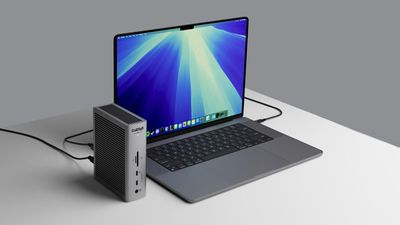
TS5
The TS5 is probably the Thunderbolt 5 dock that I would recommend if someone on the street came up to me and asked which Thunderbolt 5 dock to buy. It's smaller and takes up less space on a desk than the TS5 Plus, it has no fans like some competing docks, and it has a useful port selection. With some exceptions, it'll meet the needs of most people.
Thunderbolt 5 docks are ideal for Apple's Thunderbolt 5 Macs (the M4 Pro, M4 Max, M5 Pro, and M5 Max), but they're also backwards compatible with Thunderbolt 3 and Thunderbolt 4 Macs, so you can use the TS5 with almost any Mac to add ports for displays and accessories.
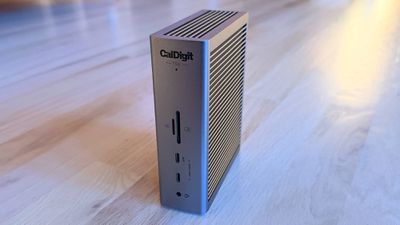
Ports on the front:
- Audio jack
- USB-C with 10Gb/s speeds and 7.5W
- USB-C with 10Gb/s speeds and 20W
- MicroSD card slot (UHS-II)
- SD card slot (UHS-II)
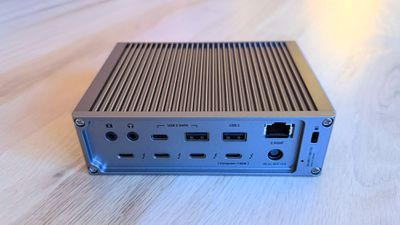
Ports on the back:
- Audio in/out
- USB-C port with 10Gb/s speeds and 7.5W
- USB-A port with 10Gb/s speeds and 7.5W
- USB-A port with 480Mb/s speeds and 7.5W
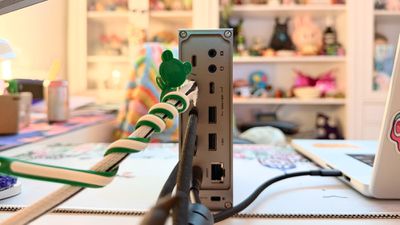
- 2.5 GbE
- Three downstream Thunderbolt 5 ports with 15W charging
- One upstream Thunderbolt 5 port with 140W charging
The TS5 does not have dual USB controllers like the TS5 Plus, it has 2.5 Gigabit Ethernet instead of 10GbE, it doesn't have DisplayPort, and it has three fewer USB-A ports and two fewer USB-C ports than the TS5 Plus. The TS5 has three downstream Thunderbolt 5 ports instead of two, so it beats the TS5 Plus (which only has two), but the higher-end TS5 Plus has more charging power. The front USB-C port on the TS5 Plus is 36W, as are the two downstream Thunderbolt 5 ports at the back.
The TS5 has the same general design that CalDigit has used for its last several docks. It's made from a space gray aluminum material with ribbing on the top and sides for dissipating heat. Though it has no fan, it never got beyond lukewarm in my testing, and I was surprised at how cool it stayed. The TS5 Plus ran much warmer when I tested it, but the smaller TS5 wouldn't keep me cozy on a freezing night.
The dock's design blends in well with a desk setup, but like most Thunderbolt 5 docks, it's not going to turn any heads. I don't have space gray equipment so the color doesn't match my MacBook or my Studio Display, but it doesn't look too out of place. I wish accessory makers would adopt bolder, brighter colors, but I'm guessing gray and black are what sell.
CalDigit's TS5 dock is about 5.5 inches tall, 4.5 inches wide, and a little under two inches thick. It fits well under a display, and it can be positioned either upright or on its side. There is a separate 240W power brick, and that's typical for most Thunderbolt 5 docks. Along with the power supply, CalDigit includes a braided 1-meter Thunderbolt 5 cable, and I appreciate the cable upgrade because not all docks come with nice cables.
One thing I appreciate about CalDigit over some other dock makers is the info the website provides. I think the average person probably finds hubs and docks somewhat confusing, especially when it comes to determining which displays and how many external displays a dock supports with a given Mac. CalDigit has an extensive chart with all Apple silicon Macs listed, so it's fairly easy to see what your Mac will support. Thunderbolt 5 supports up to 80Gb/s speeds with bandwidth boost up to 120Gb/s for displays, twice that of Thunderbolt 4.
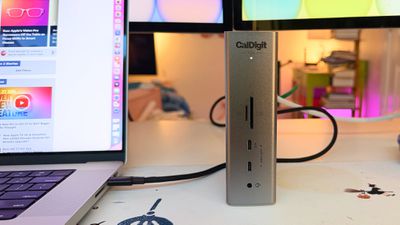
The TS5 supports up to four 6K 60Hz displays, but only if you're using a Mac with an M5 Max chip. It'll also run dual 8K 60Hz displays, dual 4K 240Hz displays, or four 4K displays with up to a 144Hz refresh rate. When used with an M5 Pro Mac, the dock supports up to three 6K 60Hz displays, and for Macs with earlier Pro/Max chips, the dock is limited to dual displays. You can power dual 8K 60Hz displays using the TS5 with an M4 Max or M5 Max Mac, while other machines cap out with two 6K 60Hz displays. The base M-series chips have different support depending on generation too. The M4 and M5 chips can support two external displays up to 6K at 60Hz with the TS5, but M1 and M2 chips only support one. The M3 is a special exception because it supports two displays when the Mac is in clamshell mode, or one with the display open.
I tested with a Studio Display and a Studio Display XDR, both of which are 5K displays. I also tested with a Studio Display and a 32-inch 120Hz OLED display, and I didn't run into any issues with either setup.
There is one 5K display limitation that potential buyers should be aware of, and that's support for the LG UltraFine 5K monitors. The dock does not support dual LG UltraFine 5K displays unless used with an M5 Max MacBook Pro.
I used every port at once and performance was as expected, but I did run into an issue with the TS5 not recognizing SSDs. SSDs that I plugged into the two USB-C ports weren't popping up, but a Thunderbolt 5 SSD was fine. Unplugging the dock and plugging it in again didn't work, but restarting my Mac did. I've had the same problem intermittently, but after the first time, unplugging the dock and then plugging it back in seemed to work. It doesn't happen every time, but losing SSD connectivity through the USB-C ports is a hassle.
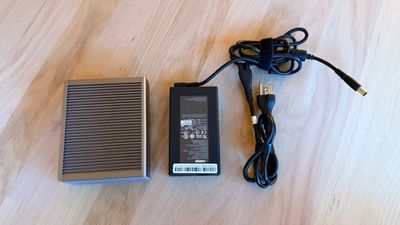
The TS5 has 140W host charging, which is more than enough for all of Apple's notebooks. The Thunderbolt 5 ports and the 10Gb/s USB-C and USB-A ports have offline charging so you can charge accessories with the dock when your Mac isn't connected.
Element 5 Hub
I also spent a short amount of time with CalDigit's $250 Element 5 Hub, which is an impressive little device. It's as small as the 180W power brick it comes with, and it's the Thunderbolt 5 option to get if you need minimal ports.
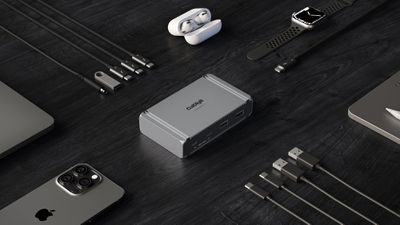
The Element 5 Hub has four Thunderbolt 5 ports (one upstream, three downstream), two USB-C ports, and three USB-A ports. 90W host charging is available for a connected Mac, which is enough to keep my 16-inch MacBook Pro charged. The downstream Thunderbolt 5 ports have 15W for accessories, and the USB-C ports offer 7.5W. Like the TS5, the ports work even when the hub isn't connected to a host computer.
Since there are three Thunderbolt 5 ports, the Element 5 Hub can drive the same number of displays as the TS5. It doesn't have as many USB-C ports, no SD card slots, and no audio jack, but if all you need is Thunderbolt and a couple of USB-C/USB-A ports, this is the way to go.

I love how little space the Element 5 takes up on my desk, so much so that I may adopt one for long-term use. I do use SD card slots, but the smaller size may be worth the sacrifice. The Element 5 is 2.75 inches wide, 4.5 inches long, and an inch thick. It's about the same size as my Thunderbolt 5 SSD, and smaller than an iPhone. If you want compact, get this dock.
Bottom Line
I prefer the TS5 over the TS5 Plus because of the extra Thunderbolt 5 port on the TS5. I can connect two displays and still have a port for a Thunderbolt 5 SSD, which isn't the case with the TS5 Plus. Unfortunately, I'm continually running into problem where SSDs connected to the USB-C ports on the dock don't work, and that makes it hard to recommend to someone who needs to use it for storage purposes. I can just restart the dock, but I shouldn't have to. TB5 SSDs are fine, so are USB-C SSDs connected through a Thunderbolt port.
CalDigit's more expensive TS5 Plus is a better option than the TS5 if you need DisplayPort 2.1, 10GbE, or an absurd number of USB-A ports (five for the TS5 Plus vs two for the TS5). The TS5 Plus also has dual 10Gb/s USB controllers, which is useful if you want to run multiple high-speed SSDs or drives at the same time.
If you only need a limited number of ports, I'd definitely recommend checking out the Element 5 Hub. It's compact, but still includes four Thunderbolt 5 ports, three USB-A ports, and two USB-C ports. I didn't seem to have the same SSD problem with the TS5 Plus or the Element 5.
I like CalDigit's Thunderbolt 5 docks over competing docks from Anker and Satechi, mainly because CalDigit doesn't include fans and its docks operate silently. The SSD problem might be my particular dock or my MacBook Pro, but if you pick up a TS5, get it from a place with a return policy just in case.
I like all of the docks I've tried so far, though, and they've all been good options with no major problems. I'd pick Anker's Prime Thunderbolt 5 dock if I wanted a dock with no external power supply, or Satechi's CubeDock if I wanted a built-in SSD or had a Mac mini and wanted to match it.
Thunderbolt 4 docks are cheaper than Thunderbolt 5 options, but if you have a Thunderbolt 5 Mac or are planning to get one in the next year or two, it's worth going for Thunderbolt 5 for the upgraded bandwidth.
How to Buy
The CalDigit TS5 can be purchased from the CalDigit website or from Amazon for $400.
The Element 5 Hub is available from the CalDigit website or from Amazon for $250.
Note: CalDigit provided MacRumors with a TS5 and Element 5 Hub for the purpose of this review. No other compensation was received.













































Top Rated Comments
I would definitely describe the USB-C issues as a "major problem", good lord.
Many products in this class have some weird gotcha and consumers deserve to know, despite future ad revenue being at risk - it is not journalism if things are papered over.
Caldigits' TS3 dock had issues where the power was so noisy audio devices connected via TB3 would be impacted. The TB4 had some weird thing I can't remember now. None of them are "no major problems" in my experience.
The entire product category is an overpriced mess. It's a shame Apple doesn't make a first party solution.
With my M4 Pro mini I use an Element 4 and Element 5 hub, and they've been great - though they don't seem to let my mini sleep properly, which is annoying.
The TS4 has had a couple of years of firmware updates, and has been absolutely completely rock solid for me now for the first six weeks.
It is bizarre to have this happen in a review, have it be repeatable and unfixable, and then say that it's fine. Idk why the reviewer talked about it like this, but yes, that is a major full-stop don't buy problem.