iOS 15: How to Use On-Device Siri - MacRumors
Skip to Content

iOS 15: How to Use On-Device Siri

by

In iOS 14 and earlier, Siri on iPhone and iPad doesn't work properly without an internet connection. For years now, the virtual assistant has had to "phone home" and ping Apple's servers to respond to almost every request or command, which has made it virtually useless when your device is offline.
iOS 15 Siri Feature
In iOS 15, however, Apple has made some major changes to the way ‌Siri‌ works. Now, all ‌Siri‌ speech processing and personalization occurs locally on your device, making the virtual assistant more secure and faster at processing requests. This also means ‌‌Siri‌‌ can now handle a range of requests entirely on-device, without needing the internet.

Once you're using iOS 15, you don't need to enable anything for ‌Siri‌ to work offline, because it works automatically. The types of requests that it can handle without phoning home to Apple's servers include the following:

  • Create and disable timers and alarms.
  • Launch apps.
  • Control Apple Music and Podcasts audio playback.
  • Control system settings including accessibility features, volume, Low Power mode, Airplane mode, and so on.

If you don't have a cellular data or Wi-Fi connection and you ask ‌Siri‌ to do anything that requires internet access – such as messaging someone, weather updates, or playing streamed content – you'll get the response like "To do that, you'll need to be online" or "I can help with that when you're connected to the internet."
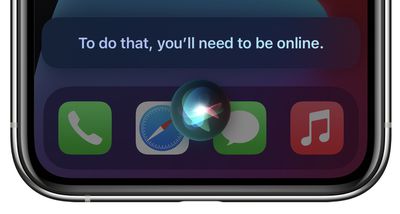
siri offline ios 15
For all the details on what else ‌Siri‌ can do that's new in iOS 15, be sure to check out our dedicated guide.
Related Forum: iOS 15

Popular Stories

apple intelligence black

Apple Briefly Posts China Guide for Connecting Siri to Qwen AI

Monday August 10, 2026 5:21 am PDT by
Apple briefly published a support guide in China explaining how Mac users can connect Alibaba's Qwen AI to Siri and Writing Tools, before pulling it entirely less than a day later. Reuters first spotted the Chinese-language guide on Apple's support site on August 8, which explained how eligible Mac users in mainland China could connect Qwen, Alibaba's family of generative AI models, to Siri...

ios 27 siri voice

Latest iOS 27 Beta Expands Siri AI Voice Customization

Monday August 10, 2026 11:57 am PDT by
With the fifth beta of iOS 27, Apple has expanded the voice customization options for Siri AI. Pace and Expressivity can now be adjusted for more of the available voice options instead of just the two American voices. There are seven American voice options and four British voices to choose from, all of which can be customized with different Pace and Expressivity settings. Pace changes...
ios 27 b5 icons

iOS 27 Beta 5 Brings New Icons for Siri, Safari, Settings and More

Monday August 10, 2026 12:18 pm PDT by
In the fifth beta of iOS 27, Apple is continuing to make design tweaks. There are updated Liquid Glass icons for Safari, the Siri app, Settings, Remote, App Store, and Preview. The Safari icon is a brighter blue with more detailed compass lines and arrows, while the Siri icon looks more like the actual Siri bubble that's displayed when Siri is activated. The App Store app icon is more...