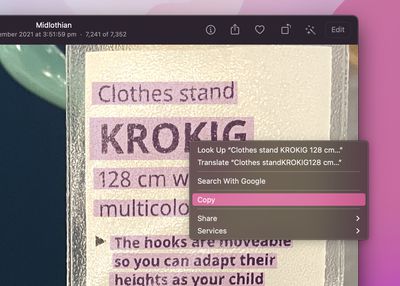
In macOS Monterey, Apple introduced a feature called Live Text that can automatically recognize text when it appears in an image in Safari, Photos, Preview, Quick Look, and elsewhere, allowing you to easily copy or share it.

For example, if you have a picture in the ‌Photos‌ app of a storefront that displays a phone number, you can capture that number to add to your contacts. It's an incredibly simple, useful feature, and here's how it works in its simplest form.

  1. Find an image containing text using ‌Photos‌, Preview, or Quick Look, or download one from the web using Safari.

    photos

  2. Hover the cursor over the portion of the image where the text is, and the cursor will change to a text selection tool. Highlight the text you want to do something with by click-dragging the cursor over it.
    photos

  3. Next, right-click the highlighted text and select an action from the contextual menu that appears. Options should include Look Up, Translate, Search with Google, Copy, and Share.
    photos

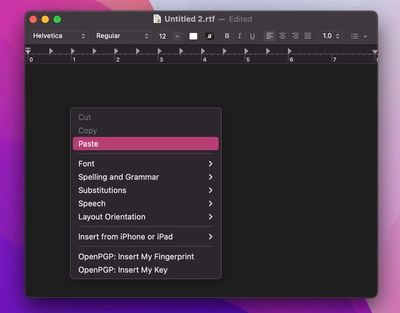
  4. If you copied the text, switch to an app that supports text input, then right-click the editing window and select Paste.
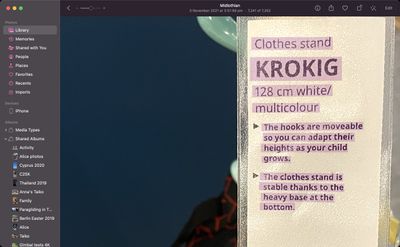
    textedit

Did you know that Live Text also features optical character recognition? That means if you have a picture of a handwritten note in your photos, you can still copy it and then paste it as digital text.

If you don't find Live Text useful on Mac, you can turn off the feature. For information on using Live Text on iPhone and iPad, be sure to check out dedicated how-to.


Popular Stories

imac video apple feature

Apple Unveils First New Products of 2026

Monday January 26, 2026 1:55 pm PST by
Apple today introduced its first two physical products of 2026: a second-generation AirTag and the Black Unity Connection Braided Solo Loop for the Apple Watch. Read our coverage of each announcement to learn more:Apple Unveils New AirTag With Longer Range, Louder Speaker, and More Apple Introduces New Black Unity Apple Watch BandBoth the new AirTag and the Black Unity Connection Braided...
iPhone 5s

iPhone 5s Gets New Software Update 13 Years After Launch

Monday January 26, 2026 3:56 pm PST by
Alongside iOS 26.2.1, Apple today released an updated version of iOS 12 for devices that are still running that operating system update, eight years after the software was first released. iOS 12.5.8 is available for the iPhone 5s and the iPhone 6, meaning Apple is continuing to support these devices for 13 and 12 years after launch, respectively. The iPhone 5s came out in September 2013,...
Second Generation AirTag Feature

Apple Unveils New AirTag With Longer Range, Louder Speaker, and More

Monday January 26, 2026 6:07 am PST by
Apple today introduced the second-generation AirTag, with key features including longer range for tracking items and a louder speaker. For those who are not familiar, the AirTag is a small accessory that you can attach to your backpack, keys, or other items. Then, you can track the location of those items in the Find My app on the iPhone, iPad, Mac, Apple Watch, and iCloud.com. The new...
Apple Creator Studio

Apple's Next Launch is Today

Tuesday January 27, 2026 2:39 pm PST by
Update: Apple Creator Studio is now available. Apple Creator Studio launches this Wednesday, January 28. The all-in-one subscription provides access to the Final Cut Pro, Logic Pro, Pixelmator Pro, Motion, Compressor, and MainStage apps, with U.S. pricing set at $12.99 per month or $129 per year. A subscription to Apple Creator Studio also unlocks "intelligent features" and "premium...
Apple Logo Spotlight

Apple to Launch These 20+ Products This Year

Sunday January 25, 2026 6:02 pm PST by
2026 promises to be yet another busy year for Apple, with the company rumored to be planning more than 20 product announcements over the coming months. Beyond the usual updates to iPhones, iPads, Macs, and Apple Watches, Apple is expected to release its all-new smart home hub, which was reportedly delayed until the more personalized version of Siri is ready. Other unique products rumored for ...