

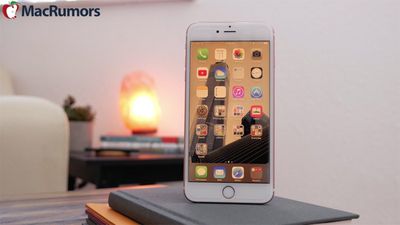
Night Shift, a major new feature iOS 9.3, is a display-based setting that lets you "warm up" an iPhone or iPad's screen at night to cut down on blue light exposure. Similar to f.lux on the Mac, Night Shift will automatically change the color temperature of an iOS device's display to reflect the time of day.
With Night Shift, an iPhone or iPad screen will look bright white with a blue-based lighting scheme during the day, but as the sun sets, that bright white will fade into a warm yellow that's easier on your eyes and your circadian rhythm.
What's the Deal With Blue Light?
Blue light, which is the light on the spectrum that makes our computer, tablet, and phone screens look so crisp and bright, is great during the day because it mimics a bright morning. Blue wavelengths wake us up, boost our attention, and let us know it's time to start the day.
At night, blue light is less desirable because that's the time when our bodies should be getting ready to wind down for sleep. Studies have shown that looking at a bright blue screen during the evening hours can confuse the body's biological clock and disrupt our natural circadian rhythm (the ~24-hour light and dark schedule everyone runs on) by suppressing melatonin production, making it harder to fall asleep. All light disrupts the circadian rhythm, but blue light has been proven to be the most disruptive.
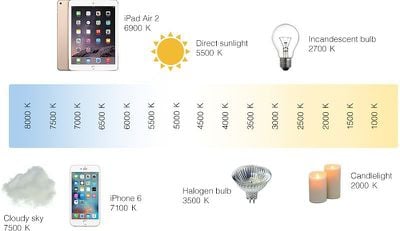
On the Kelvin scale used to determine color temperature, an iPhone 6 display measures in at about 7100K, while an iPad Air 2 display is slightly warmer at 6900K. On the lighting spectrum, 6900K and 7100K blue light levels are similar to the light you would see on a bright, cloudy day outdoors. Blue light is also harder on the eyes, especially in an indoor room that's lit with a dimmer yellow light.
In a nutshell, your iPhone and iPad might be keeping you up at night, and Apple's solution to that problem is Night Shift.
Activating Night Shift
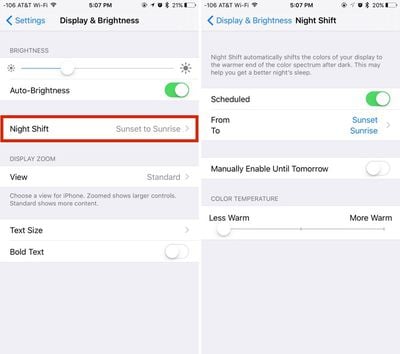
Night Shift mode works by shifting the iPhone or iPad's display from a blue tint to a much more yellow tint, either on demand, automatically at sunrise and sunset, or on a custom user-set schedule. Night Shift is turned on in the Settings app.
 For manual use:
- Open up the Settings app.
- Scroll to the Display & Brightness section. This is where the Night Shift controls are located.
- Tap on "Night Shift."
- Tap on the "Manually Enable Until Tomorrow" toggle.
- Adjust screen temperature as desired.
- With no schedule set, Night Shift mode will automatically turn off in the morning.
For automatic use:
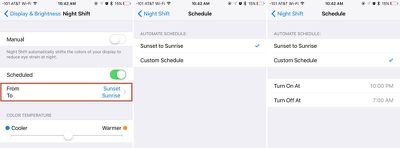
- In the Night Shift menu, tap on "From and To" to set Night Shift activation times.
- Tap on "Sunset to Sunrise" to set Night Shift to come on when the sun sets based on your iPhone's clock. When the sun sets in your local area, the display will shift from regular mode to Night Shift mode over the course of a minute.
- Tap on "Custom Schedule" to set your own times for Night Shift to turn on and off again.
When using Night Shift with the Schedule mode, there is no need to touch the toggle. Night Shift will look like it is turned off, but when sunset rolls around, it will turn on automatically and the toggle will be activated.
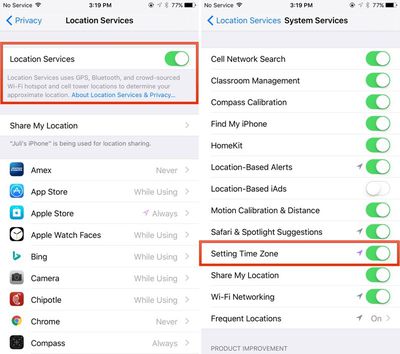
With Apple's default schedule, Night Shift will turn on when the sun sets and turn back on when the sun rises in the morning. For the default scheduling to work, Location Services (under the "Privacy" section in the Settings app) needs to be enabled so Apple can determine the sunrise and sunset times of the area where you are located.
Additionally, the "Setting Time Zone" feature under Location Services also needs to be enabled. This can be accessed by going to Privacy --> Location Services --> System Services. Make sure "Setting Time Zone" is toggled on.
Adjusting Night Shift Color
While Night Shift mode is turned on, the exact color of the display can be adjusted with the slider to meet individual preferences. By default, the slider is set in the middle, but moving it to the left will increase the amount of blue light while moving it to the right will decrease the amount of blue light when Night Shift is activated. Apple doesn't provide exact temperatures, with the slider simply labeled with "Less Warm" and "More Warm."
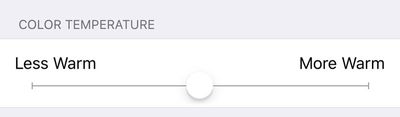
At its coolest, the display is just slightly more yellow than it is without the Night Shift feature enabled. At its warmest, an iOS device's display gets much more yellow, so most users will probably be most comfortable with a setting in the middle.
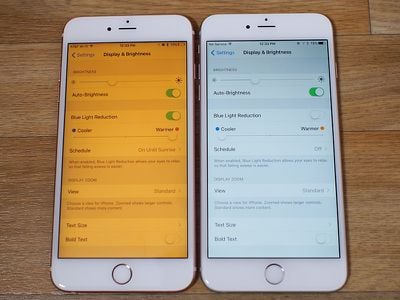
Night Shift's "Less Warm" and "More Warm" settings are distinct from screen brightness, which can also be adjusted to further customize the display of an iOS device at night.
Night Shift Control Center Options
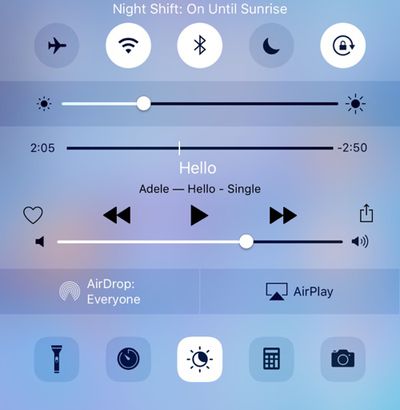
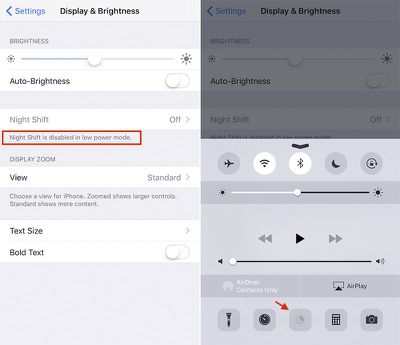
For quickly turning on or disabling Night Shift, there's a Control Center option for Night Shift. The Control Center can be accessed by swiping up from the bottom of an iPhone or iPad's display, where Night Shift is represented by an icon that depicts crescent moon inside of a sun. Tapping on the icon will automatically toggle Night Shift on or off. Tapping while Night Shift is on will turn it off until the next sunset, while tapping with Night Shift off will turn it on until the next sunrise.
Night Shift Devices
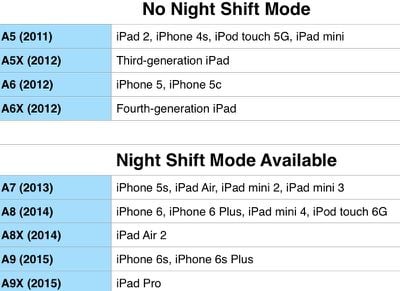
Night Shift is a feature in iOS 9.3, but as it turns out, it isn't a feature that's available on all of the devices able to run iOS 9. Night Shift requires a 64-bit processor, which encompasses the A7, A8, A8X, A9, and A9X. The iPhone 5s and later, the iPad mini 2 and later, the iPad Air and later, the sixth-generation iPod touch, and the iPad Pro can be used with Night Shift.
Low Power Mode and Night Shift
Night Shift and Low Power mode were compatible in the first few iOS 9.3 betas, but Apple made a change that causes Night Shift not to work when Low Power mode is turned on. Activating Low Power mode while Night Shift is active will turn Night Shift off. Attempting to turn Night Shift on when Low Power mode is on doesn't work, with Night Shift grayed out in the Control Center and in the Settings app.
Night Shift for Mac?
Apple is only implementing Night Shift on iOS devices at the current time, but it's a feature that could be expanded to the Mac in the future. In the meantime, there's a popular Mac alternative that's widely used in the Mac community, f.lux. In fact, f.lux was likely the inspiration for Night Shift mode.
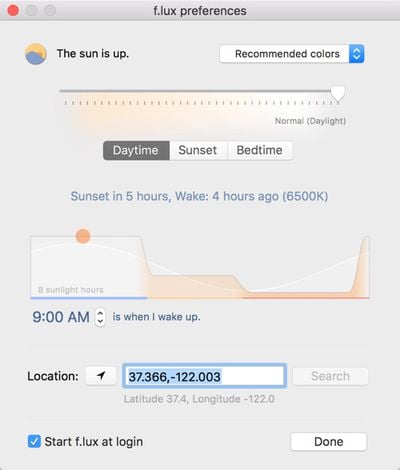
When installed on a Mac, f.lux works in the same way as Night Shift, changing the color temperature of a Mac's display from blue to yellow as it gets dark outside. As it gets later, f.lux continues to cut down on blue lighting, and during the day, it returns the display to its natural bright color. f.lux is highly customizable and can be turned off for specific apps or for set periods of time.
f.lux is a free download, so if you like Night Shift on the iPhone and iPad, it's worth checking out f.lux for the Mac.
Night Shift Release Date
Night Shift is built in to iOS 9.3, which was released to the public on Monday, March 21.

















































Top Rated Comments
A simple time/location based scheduling of the phone's volume settings would be infinitely more useful than this.
If you have a white iPhone...
Doesn't make sense though because it barely matches the white that the iPhone actually is.
¯\(°_O)/¯
I don't get why it's necessary.