How to Use Fast User Switching in macOS Big Sur - MacRumors
Skip to Content

How to Use Fast User Switching in macOS Big Sur

by

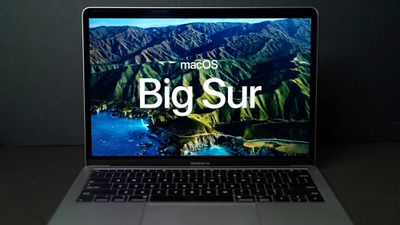
In macOS Big Sur, Apple includes a feature that will be familiar to Windows users, called Fast User Switching. As the name suggests, it lets you switch user accounts quickly and easily, without having to log out or restart your Mac.
macosbigsur
As you'd expect, multiple user accounts are kept completely separate, and backgrounded accounts still require user authentication to switch between them. So if you've been taking the slower restart route to switching between macOS user accounts, it's time to enable Fast User Switching. Here's how.

How to Enable Fast User Switching on Mac

    Launch System Preferences, either by clicking on its icon in the Dock or by clicking the Apple () symbol in the menu bar and selecting System Preferences....
    system prefs

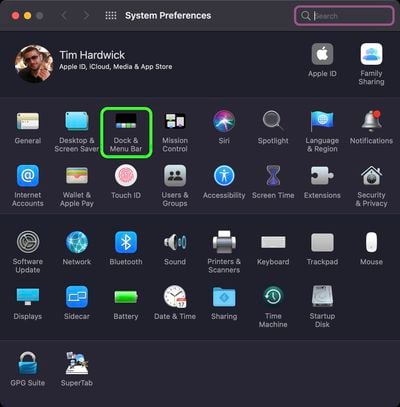
  1. Click the Dock & Menu Bar preference pane.
    system prefs

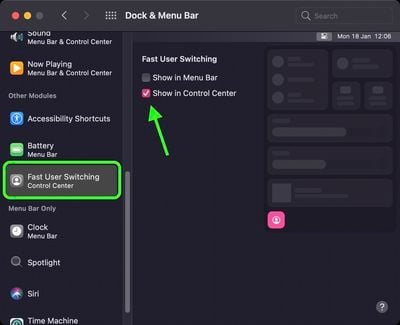
  2. In the side column, scroll down to "Other Modules" and choose Fast User Switching.
  3. Check the box next to Show in Menu Bar or Show in Control Center (you can also check both).
    system prefs

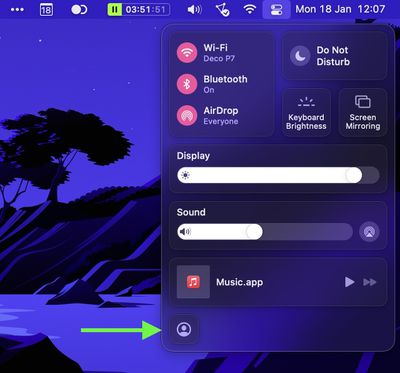
That's all there is to it. You can now switch between macOS user accounts via the user button that appears in the menu bar or in the Control Center (or both), depending on your preferences.
4fast user switching macos

How to Disable Fast User Switching on Mac

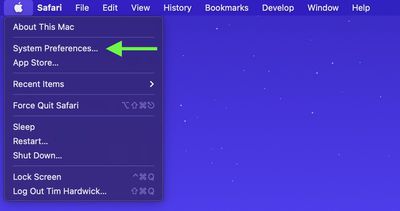
    Launch System Preferences, either by clicking on its icon in the Dock or by clicking the Apple () symbol in the menu bar and selecting System Preferences....
    system prefs

  1. Click the Dock & Menu Bar preference pane.
    system prefs

  2. In the side column, scroll down to "Other Modules" and choose Fast User Switching.
  3. Uncheck the box next to Show in Menu Bar or Show in Control Center (you may need to uncheck both).
    system prefs

After following these steps, you'll have to log out to allow another user to log in to their account.
Related Forum: macOS Big Sur

Popular Stories

macOS 27 on MacBook Pro

macOS 27 Will Mark the End of an Era

Saturday April 18, 2026 6:45 am PDT by
During its Platforms State of the Union segment at WWDC 2025, Apple revealed that macOS 26 Tahoe is the final major macOS version for Intel-based Macs. The upcoming macOS 27 release will be compatible with Apple silicon Macs only, meaning that you will need a Mac with an M-series chip or a MacBook Neo with an A18 Pro chip in order to install the software update. macOS 27 should be available...

Aston Martin CarPlay Ultra Screen

Apple Says CarPlay Ultra is Coming to These Vehicle Brands

Saturday April 18, 2026 5:59 am PDT by
Last year, Apple launched CarPlay Ultra, the long-awaited next-generation version of its CarPlay software system for vehicles. Nearly a year later, CarPlay Ultra is still limited to Aston Martin's latest luxury vehicles, but that should change fairly soon. In May 2025, Apple said many other vehicle brands planned to offer CarPlay Ultra, including Hyundai, Kia, and Genesis. CarPlay Ultra...
Tim Cook Rainbow

Apple CEO Tim Cook Stepping Down, John Ternus Taking Over

Monday April 20, 2026 1:33 pm PDT by
Apple CEO Tim Cook is stepping down as Apple's chief executive officer, and hardware engineering chief John Ternus is set to take over, Apple announced today. Cook will continue on as Apple CEO through the summer, with Ternus set to join Apple's Board of Directors and take over as CEO on September 1, 2026. Cook is going to transition to executive chairman, and he will "assist with certain...