Skip to Content

How to Turn Off Quick Note on macOS Monterey

by

macOS Monterey introduces a Quick Note feature that's designed to give you quick access to a fresh note in the built-in Notes app if you need to jot down some ideas in a hurry.

monterey quick note
Quick Note is enabled by default and can be accessed by mousing over the bottom right hand corner of your Mac, but if you're not interested in using it, there is a way to disable it. Here's how:

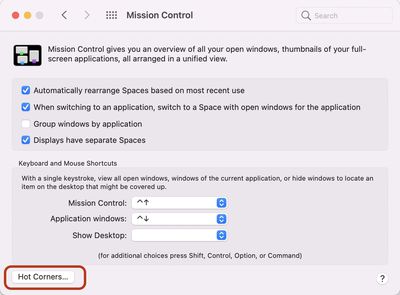
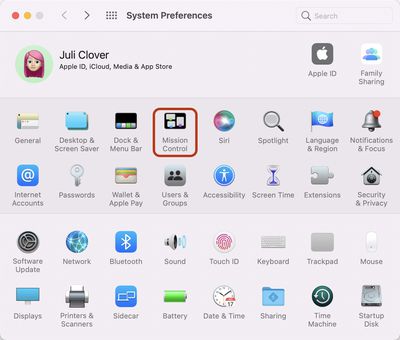
  1. Open up System Preferences. mission control system preferences
  2. Click on Mission Control. mission control hot corners
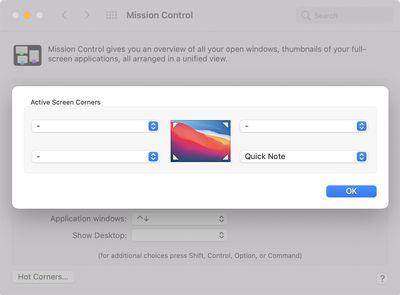
  3. Click on Hot Corners. mission control quick notes hot corner
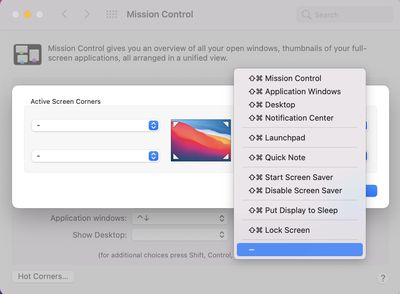
  4. In the bottom right hand corner where it says Quick Note, click and then select another option or select "-" if you don't want to use Hot Corners at all. hot corners quick note disable
After being disabled through the Hot Corners feature, Quick Note will no longer activate when you mouse over the bottom right corner of the Mac's display.

If you want to re-enable it you can do so by reversing the above steps, and you can also use the Hot Corners feature to assign it to another corner of the display if that's more useful to you.

Related Forum: macOS Monterey

Popular Stories

Apple Event Logo

Apple Released Seven New Products Today

Wednesday March 11, 2026 7:05 am PDT by
Starting today, the seven new Apple products that were announced last week are available at Apple Stores and beginning to arrive to customers. The colorful MacBook Neo and all of the other new products are on display at most Apple Store locations around the world starting today. Apple Stores have inventory of the new products for both walk-in customers and Apple Store pickup, but...
ios 26 4 yellow

Everything New in iOS 26.4 Beta 4

Monday March 9, 2026 3:50 pm PDT by
Apple is continuing to test the iOS 26.4 beta, and the latest update is now available for developers and public beta testers. As testing goes on, there are fewer new features in each beta, but today’s release adds new emoji characters and a few other changes. New Emoji Apple added new emoji characters, including trombone, treasure chest, distorted face, hairy creature, fight cloud, orca,...
Apple 50 Years of Thinking Different

Apple Announces 50th Anniversary Plans

Thursday March 12, 2026 6:10 am PDT by
Apple today announced that it will celebrate the company's 50th anniversary over the coming weeks, but it has yet to reveal any specific plans. Apple was founded on April 1, 1976, so the company will turn 50 on April 1, 2026. "While Apple is known for looking forward, this milestone offers a special moment to reflect on the journey that has brought the company here, to celebrate the...