

Shazam is an Apple-owned popular service that can identify the names and lyrics of songs, music videos, TV shows, and more, simply by listening to and deciphering whatever is playing.
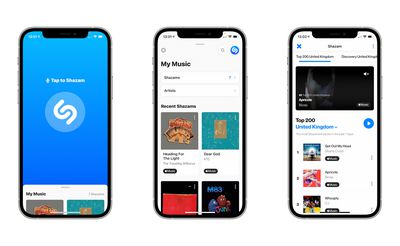
After you've identified songs in the Shazam app by pressing the big Shazam button, you can use streaming services like Spotify and Apple Music to listen to them. In this article, we're going to show you how to link Shazam to your Spotify account.
- First, make sure you have the Spotify and Shazam apps downloaded on your iPhone, iPad, or iPod touch, otherwise you won't be able to connect the two services. Both apps are available on the App Store.

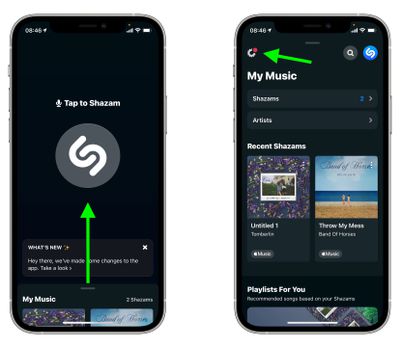
- Next, launch the Shazam app on your iOS device, then swipe up to My Music from the main Shazam screen and tap the Settings button (the cog icon in the upper left corner of the screen).
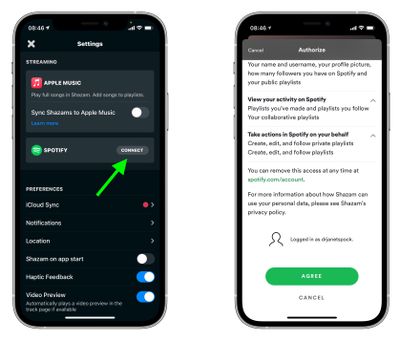
- In Settings, tap Connect next to Spotify, then when Spotify opens, scroll down and tap the green Agree button to authorize the link.

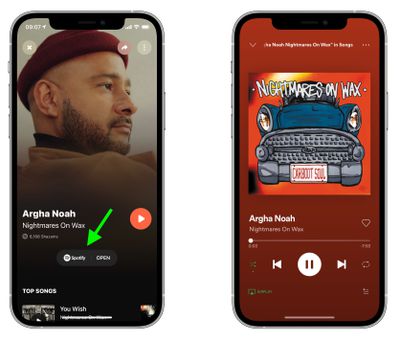
Once you've connected Shazam to your Spotify account, you can listen to your Shazams in full. In Shazam, tap the play button next to a song to listen to a 30-second preview. To listen to the whole song in Spotify, tap Spotify next to a Shazam or when viewing a Shazam in fullscreen.
You can also get Shazam to create a "My Shazam Tracks" playlist in Spotify. Simply go into Shazam's Settings and toggle the switch next to Sync Shazams to Spotify to the green ON position. Once that's done, you'll be able to listen to all your previous Shazams in the "My Shazam Tracks" playlist in the Spotify app.




























![Apple Watch Ultra 3 Hits New Low Price With Amazon's $299 Discount [Updated]](https://images.macrumors.com/t/BXKI27vT0hWfumJQpYzf41rH3Mw=/112x112/article-new/2026/10/apple-watch-ultra-3-milanese.jpeg)

















Top Rated Comments
"Hey Siri, what am I Listening to?" or "Hey Siri, what is this song?" and hold your phone near an audio source, it many cases it should be able to identify the song in about 15 seconds.