

iOS 26: Enable Call Filtering in FaceTime - MacRumors
Skip to Content

iOS 26: Enable Call Filtering in FaceTime

by

In iOS 26, Apple has added new call filtering options to FaceTime. You can still silence unknown callers, but you can now have missed calls and voicemails from unsaved numbers sorted into an Unknown Callers list that's hidden from view unless you select it.

iOS 26 Glass FaceTime Feature

Enable FaceTime Call Filtering

Call filtering for FaceTime is opt-in, so if you often get calls from unknown numbers, you can turn it on. The following steps show you how it's done.

  1. Open the Settings app on your iPhone or iPad.
  2. Scroll to the bottom and select Apps.
  3. Select FaceTime from the alphabetical list.
  4. In the "Call Filtering" section, toggle on Unknown Callers.
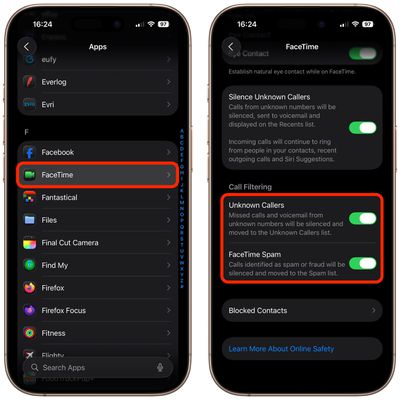
settings

Note that you can toggle on FaceTime Spam in the same "Call Filtering" section of FaceTime's settings. Calls that are identified as spam will be silenced and automatically added to a new Spam list.

Access Unknown Callers List

In the FaceTime app, you can get to the different filtered sections by tapping on the menu button in the upper right of the app. Sections include Calls, Missed, Video, Voicemail, Unknown Callers, and Spam. If you haven't had calls from unknown callers, this option won't appear in the menu.
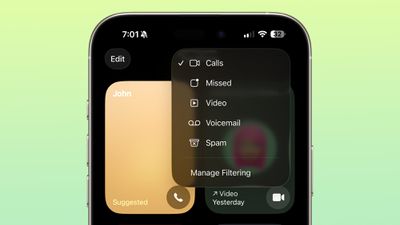
ios 26 facetime call filtering
In ‌iOS 26‌, the Sensitive Content Warning and Communication Safety features are also available for ‌FaceTime‌ video calls. You can learn more about them in our dedicated how-to.

Popular Stories

Apple Event Logo

Apple Just Released a New Accessory

Monday May 4, 2026 8:13 am PDT by
Apple today released a new Pride Edition Sport Loop for the Apple Watch. The band features a rainbow design with 11 colors of woven nylon yarns. The new Pride Edition Sport Loop is available to order now on Apple.com and in the Apple Store app in 40mm, 42mm, and 46mm sizes, and it will be available at Apple Store locations starting later this week. In the U.S., the band costs $49. There...

Instagram Feature 2

PSA: Instagram Encrypted Messaging Ends on Friday, May 8

Tuesday May 5, 2026 8:24 am PDT by
Instagram will remove end-to-end encryption for direct messages between users from May 8, 2026. When the date comes around, Meta will potentially be able to see the contents of all messages between users on the social media platform. Encrypting messages has been an optional feature in Instagram since 2023, but in March of this year the social media platform quietly updated a help page to say ...
iOS 26

Apple Says iOS 26.5 Adds Three New Features to Your iPhone

Tuesday May 5, 2026 7:36 am PDT by
iOS 26.5 includes three new features for iPhones, according to Apple's release notes for the update, which is expected to be released next week. As discovered during beta testing, iOS 26.5 enables end-to-end encryption for RCS messaging between iOS and Android devices. Apple says this security upgrade is limited to supported carriers around the world and will continue to roll out....










































