Here's a Simple Parental Lock for Your Apple Watch - MacRumors
Skip to Content

Here's a Simple Parental Lock for Your Apple Watch

by

Anyone who looks after children knows how fascinating an illuminated display is to a baby or toddler. When it's an interactive touchscreen that's strapped to your wrist, the intrigue
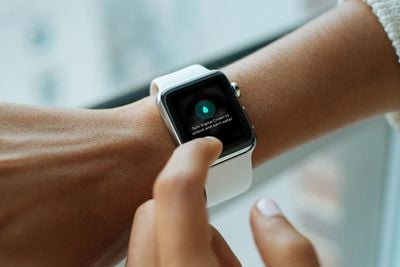
improvised parental lock apple watch
If your Apple Watch has proven a bit too attractive to little fingers and you're worried they'll unintentionally send a message, mess up your notification settings, or worse, here's a quick trick that you can use whenever their interest is piqued.

It only takes a second to perform, and with a little luck, it will make your smartwatch a little less interesting – until they get old enough to figure out how to reverse what you've done!

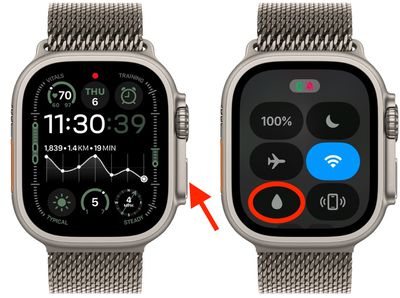
  1. Bring up the Control Center on your ‌Apple Watch by pressing the Side button.
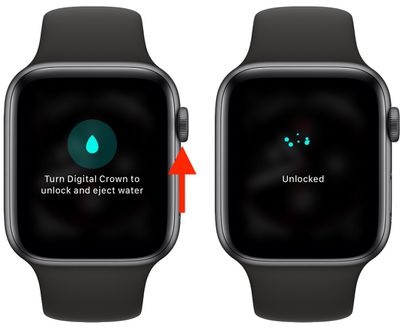
  2. Tap the Water Lock icon (it looks like a water droplet).
    water lock

And that's it! Of course, we're improvising here by using the Water Lock feature, which is intended to be used when you're swimming (it locks the screen so you can swim without water activating it). But it works great as a quick parental lock, too, because your watch remains unresponsive to taps by tots for as long as it's enabled.

It's also easily turned off – if you know how. Simply press and hold the Digital Crown. You'll see an animation on the screen indicating that the speaker is being cleared of water after your "swim." Keep turning it until you hear the beeping tone rise in pitch, and your Apple Watch touchscreen will return to its normal responsive state.
Apple Watch

If your little one got bored and is having a nap, just be sure to disable the Water Lock feature in another room, as it can be a bit noisy.

Popular Stories

iOS 27 on iPhone 17 1

iOS 27 Will Add These New Features to Your iPhone

Saturday May 2, 2026 8:43 am PDT by
Apple is expected to unveil iOS 27 during its WWDC 2026 keynote on June 8, and there are already many rumored features and changes for iPhones. The first developer beta of iOS 27 will likely be available immediately following the keynote, and a public beta typically follows in July. Following beta testing, the software update should be released to all users with a compatible iPhone in...

Apple MacBook Pro M4 hero

Why You Might Want to Wait to Buy a MacBook Pro

Friday May 1, 2026 3:43 pm PDT by
Apple refreshed the 14-inch and 16-inch MacBook Pro with M5 Pro and M5 Max models in March 2026, but depending on your needs and interests, you might want to skip this generation because there's something better in the works. The M5 Pro and M5 Max MacBook Pro models have faster chips, but the same design that Apple has used since 2021. An updated design with new display technology and faster ...
macOS 27 on MacBook Pro

Apple to Unveil macOS 27 Next Month With These New Features

Friday May 1, 2026 1:21 pm PDT by
Apple will unveil its latest software platforms during its WWDC 2026 keynote on Monday, June 8, and one of them will be macOS 27 for the Mac. The first developer beta of macOS 27 will likely be available immediately following the keynote, and a public beta typically follows in July. Following beta testing, the software update should be released to all users in September. macOS 26 is known ...