

In a new privacy-centric update released in August 2022, WhatsApp has added the ability for users to adjust the visibility of their "Last Seen" status on a contact-by-contact basis. Keep reading to learn how it's done.

As regular WhatsApp users will know, the "Last Seen" status of a contact you're in conversation with sits atop the conversation thread, informing you when that contact last opened and was active on the app.
Previously, WhatsApp let you disable your Last Seen status so that other contacts couldn't see when you were last online, but the setting's options were limited to "Everyone," "My Contacts," and "Nobody," and there was no way to make exceptions for individual contacts.
The good news however is that WhatsApp is switching things up by adding the option "My Contacts Except..." which lets you select specific contacts so that they don't see when the last time was that you were active on the messaging network.
Here's how to make the change to your privacy settings in the WhatsApp app for mobile.
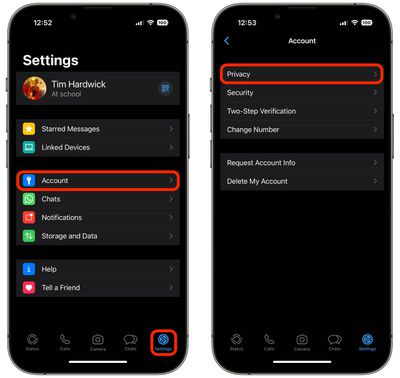
- In WhatsApp, tap the Settings tab (the cog icon) at the bottom of the screen.
- Tap Account -> Privacy.

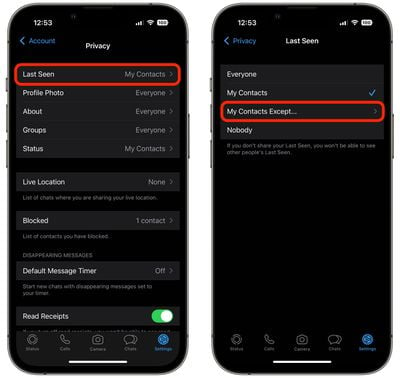
- Tap Last Seen.
- Select My Contacts Except....
- Choose the people from your contacts list that you want to hide your Last Seen status from.
- When you've finished selecting contacts, tap Done in the top-right corner of the screen.
If you don't see the new option in the Last Seen menu, make sure you've updated WhatsApp to the latest version, then try again.









































![Apple Pulls Keynote, Pages and Numbers From App Store [Update: Back]](https://images.macrumors.com/t/Okb7kitB_gNr6qe5Pex9nQIysD8=/112x112/article-new/2026/01/Apple-Creator-Studio-iWork-suite.jpg)



