

How to Change Reminder Priority in the Reminders App for iOS - MacRumors
Skip to Content

How to Change Reminder Priority in the Reminders App for iOS

by

In iOS 13, Apple's stock Reminders app can be used to create a reminder for just about anything. You can add notes and websites to provide a reminder for more context, and you can even prioritize your reminders to see at a glance how important they are relative to each other. Keep reading to learn how.
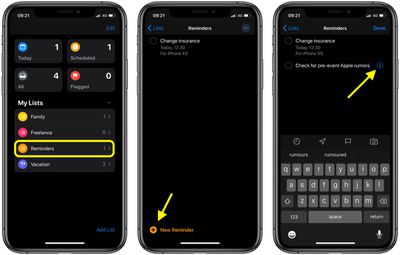
how to add notes and URLs to reminders in iOS 2
Adding a reminder to a list can be done by tapping into a list and then tapping New Reminder, or by tapping into the Today, Scheduled, All, or Flagged categories at the top of the app and then choosing New Reminder or tapping the plus button.

Once you've given your reminder a name, tap the info ("i") button next to it to open the Details screen. Further down the screen you'll find the Priority option – tap it, then select Low, Medium, or High, depending on the reminder's importance. Tap back to the details screen and then select Done to confirm.
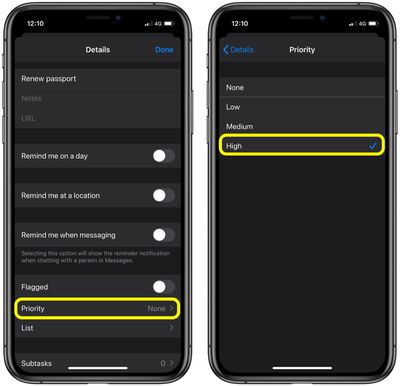
reminders
Note that flagging a reminder makes it appear in the default Flagged list and helps to highlight it in your own custom list, but making a reminder a priority adds exclamation marks to it and re-locates it higher up the list based on its priority level.


Popular Stories

iphone 17 pro dark blue 1

Apple Preparing 'Most Significant Overhaul in the iPhone's History'

Sunday March 29, 2026 8:18 am PDT by
Bloomberg's Mark Gurman has high expectations for Apple's first foldable iPhone. In his Power On newsletter today, he said the foldable iPhone will be "the most significant overhaul in the iPhone's history." "iPhone 4, iPhone 6 and iPhone X were clearly a big deal, but this is a whole new design," he said. Like Samsung's Galaxy Z Fold 7, the foldable iPhone will reportedly open up like ...

Apple Event Logo

Apple to Launch These 15+ New Products Later This Year

Friday March 27, 2026 2:03 pm PDT by
March has been an incredibly busy month for Apple, with the company unveiling more than 10 new products and accessories. We said hello to the MacBook Neo at the start of the month, and we bid farewell to the Mac Pro at the end of it. Nevertheless, there is still a lot more to come this year. Beyond the usual annual updates to iPhones and Apple Watches, Apple's all-new smart home hub is...
Apple Apps Grid

Apple Releasing Two New iPhone Apps This Year

Saturday March 28, 2026 8:00 am PDT by
Apple is expected to release two new iPhone apps this year, including an Apple Business app and a Siri app with chatbot-like functionality. With the Apple Business app, employees at businesses using the new Apple Business platform will be able to install apps for work, view contact information for colleagues, and request support. Apple Business is launching on April 14, and it replaces Apple ...







































