Skip to Content

Change Clock Style in Your iPhone's StandBy Mode

by

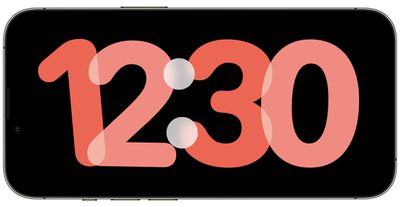
StandBy is a Lock Screen mode that activates when an ‌iPhone‌ is plugged into a charger and positioned in a horizontal (or landscape) orientation. It consists of three different screens, the last of which is the fullscreen clock display. Keep reading to learn how to change the style of the clock.


StandBy's third screen shows the time and date in various themes that you can access by swiping up and down on the display. They include Digital, Analogue, World, Solar, and Float. Some themes also show additional information like the temperature or your next alarm.

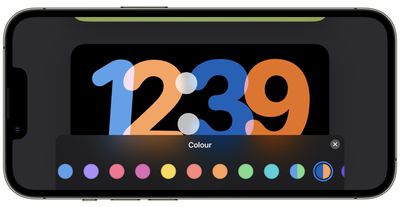
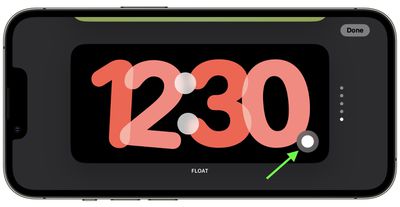
Float shows the time in big bubble numbers in customizable colors, while Solar has more of a standard font with a solar flare design in different colors. Similarly, the Analog theme has customizable accent colors, and Digital has bold numbers with different color options. The World theme shows the time with a map of the world and your current location highlighted, and is the only theme that can't be color-customized.

Here are the steps to take to change the color of the Analog, Solar, Float, and Digital clocks.

  1. Press and hold on the clock face.
    standby

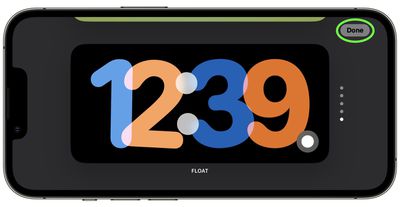
  2. Tap the white button in the bottom-right corner of the clock.
    standby

  3. Choose a different color swatch from the row of options that appears.
    standby

  4. When you're happy with your selection, tap the X button in the top-right corner of the color swatch menu pane, then tap Done.
    standby

That's all there is to it. You can also customize the widgets screen in StandBy mode. Check out our dedicated guide for more help.


Popular Stories

MacBook Neo Feature Pastel 1

First MacBook Neo Benchmarks Are In: Here's How It Compares to the M1 MacBook Air

Thursday March 5, 2026 4:07 pm PST by
Benchmarks for the new MacBook Neo surfaced today, and unsurprisingly, CPU performance is almost identical to the iPhone 16 Pro. The MacBook Neo uses the same 6-core A18 Pro chip that was first introduced in the iPhone 16 Pro, but it has one fewer GPU core. The MacBook Neo earned a single-core score of 3461 and a multi-core score of 8668, along with a Metal score of 31286. Here's how the...

imac video apple feature

Apple Unveils Seven New Products

Friday March 6, 2026 11:48 am PST by
Apple this week unveiled seven products, including an iPhone 17e, an iPad Air with the M4 chip, updated MacBook Air and MacBook Pro models, a new Studio Display, a higher-end Studio Display XDR, and an all-new MacBook Neo that starts at just $599. iPhone 17e features the same overall design as the iPhone 16e, but it gains Apple's A19 chip, MagSafe for magnetic wireless charging and magnetic...
Apple MacBook Pro M4 hero

Apple Planning 'MacBook Ultra' With Touchscreen and Higher Price

Sunday March 8, 2026 8:05 am PDT by
Apple is planning to launch an all-new "MacBook Ultra" model this year, featuring an OLED display, touchscreen, and a higher price point, Bloomberg's Mark Gurman reports. Gurman revealed the information in his latest "Power On" newsletter. While Apple has been widely expected to launch new M6-series MacBook Pro models with OLED displays, touchscreen functionality, and a new, thinner design...