If you have an Apple Watch Series 9 or later or Apple Watch Ultra 2 or later, it can detect patterns in your heart rhythm that suggest hypertension and send you critical health notifications when they occur. This potentially life-saving feature requires just a few quick setup steps to activate.
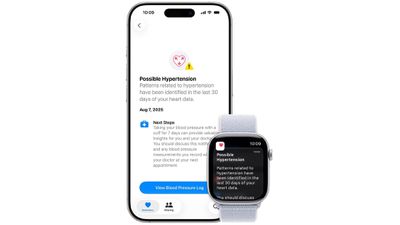
Apple Watch hypertension notifications analyze irregular heart rhythm patterns to identify potential signs of high blood pressure. When enabled, you'll receive alerts on both your Apple Watch and iPhone if the device detects concerning cardiovascular activity that warrants medical attention.
What You Need
- An Apple Watch Series 9 or later or Apple Watch Ultra 2 or later, with the latest version of watchOS.
- An iPhone 11 or later with the latest version of iOS.
- Make sure Wrist Detection is turned on.
- You must be 22 years or older, not pregnant, and have not been diagnosed with hypertension.
Setting Up Hypertension Notifications
The hypertension notification feature is accessed through your Health app's profile settings. Here's how to enable it:
- Open the Health app on your iPhone.
- Tap your profile photo in the top right corner.
- Select Health Checklist under the "Features" list.
- Find "Hypertension Notifications" and tap Set Up.
- Follow the on-screen prompts to complete activation.
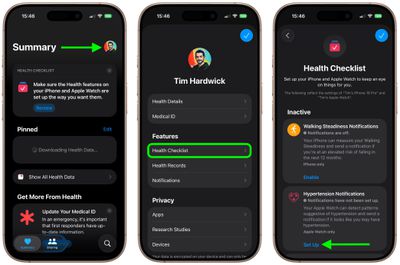
The setup process includes reading important medical disclaimers and confirming that you understand the notification system's limitations. Note that Apple Watch hypertension detection is designed to supplement – not replace – regular medical monitoring.
What Happens After Setup
Once activated, your Apple Watch continuously monitors your heart rhythm in the background. If it detects patterns potentially associated with hypertension, you'll receive a notification explaining the findings and recommending you consult with your healthcare provider.
These notifications appear on both your Apple Watch and paired iPhone. And that's all there is to it. The feature works automatically whenever you're wearing your Apple Watch.
Important Health Considerations
Apple Watch hypertension notifications are not a medical diagnosis tool. Apple says they're designed as an early warning system that can prompt you to seek proper medical evaluation. If you receive a hypertension notification, contact your doctor to discuss the findings and determine if additional testing is needed.