iOS 27 Makes the Shortcuts App Much Less Intimidating - MacRumors
Skip to Content

iOS 27 Makes the Shortcuts App Much Less Intimidating

The Shortcuts app can be intimidating to casual iPhone users, but with iOS 27, it's a lot easier to use. With Apple Intelligence integration, shortcuts can be created using natural language, and they're much more accessible to the average person.

Shortcuts Feature

Describe a Shortcut

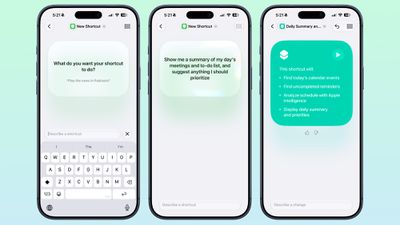
When you tap on the New Shortcut button in the ‌iOS 27‌ Shortcuts app, it opens to the Describe a Shortcut interface.
ios 27 describe shortcut
There's a text box that asks you what you want your shortcut to do, and you can describe what you need in natural language. You can start with a single step, or add in multiple parameters. ‌Apple Intelligence‌ selects the correct actions, creates the automations, and folds it all into a completed shortcut. A few examples of what you can do:

  • Each evening, set tomorrow's alarm based on my first Calendar event, turn on Sleep Focus, and dim the bedroom lights.
  • Every morning, show me my first meeting, today's weather, and my Reminders due today.
  • Turn on the porch lights at night when you get a notification that food delivery is arriving.
  • Text my partner an ETA when I leave work, then start playing my podcast.
  • Show me a summary of my day's meetings and to-do list, and suggest anything I should prioritize.
  • When I open YouTube, turn off orientation lock. Turn it back on when I close the app.
  • Give me a three-line summary of today's tech news.

Shortcuts and automations can run based on time of day, location, an app action, a system feature like a screenshot, an incoming notification, and more. Shortcuts can do all kinds of things, from accessing system features to opening and running apps.

Add Refinements

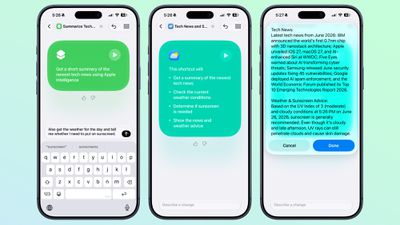
After dictating a shortcut, the app will outline each of the actions the shortcut will perform. If it's what you want, you can tap on the play button to test it. It will be added automatically to your personal shortcuts.
ios 27 shortcut refine
If it's not quite what you want or you want to add more features, you can use the "Describe a change" interface. You can type in what you want to tweak, and go through multiple rounds of refinement until you get exactly what you want.

Shortcuts can be used from Siri, the app, Control Center, the Action Button, and more.

Edit Manually

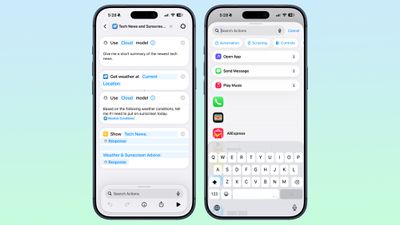
Once created, you can tap into a manual editing interface if you want to add more complicated actions or tweak without using ‌Apple Intelligence‌. AI Shortcuts is in beta and it's not always perfect, so sometimes manual edits are required to get the end result you want.
ios 27 shortcut edit manual
You can also open any shortcut and use the ‌Apple Intelligence‌ mode to make edits.

New Automation Triggers

  • When a notification is received
  • When a screenshot is captured
  • When a keyboard is connected
  • When an Apple Watch workout starts

New Actions

There are several new actions in the Shortcuts app.

  • Automate a recording in Notes
  • Send messages to a group conversation
  • Updated Get What's On Screen option that gets context information from the display (e.g. text, title, or links)
  • Choose an item from a list
  • Delete conversations or messages in Messages
  • Mark as read in Messages
  • Search in Messages
  • Open Messages inbox
  • Send Tapback
  • Auto Enhance Photo
  • Delete albums and photos
  • Favorite photos
  • Hide photos
  • Open photo
  • Create Group in Reminders
  • Create Section in Reminders
  • Delete groups, lists, and sections in Reminders
  • Edit list in Reminders
  • Toggle Hearing Aid Mute
  • Toggle Vehicle Motion Cues

Improved Apple Intelligence Models

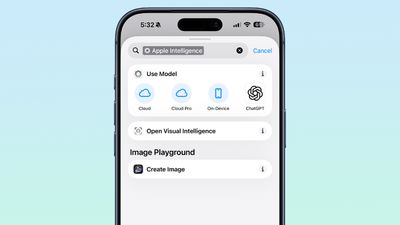
Shortcuts can use improved ‌Apple Intelligence‌ models that have access to broad world knowledge, which means the model can search the web to get information.
ios 27 shortcuts apple intelligence
There are now Cloud, Cloud Pro, and on-device models that can be used in shortcuts. Cloud Pro is able to search the web, and is used for queries that need information from the internet.

Data Storage

Shortcuts can store and update data, so you can do things like add items to a list or keep a tally.
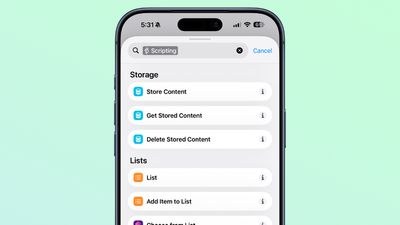
ios 27 shortcuts data storage

Automation Updates

Automation is no longer a separate section in the Shortcuts app, and automation triggers are under the general Shortcuts actions.
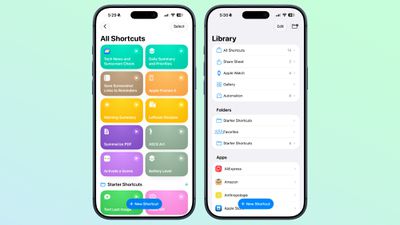
ios 27 shortcut interface

Cross-Platform Support

The Describe a Shortcut feature is available in the Shortcuts app in ‌iOS 27‌, iPadOS 27, and macOS Golden Gate.

Requirements

The ‌Apple Intelligence‌ Shortcut app features require a device that supports ‌Apple Intelligence‌, which includes the iPhone 15 Pro and later, iPads with an M-series chip or the iPad mini with A17 Pro, or a Mac with an Apple silicon chip.

Supported languages include English, Danish, Dutch, French, German, Italian, Norwegian, Portuguese, Spanish, Swedish, Turkish, Vietnamese, Chinese (simplified and traditional), Japanese, and Korean.

Availability

‌iOS 27‌ is available to developers and public beta testers right now, and a public launch is planned for September 2026.

Related Roundups: iOS 27, iPadOS 27
Related Forum: iOS 27

Popular Stories

iOS 27 0 1

iOS 27.0.1 is Coming Soon

Wednesday September 23, 2026 1:06 pm PDT by
After releasing iOS 27 last week, Apple is already testing a follow-up iOS 27.0.1 update for iPhones, according to MacRumors logs. iOS 27.0.1 will likely be a minor update with bug fixes and/or security patches. Shortly after Apple launches new iPhone models, some software bugs are usually discovered as the devices get into the hands of millions of customers around the world. This year, so...
Face ID iPhone 18 Pro

Apple Confirms iPhone 18 Pro Bug Fix Update is Coming Next Week

Thursday September 24, 2026 6:10 am PDT by
Apple has confirmed to 9to5Mac's Benjamin Mayo that it plans to release a software update early next week with a fix for a Face ID issue affecting some iPhone 18 Pro users. Yesterday, we reported that Apple is testing iOS 27.0.1, which is likely to be the update with the...
iPhone Handoff Feature

AT&T Responds to iOS 27's New iPhone Handoff Feature

Wednesday September 23, 2026 7:06 am PDT by
Apple added a new iPhone Handoff feature to iOS 27 that allows you to switch between two iPhones while using the same phone number on each device. T-Mobile and Deutsche Telekom are the first carriers to offer iPhone Handoff, and Apple said Verizon and EE will add support later this year, but AT&T is noncommittal about the feature. A spokesperson for AT&T told CNET that the carrier sees...

Top Rated Comments

Radeon85 Avatar
16 weeks ago

I never had problems with shortcuts, I asked for more automatisations not Ai slop
This is certainly not AI slop. If you wanted a shortcut to perform multiple tasks, or even a complicated one, it was impossible for the average user to make unless you knew what you were doing. I wanted a simple shortcut to resize photos, but I wouldn’t have had a clue where to start making this.

Now it’s stupidly easy to use, and anyone can use it. Good luck asking your average tech-illiterate person to make this shortcut in a few seconds.


Attachment Image

Attachment Image

Attachment Image

Attachment Image
Score: 29 Votes (Like | Disagree)

cjsuk Avatar
16 weeks ago
It’s not intimidating now. It’s just crappy and unreliable.
Score: 26 Votes (Like | Disagree)
Radeon85 Avatar
16 weeks ago
After playing about with it for a week, it’s one of my favourite features in 27, being able to ask Siri what I want in plain English is a massive improvement.

Made a shortcut to batch import photos from the Folders app and import them into the Photos app into collections, while preserving the same folder names, and then import them into those folders. Works beautifully and saved me hours of manual work.

Made another one to allow me to resize photos to either a simple small, medium, large, or enter my own custom resolution while converting it to jpeg: simple tool, and I no longer need those crappy third-party apps to do that, which are full of ads or demand a subscription.
Score: 20 Votes (Like | Disagree)
chrono1081 Avatar
16 weeks ago
I could never ever get the shortcuts app to do what I wanted to do, and I’m a software developer. Glad to see they’re making improvements.
Score: 15 Votes (Like | Disagree)
16 weeks ago
I have never used the shortcuts app and probably never will.
Score: 12 Votes (Like | Disagree)
phenste Avatar
16 weeks ago
genuinely one of the most exciting/underrated features of the update + a prime example of how to use AI in a non-slop way
Score: 12 Votes (Like | Disagree)
Latest Stories
Amazon Offers $900 Off 2026 16-Inch MacBook Pro With M5 Max Chip
16 minutes ago
Amazon Discounts New Mac Mini by Up to $149, Mac Studio by $200
17 hours ago
Apple Expected to Release New Products on Next Four Fridays
19 hours ago
Apple Reveals iPhone Duo's Battery Capacity
22 hours ago
Apple Planning 'HomeView Max' With 9-Inch, 360-Degree Screen
23 hours ago
Mark Gurman: Apple Made 'Major Mistake' With iPhone Duo Pre-Orders
23 hours ago
Apple Retail Staff Told to Warn Against iPhone Duo Walk-In Purchases
2 days ago
Apple Hires Former Meta Lawyer to Oversee Global Litigation
2 days ago
Top Stories: Apple HomeView, New Apple TV and HomePod mini, and Sold-Out iPhone Duo
2 days ago
Verizon Will Charge $10 a Month for iPhone Handoff
3 days ago
Apple Calls iPhone Duo Demand 'Extraordinary' After Orders Slip to 2027
3 days ago
New App Store Rules Target AI Deepfakes and Nudify Apps
3 days ago
Didn't Pre-Order Apple's HomeView? Here's How Long the Wait is Now
3 days ago
Apple's $79 iPhone Duo Case Sticks On With Adhesive
3 days ago
Apple TV 4K and HomePod Mini Price Increases 'Much More Striking' Than New Features
3 days ago
The MacRumors Show: Was HomeView Worth the Wait?
3 days ago
Apple Refers to HomeView as 'HomePodDevice' in Legal Document
3 days ago
Apple Pre-Orders Kick Off With First Discounts on HomeView and Apple TV 4K
3 days ago
Developers Question Scope of Potential Apple Antitrust Settlement
3 days ago
iPhone Duo Resold for $5,000 on eBay After Selling Out
3 days ago
Massive Discounts Hit 2026 MacBook Pro With Up to $800 Off
3 days ago
iPhone Duo is Sold Out for Christmas as Shipping Estimates Slip to 2027
3 days ago
Didn't Pre-Order an iPhone Duo Yet? Wait Times Are Significant Now
3 days ago
First Apple TV 4K Pre-Order Discount Arrives at Amazon
3 days ago
iPhone Duo Pre-Order Deals: The Best Carrier Offers From AT&T and T-Mobile
3 days ago
iPhone Duo Now Available to Pre-Order From Apple
3 days ago
iPhone 18 Pro vs. iPhone Duo Buyer's Guide: Which Should You Choose?
3 days ago
Apple Store Down Ahead of iPhone Duo Pre-Orders
3 days ago
Oops, Apple's Website Just Hinted at iPad Mini 8
4 days ago
OLED MacBook Pro Won't Get M7 Chips Until Late 2027
4 days ago