watchOS 27.2 Code Hints at iPhone-Style Screenshot Previews - MacRumors
Skip to Content

watchOS 27.2 Code Hints at iPhone-Style Screenshot Previews

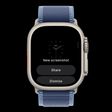
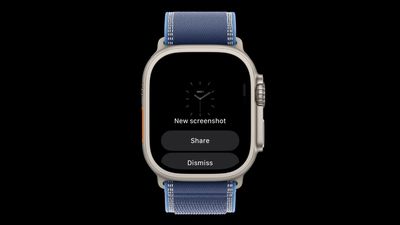
watchOS 27.2 could introduce a feature that lets Apple Watch screenshots be previewed with options to share or delete, similar to how screenshots work on the iPhone.
watchos 27 2 screenshot
Signs of the feature were found in watchOS 27.2 by code explorer pdfu. The option is hidden behind a feature flag that's not enabled, but it could be introduced in a later watchOS 27.2 beta.


Right now, taking a screenshot on the Apple Watch sends it directly to the iPhone Photos app with no confirmation screen. It's easy to accidentally take a screenshot since it only requires pressing the Digital Crown and side button at the same time.

On the iPhone, taking a screenshot shows either a full-screen preview or a thumbnail preview depending on your settings, but both options let you save, share, or delete the screenshot with a couple taps.

Screenshots on Apple Watch are disabled by default but can be turned on through the Settings app on the watch or the Apple Watch app on iPhone. An option to save or delete screenshots would add more control than a simple on or off toggle.

Related Roundups: watchOS 26, watchOS 27
Related Forum: Apple Watch

Popular Stories

watchos 27

PSA: watchOS 27 Removes This Useful Feature From Your Apple Watch

Thursday September 17, 2026 1:34 am PDT by
Apple released watchOS 27 on September 14, bringing a new Audio Intelligence feature set to its latest Apple Watch models, but as a result, owners of previous models are set to lose out doubly in the process. Apple Watch Series 12 and Ultra 4 models later this year will get Live Rewind, a feature that provides a transcript of any spoken audio that was picked up by the device in the last 15...
watchos 27

Apple Releases watchOS 27.0.1 for Additional Models

Monday September 28, 2026 2:08 pm PDT by
After releasing watchOS 27.0.1 for the Apple Watch Series 12 and Apple Watch Ultra 4 last week to address a bug that was causing devices to restart unexpectedly, Apple has now released the update for all eligible watches, which includes Series 9 and later. Apple's release notes say only that the update "provides bug fixes for your Apple Watch" and the company does not list any security fixes,...
watchos 27

Apple Releases watchOS 27.0.1 With Fix for Restart Bug

Wednesday September 23, 2026 12:44 pm PDT by
Apple today released watchOS 27.0.1, a minor update to the watchOS 27 operating system that came out last week. The update is limited to the Apple Watch Series 12 and Apple Watch Ultra 4. watchOS 27.0.1 can be downloaded through the Settings app on the watch or the Apple Watch app on a connected iPhone. Software can only be installed when the Apple Watch is on the charger and has over 50...

Top Rated Comments

mattkally Avatar
3 weeks ago
Useless.
Score: 7 Votes (Like | Disagree)
CarlJ Avatar
3 weeks ago

Hell no. What a stupid feature. It’s not “easy to accidentally take a screen shot” as you describe. No one accidentally presses both side buttons at once. This just adds an extra step to an already awkward process.
Sure they do. I have screenshots turned on, on my Watch, because I want to take them occasionally, and I get accidental screenshots from time to time.

Totally agreed though on the extra steps. The "automatic full screen preview of screenshots" is one of the first things I turn off on iPhone and iPad - frequently I want a screenshot of something that's happening in real time (like layout of pieces in a real-time game), and I DO NOT WANT the screen taken over by the "here's your new screenshot, what would you like to do with it" "feature" - great, now you pulled me out of the game for 5 seconds and I lost the round - I wanted that screenshot to look at LATER, not now.

It's already infuriating that if I take a screenshot on the Watch of my current stats in the fitness app while exercising, it "helpfully" pauses the workout. 🤬 I've had once or twice where I'll exercise for 30 minutes and find that the last 15 minutes wasn't recorded, because I took a screenshot and the app decided to pause the workout for some ****ing reason. I don't want any extra "help" from Apple with screenshots on the Watch. There better be a way to turn this off.

ETA: going on a clue from elsewhere in this thread, I worked out that pausing the workout is an intentional overloading of this combination press by Apple. Fortunately, in Settings > Workout it's possible to switch off what they call "Press to Pause".

(Related, when they added the buttons for asking AI about the screenshot, to the full-screen screenshot UI, they seem to have removed the button for OCR - you can still select and copy text from a screenshot, but it tries much less hard when not in OCR mode, so it doesn't always work now. I've been in the habit for a while now, of if an app puts text on the screen I want to copy, and it doesn't make it selectable, I'll hit screenshot, tap the thumbnail to go fullscreen, then select and copy the text from there, and dismiss the fullscreen UI with "X" so it doesn't add the screenshot to my photo library.)
Score: 3 Votes (Like | Disagree)
awshucks Avatar
3 weeks ago
I have the screenshot feature turned off anyways. They’re not really useful on my watch.
Score: 3 Votes (Like | Disagree)
Rychiar Avatar
3 weeks ago
I've never taken a screenshot of my watch that wasn't accidental....
Score: 3 Votes (Like | Disagree)
Radeon85 Avatar
3 weeks ago

I wish Apple would do a pass on watchOS design to remove all of the scrolls required to reach buttons. So much scrolling in the OS, it drives me bananas. I feel like they could get more creative.
It used to be so much better with 3D Touch until they made the stupid decision to remove it. Instead of scrolling to reach the "clear all" button, I could tap on the screen anywhere in the list and tap clear. So many other things were quicker with it.
They need to bring this back to the watch and the iPhone.
Score: 2 Votes (Like | Disagree)
3 weeks ago
SHARING screenshots is very useful!
Score: 2 Votes (Like | Disagree)
Latest Stories
Apple TV 4K 2022 vs. 2026 Buyer's Guide: All Differences Compared
1 hour ago
Apple CEO John Ternus on Early Foldables: 'Kind of Cheap and Crappy'
2 hours ago
Greg Joswiak Says Apple Isn't Focused on Making AI for 'Lunatic Fringe'
3 hours ago
Amazon Offers $120 Discount on AirPods Max 2, $50 Off AirPods Pro 3
3 hours ago
Apple CEO John Ternus Featured on Cover of TIME Magazine: 'New Era'
4 hours ago
Apple Announces Deadline to 'Get Ready' to Pre-Order the iPhone Duo
4 hours ago
MKBHD is 'Not Convinced' About Apple's New HomeView, Here's Why
5 hours ago
Apple's Wall-Mounted HomeView Ships Without a Power Adapter
5 hours ago
Rare Apple-1 With Steve Jobs Letter Sells for $1.15 Million
5 hours ago
Apple Now Inviting Media to October 28 'Launch Experience'
6 hours ago
iPhone Duo's A20 Pro Chip Benchmarked Ahead of Launch
17 hours ago
10 HomeView Features You Might Have Missed
18 hours ago
Apple Becomes Second Company to Close Above $5 Trillion
19 hours ago
Which Apple Home Devices Get Siri AI, and When
20 hours ago
Apple's Long-Delayed HomeView Was Already Being Tested in 2024
21 hours ago
Apple Intelligence Coming to China in December With iOS 27.3
21 hours ago
Apple Invites App Updated With Two New Features
21 hours ago
OpenAI Says Ex-Employee Showed Its Device Plans to Apple
23 hours ago
Discover the Best Cases and Screen Protectors for Your New iPhone Duo
23 hours ago
Apple Store Near Los Angeles Closed Due to 'Events Beyond Our Control'
1 day ago
No, HomePod Mini 1 Won't Support Siri AI as CNET Reported
1 day ago
iPhone Duo Compromises: Everything You Have to Give Up
1 day ago
Apple HomeView Has These 15 Apps, Some CarPlay Apps and Widgets Also Supported
1 day ago
iPhone Duo: Apple Charging $49 for New Cover Layer, $229 for Battery
1 day ago
iPhone Duo: Skipping AppleCare+ Could Be $1,499 Mistake
1 day ago
Ready for HomeView? Don't Miss These Smart Home Accessory Deals
1 day ago
Apple Says HomePod 2 Also Works as Default Speaker With Select Macs
1 day ago
HomePod Mini 2: All the New Features
1 day ago
WhatsApp Now Lets Anyone Join Calls, No Account Needed
1 day ago
AppleCare+ Launched 15 Years Ago Today
1 day ago