

Skip to Content

macOS Tahoe Transforms Launchpad Into App Library

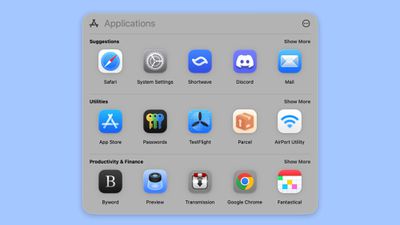
macOS Tahoe does away with the Launchpad feature that's designed to show you all of the apps on your Mac, instead replacing it with a new "Applications" interface that's similar to the App Library on the iPhone and iPad.
macos tahoe app list
The Applications interface organizes apps by category, like Utilities, Productivity and Finance, Social, Creativity, Information and Reading, Entertainment, and Other. There's also a Suggested section at the top of the interface.

The Launchpad replacement appears to be part of Apple's big Spotlight overhaul, and it can also be used to access Actions, Files, and Clipboard, with quick access keyboard shortcuts. Apple calls these "Browse Modes."

  • Command + 1 opens up Applications.
  • Command + 2 opens Files.
  • Command + 3 opens Actions.
  • Command + 4 opens Clipboard.

Actions are what you can do from the new version of Spotlight, and there are options ranging from sending a message to starting a timer. Clipboard brings up your clipboard history, including images you've copied and things you've pasted.

By default, the Applications interface shows your apps in a tiled view organized by category, but there are other options. You can choose a list view that's either organized by category or by app name, or you can use the alphabetical option in a tiled view.

‌macOS Tahoe‌ and the revamped Applications interface that replaces Launchpad is only available to developers right now. Apple plans to make a public beta available in July, with a launch to follow in September.


Related Roundup: macOS Tahoe
Related Forum: macOS Tahoe

Popular Stories

Apple Event Logo

Apple Released Seven New Products Today

Wednesday March 11, 2026 7:05 am PDT by
Starting today, the seven new Apple products that were announced last week are available at Apple Stores and beginning to arrive to customers. The colorful MacBook Neo and all of the other new products are on display at most Apple Store locations around the world starting today. Apple Stores have inventory of the new products for both walk-in customers and Apple Store pickup, but...
ios 26 4 yellow

Everything New in iOS 26.4 Beta 4

Monday March 9, 2026 3:50 pm PDT by
Apple is continuing to test the iOS 26.4 beta, and the latest update is now available for developers and public beta testers. As testing goes on, there are fewer new features in each beta, but today’s release adds new emoji characters and a few other changes. New Emoji Apple added new emoji characters, including trombone, treasure chest, distorted face, hairy creature, fight cloud, orca,...
Apple MacBook Pro M4 hero

Apple Planning 'MacBook Ultra' With Touchscreen and Higher Price

Sunday March 8, 2026 8:05 am PDT by
Apple is planning to launch an all-new "MacBook Ultra" model this year, featuring an OLED display, touchscreen, and a higher price point, Bloomberg's Mark Gurman reports. Gurman revealed the information in his latest "Power On" newsletter. While Apple has been widely expected to launch new M6-series MacBook Pro models with OLED displays, touchscreen functionality, and a new, thinner design...


Top Rated Comments

Kylo83 Avatar
10 months ago
This sucks, I use it all the time, I want to see all apps in one place, this is a step back
Score: 52 Votes (Like | Disagree)
AppleTO Avatar
10 months ago
Oh really? Launchpad is how I launch almost all my apps. I prefer it and use a minimal dock. Not sure how I feel about this one.
Score: 40 Votes (Like | Disagree)
10 months ago
So is it now a …..Start menu?
Score: 36 Votes (Like | Disagree)
10 months ago
This is very annoying for me because I basically use the LaunchPad like I use my Home Screen on iOS and leave the desktop screen blank.

On the LaunchPad, I have my apps in different folders and designed my own folder name and categories. So I would hate if the new categories are based on what Apple or the developer labels them.
Score: 28 Votes (Like | Disagree)
10 months ago
why the **** would they remove launchpad ? they could leave it as it and add app library as a bonus. this sucks
Score: 27 Votes (Like | Disagree)
Kylo83 Avatar
10 months ago
I use launchpad all the time to check what app I wanna click
Score: 24 Votes (Like | Disagree)








































