iOS 18 Home Screen: Place Apps Anywhere and Dark Mode for Icons
Apple announced iOS 18 today with two notable changes for the Home Screen: the ability to place app icons anywhere, and a dark tint option for app icons.
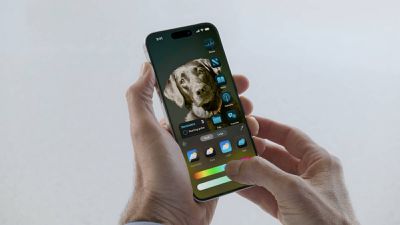
iPhone users can now place app icons anywhere on the Home Screen, although they still must conform to an invisible grid. In other words, Apple now allows blank spaces, rows, and columns between app icons, which can reveal more of the wallpaper.
App icons can now have a dark or tinted appearance, with many color options available. Icons can be manually set to appear in dark or light mode, or they can automatically switch based on whether Dark Mode is turned on or off on the iPhone.
MacRumors was first to report about the ability to place app icons anywhere on the Home Screen, and the darker tint option, prior to WWDC.
Read our iOS 18 announcement coverage for more details about the update, which is now available in beta for members of the Apple Developer Program.
Popular Stories
Some Apple retail employees have been told to warn customers against visiting to purchase an iPhone Duo without a pre-order on Friday, October 23.
Apple Store employees told MacRumors that they have been advised that there will likely be no iPhone Duo stock available for walk-in purchases on launch day. Staff have been instructed to discourage customers without pre-orders from coming in...
Verizon plans to charge customers $10 per month for the iPhone Handoff feature that Apple added in iOS 27. iPhone Handoff allows one phone number to be shared across two separate iPhones.
Pricing was included in Verizon's iPhone Duo announcement today, with the carrier confirming iPhone Handoff will work with the iPhone Duo and the iPhone 18 Pro models.
Verizon will support iPhone Handoff,...
Despite knowing that the iPhone Duo would face "severe supply constraints" due to manufacturing challenges, Apple chose to begin iPhone Duo pre-orders on Friday instead of waiting until it had more inventory ready, according to Bloomberg's Mark Gurman. In his Power On newsletter today, he called this decision a "major mistake."
"Let me cut to the chase: Apple made a major mistake here," he...