Apple TV Just Got More Screen Savers, Here's How to Get Them on Your Mac - MacRumors
Skip to Content

Apple TV Just Got More Screen Savers, Here's How to Get Them on Your Mac

With the release of tvOS 15.2 earlier this week, Apple added nine new high-resolution screen savers to Apple TV HD and ‌Apple TV‌ 4K, including three featuring Scotland's Isle of Skye and Loch Moidart, and six offering various views of Iceland's stunning landscapes.

scotland aerial screensaver e1639571845470

Traveling along the coast of the Isle of Skye, Scotland

‌Apple TV‌ downloads new screen savers on a regular basis depending on your ‌Apple TV‌ settings (daily, weekly, or monthly via Settings -> General -> Screen Saver -> Download New Video), so you may not see them immediately. But when you do, and if you like them, you'll be happy to learn that you can get them on your Mac, too.

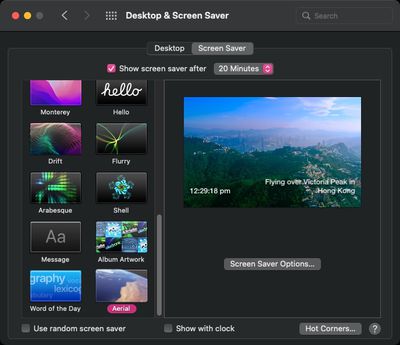
Created by developer John Coates and maintained by Guillaume Louel, Aerial is a free and open source app for macOS 10.12 and later (including Monterey and Apple silicon) that lets you view the same high-quality ‌Apple TV‌ screen savers on your Mac.

The app periodically scrapes the screen savers from Apple's servers and lets you choose your favorite videos so that they play more often. So while it's not possible to choose a specific screensaver on ‌Apple TV‌ once it's downloaded, you can on your Mac, thanks to Aerial.
aerial
In addition, Aerial has some additional options, including the ability to filter video themes, overlay weather data, and adapt the videos that are played to the time of day, plus it offers an additional library of over 100 different videos.

The easiest way to get it on your Mac is to download the Aerial Companion from Coates' GitHub page, drag the app to your Applications folder, launch it, and then follow the quick setup process.

aerial app
You can choose whether updates should happen automatically in the background, or if you prefer to be notified. You can also pick whether you want an icon in the menu bar to notify you or not.

Aerial 2 also introduced Community Videos, including 20 screen savers donated at no charge by Joshua Michaels and Hal Bergman. And if you like the Aerial app, you can always buy the developers a coffee.
Popular Stories

Four iPhone 18 Pro Colors Mock Feature

iPhone 18 Pro: Pre-Orders and Release Date

Sunday August 16, 2026 8:24 pm PDT by
Apple has yet to reveal when the iPhone 18 Pro and iPhone Ultra will be announced and released, but the dates usually follow a familiar pattern. As usual, the event is expected to take place in the first half of September. Labor Day falls on September 7 this year. The last time the holiday was on that day was in 2020, but the iPhone event that year was delayed until October due to the...
apple camera airpods

Apple's Camera-Equipped AirPods Confirmed: See Them in Action

Monday August 17, 2026 6:21 pm PDT by
Apple is working on camera-equipped AirPods that appear to be nearly ready to launch, based on a video MacRumors found in the macOS Tahoe 26.7 release candidate. In a short demo, a man holds a book up so the camera in the AirPods can see the title. "With Visual Intelligence, your world becomes savable. See something you like? Just ask me to save it for later," says the voiceover text. Here ...
iPhone 18 Pro Dark Cherry Feature

iPhone 18 Pro and iPhone Ultra: New Details Leak as Apple Event Nears

Monday August 17, 2026 11:09 am PDT by
"iPhone Ultra" supply will be very limited when the foldable device is first released later this year, according to Fixed Focus Digital, a known leaker on the Chinese social media platform Weibo. The account also claimed that the iPhone 18 Pro's A20 Pro chip will be up to 18% faster and up to 30% more power efficient compared to the iPhone 17 Pro's A19 Pro chip. The A20 Pro chip will be the...

Top Rated Comments

61 months ago
Guillaume here, thanks for the writeup.

If I may add, for new users, to get the new videos you need to pick "beta" during install when prompted. If you didn't, in Aerial Companion (in your menu bar, launch it again if you don't see it) open the menu and pick "Desired Version" and "Beta", then you'll get the latest videos.

I'm hoping to release next full update in a couple of weeks and this will no longer be necessary.
Score: 14 Votes (Like | Disagree)
Lloigorr Avatar
61 months ago
I’ve been using the Aerial screen saver for a few years now and it’s great! Really recommend it.


But keep in mind that the videos are in 4K resolution (you may set them at lower resolution though) and there is quite a number of those available. So the space used on your SSD may be rather huge (25GB on my drive, not every clip installed).
Score: 6 Votes (Like | Disagree)
timmyh Avatar
61 months ago

Yea, the app is amazing but it devours the drive heh.
The companion is really good for this. It has an option to limit the amount of storage space it uses to download videos, similar to that other great screensaver, Electric Sheep!
Score: 4 Votes (Like | Disagree)
dredlew Avatar
61 months ago
It’s a crying shame that this one guy can develop a vastly superior app than Apple can. Despite numerous feedback reports over the years, the AppleTV screensaver still sucks like there’s no tomorrow. I hate it!
Score: 4 Votes (Like | Disagree)
Pushpaw Avatar
61 months ago

Yes, the Aerial screensaver could easily be great, but simple little measures are missing that make a big difference.

My Apple TV always repeats the most boring choices, and never shows the good ones. All it needs is a way for the user to select which ones they want, and to never repeat the same one immediately.
I'd be happy if they would just let me indicate ones that I don't want to see. I am sick to death of the Dubai and Hong Kong ones and wish I could prevent them from showing up.

Score: 2 Votes (Like | Disagree)
Moonjumper Avatar
61 months ago

It’s a crying shame that this one guy can develop a vastly superior app than Apple can. Despite numerous feedback reports over the years, the AppleTV screensaver still sucks like there’s no tomorrow. I hate it!
Yes, the Aerial screensaver could easily be great, but simple little measures are missing that make a big difference.

My Apple TV always repeats the most boring choices, and never shows the good ones. All it needs is a way for the user to select which ones they want, and to never repeat the same one immediately.

Score: 2 Votes (Like | Disagree)