

Just two days after Apple released iOS 15 and iPadOS 15 to the public, a new wave of user reports from social media are already pointing to some widespread bugs, this time pertaining to reported storage on a device.
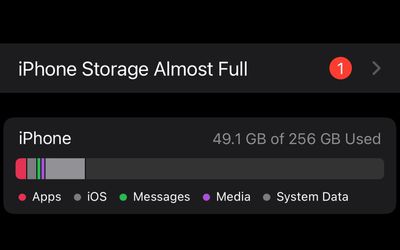
A flood of users has taken to Twitter over the last 24-48 hours to share their experience that after updating to iOS 15, they see an "iPhone Storage Almost Full" warning inside of Settings, despite their iPhone having a sufficient amount of storage left. Apple Support's Twitter account is riddled with users reporting the bug.
@AppleSupport updated my phone and now under settings it says phone storage almost full. I got to click on it and nothing happens. So I’m stuck with the badge — ♡︎мonιca мelanιe♡︎ (@monica__melanie) September 20, 2021
Can’t get rid of a notification on my iPhone which is saying “iPhone storage almost full” after updating to iOS 15. I have 50GB free? #iOS15 @AppleSupport — Laura (@luarasaurus) September 20, 2021
#iOS15 @AppleSupport Why can't I get rid of a notification saying "iPhone storage almost full" despite having 30GB free space??????? — 림쿠 (@limcupk) September 20, 2021
@AppleSupport sigh..'iPad storage almost full' message after installing IOS 15. pic.twitter.com/S3C3DwpZZI — MoOse (@3_Blind_Moose) September 21, 2021
@AppleSupport Hey, upgraded to ios15 and getting storage almost full notification when there is more than 10GB space available? A bug I’d presume? Is there a way to fix this pic.twitter.com/EZ81OljR52 — Ishan Prakash (@ishanprakash) September 21, 2021
There are more than 10 GB free on my iPad but #iOS15 keeps nagging me with "Storage almost full" messages, @AppleSupport. — Oli's HelpDesk (@OlisHelpDesk) September 22, 2021
Annoyingly, the warning inside of Settings can't be dismissed, and tapping on it only takes users to the iPhone Storage page within Settings, where they're reminded that their device, in the majority of cases, still has an adequate amount of storage left. A post on Apple Support's Community Forums, which has racked up over 900 views at the time of writing in just over 13 hours, also includes users reporting the bug.
The warning, however, is not the only storage-related bug that's irking some users. Other reports on Twitter indicate that iOS 15 has resulted in a bug in which the amount of available storage on a device is sometimes shown to be more than the device's capacity. In other cases, an iOS 15 bug results in the wrong tabulation for how much storage a user's content is taking up.
Ez pic.twitter.com/sEpJvpmxnZ — Pierre (@Chibibowa) September 20, 2021
In all cases, Apple Support is advising users to restart their devices, but that does little to address the problem. Some of the bugs experienced by users appeared during the beta testing period for iOS 15 over the summer, which is meant to fix as many bugs and issues as possible before the update becomes widely available.
This week, Apple began testing iOS and iPadOS 15.1; however, given the widespread nature of these bugs, Apple may decide to release iOS 15.0.1 to address the storage bug and other improvements and security enchantments. We've reached out to Apple for comment.




/https://forums.macrumors.com/attachments/1839937/)
/https://forums.macrumors.com/attachments/1839934/)






















![Apple Pulls Keynote, Pages and Numbers From App Store [Update: Back]](https://images.macrumors.com/t/Okb7kitB_gNr6qe5Pex9nQIysD8=/112x112/article-new/2026/01/Apple-Creator-Studio-iWork-suite.jpg)





















