eSIM Functionality Available in iOS 12.1, But Carrier Support is Required

Apple's iOS 12.1 beta introduces support for the eSIM, aka a digital SIM that lets you activate a cellular plan from your carrier without needing to use a physical SIM card. In the iPhone XS, XS Max, and XR, the eSIM pairs with the included nano-SIM to enable dual-SIM functionality.

The eSIM in the new iPhone XS and XS Max was not available at launch, with Apple promising to activate it in a later update, which appears to be iOS 12.1.
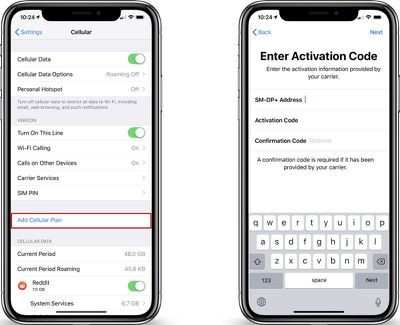
dualsimcellularplan
eSIM settings are available by going to the Cellular section of the Settings app and choosing "Add Cellular Plan," which is the method used to add another cellular provider via the eSIM.

All contacts in the Contacts app also now list a "default [P] Primary" setting in iOS 12.1 which lets you change the default phone number that you contact each person with if you have multiple phone numbers.
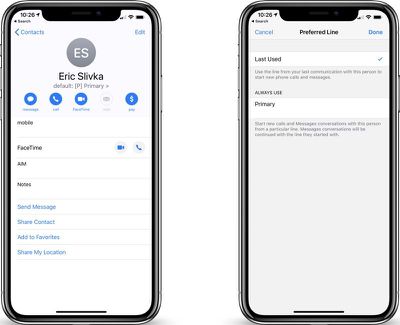
dualsimcontacts
According to German site iPhone-Ticker.de, some Deutsche Telekom users are able to use the eSIM feature in iOS 12.1 to add two SIMs to their iPhones. Carriers need to implement the eSIM feature before it will work, and Apple offers a list of carriers that plan to offer the eSIM it in a support document.

In the United States, AT&T, T-Mobile, and Verizon plan to offer eSIM support, but the carriers likely won't roll out the feature until iOS 12.1 launches to the public.

Dual-SIM support with the eSIM is useful for people who use two cellular plans at once, such as for home or work, and it is also beneficial when traveling.

As Apple outlines on its website, both numbers used with a dual-SIM iPhone can make and receive voice calls and SMS/MMS messages, but an iPhone can only use one cellular data network at a time. That means if one number is on a call, a call to the other number will go to voicemail.

Both networks are active at once, however, and with dual-SIM enabled, you will see two carrier signal readings in the Control Center.
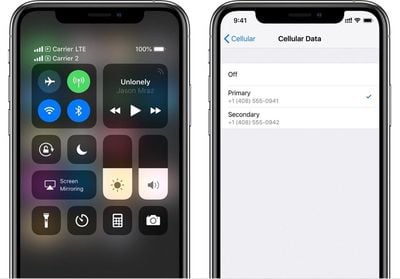
appleesim
eSIM support will be available to everyone with an iPhone XS, XS Max (and future XR) when the iOS 12.1 update launches to the public. We've only had one beta of iOS 12.1 so far, so there is still a ways to go.

The iOS 12.1 update also includes support for Group FaceTime for up to 32 people, a new real-time Depth Control slider that can be used when taking Portrait Mode photos, and, with watchOS 5.1, new color watch face options in the Apple Watch app.

Related Forums: iOS 12, iPhone

Popular Stories

iOS 26

iOS 26.2 Coming Soon With These 8 New Features on Your iPhone

Thursday December 11, 2025 8:49 am PST by
Apple seeded the second iOS 26.2 Release Candidate to developers earlier this week, meaning the update will be released to the general public very soon. Apple confirmed iOS 26.2 would be released in December, but it did not provide a specific date. We expect the update to be released by early next week. iOS 26.2 includes a handful of new features and changes on the iPhone, such as a new...

iOS 26

iOS 26.4 and iOS 27 Features Revealed in New Leak

Friday December 12, 2025 10:56 am PST by
Macworld's Filipe Espósito today revealed a handful of features that Apple is allegedly planning for iOS 26.4, iOS 27, and even iOS 28. The report said the features are referenced within the code for a leaked internal build of iOS 26 that is not meant to be seen by the public. However, it appears that Espósito and/or his sources managed to gain access to it, providing us with a sneak peek...
AirPods Pro Firmware Feature

Apple Releases New Firmware for AirPods Pro 2 and AirPods Pro 3

Thursday December 11, 2025 11:28 am PST by
Apple today released new firmware designed for the AirPods Pro 3 and the prior-generation AirPods Pro 2. The AirPods Pro 3 firmware is 8B30, up from 8B25, while the AirPods Pro 2 firmware is 8B28, up from 8B21. There's no word on what's include in the updated firmware, but the AirPods Pro 2 and AirPods Pro 3 are getting expanded support for Live Translation in the European Union in iOS...
iOS 26

Apple Releases iOS 26.2 With Alarms for Reminders, Lock Screen Changes, Enhanced Safety Alerts and More

Friday December 12, 2025 10:10 am PST by
Apple today released iOS 26.2, the second major update to the iOS 26 operating system that came out in September, iOS 26.2 comes a little over a month after iOS 26.1 launched. ‌iOS 26‌.2 is compatible with the ‌iPhone‌ 11 series and later, as well as the second-generation ‌iPhone‌ SE. The new software can be downloaded on eligible iPhones over-the-air by going to Settings >...
Google maps feaure

Google Maps Quietly Added This Long-Overdue Feature for Drivers

Wednesday December 10, 2025 2:52 am PST by
Google Maps on iOS quietly gained a new feature recently that automatically recognizes where you've parked your vehicle and saves the location for you. Announced on LinkedIn by Rio Akasaka, Google Maps' senior product manager, the new feature auto-detects your parked location even if you don't use the parking pin function, saves it for up to 48 hours, and then automatically removes it once...
AirTag 2 Mock Feature

Apple AirTag 2: Four New Features Found in iOS 26 Code

Thursday December 11, 2025 10:31 am PST by
The AirTag 2 will include a handful of new features that will improve tracking capabilities, according to a new report from Macworld. The site says that it was able to access an internal build of iOS 26, which includes references to multiple unreleased products. Here's what's supposedly coming: An improved pairing process, though no details were provided. AirTag pairing is already...
macOS Tahoe 26 Thumb

Apple Releases macOS Tahoe 26.2 With Edge Light

Friday December 12, 2025 10:08 am PST by
Apple today released macOS Tahoe 26.2, the second major update to the macOS Tahoe operating system that came out in September. macOS Tahoe 26.2 comes five weeks after Apple released macOS Tahoe 26.1. Mac users can download the macOS Tahoe update by using the Software Update section of System Settings. macOS Tahoe 26.2 includes Edge Light, a feature that illuminates your face with soft...
iOS 26

15 New Things Your iPhone Can Do in iOS 26.2

Friday December 5, 2025 9:40 am PST by
Apple is about to release iOS 26.2, the second major point update for iPhones since iOS 26 was rolled out in September, and there are at least 15 notable changes and improvements worth checking out. We've rounded them up below. Apple is expected to roll out iOS 26.2 to compatible devices sometime between December 8 and December 16. When the update drops, you can check Apple's servers for the ...

Top Rated Comments

0970373 Avatar
94 months ago
There can be multiple email addresses, but only be one number.
This is not true. I have 2 phones on the same iCloud account and both have iMessage enabled. I can get iMessages to my UK# on my US phone and vice versa.
Score: 8 Votes (Like | Disagree)
ChromeAce Avatar
94 months ago
It's important to note that as of today the iMessage\Facetime platform only allows you to support one phone number. But with Dual Sim in place there is no reason that they could not change this. You can already support several email address's, I would not be surprised to see them add support for 2 phone numbers.
Not true. iMessage supports multiple phone numbers. Simply sign in to the same iCloud account on multiple phones and all the numbers will be usable in iMessage on all phones signed in.
Score: 8 Votes (Like | Disagree)
MrGimper Avatar
94 months ago
Need to provide feedback to Apple that the text under "Enter Activation Code" is badly aligned.....
Score: 8 Votes (Like | Disagree)
avanpelt Avatar
94 months ago
It will be interesting to see if AT&T locks the eSIM to their network when you choose to activate it with them like they did with the iPad Pro eSIM.
Score: 7 Votes (Like | Disagree)
cmwade77 Avatar
94 months ago
All things old are new again, remember old CDMA phones that didn't have SIM cards? This is essentially the same thing with a new name.
Score: 6 Votes (Like | Disagree)
TrulsZK Avatar
94 months ago
In comparison to have to iPhones, the main issue for me is that you can not use both SIM cards for iMessage and FaceTime
Today I frequently send iMessages from both iPhones so only being able to send iMessages from one number is a big problem for me

Also for me both iPhones have different apps, email+calendar accounts, contacts, etc
They work independently from each other with no shared/synced data between the iPhones (other than iMessage communication for file transfer).
For this to work properly for me the iPhone should have multiple accounts, similar to accounts on Mac
Score: 5 Votes (Like | Disagree)