

Firefox Updated With Screenshot Feature, Cross-Platform Tab Delivery, and Form Autofilling - MacRumors
Skip to Content

Firefox Updated With Screenshot Feature, Cross-Platform Tab Delivery, and Form Autofilling

by

Earlier this week Firefox announced its upcoming "Quantum" browser that will bring twice the internet browsing speeds when it launches on November 14. Ahead of that major update, the company is now releasing a few minor additions to Firefox on desktop that will let you save screenshots, share content more easily between your computer and smartphone, and more.

Screenshots allow you to capture any area within the Firefox browser without needing to download new software. After tapping a "Screenshot" button, Firefox presents a new interface where you can customize the specific part of the page you want to take a shot of, or let Firefox automatically detect the area you want, and then click save.
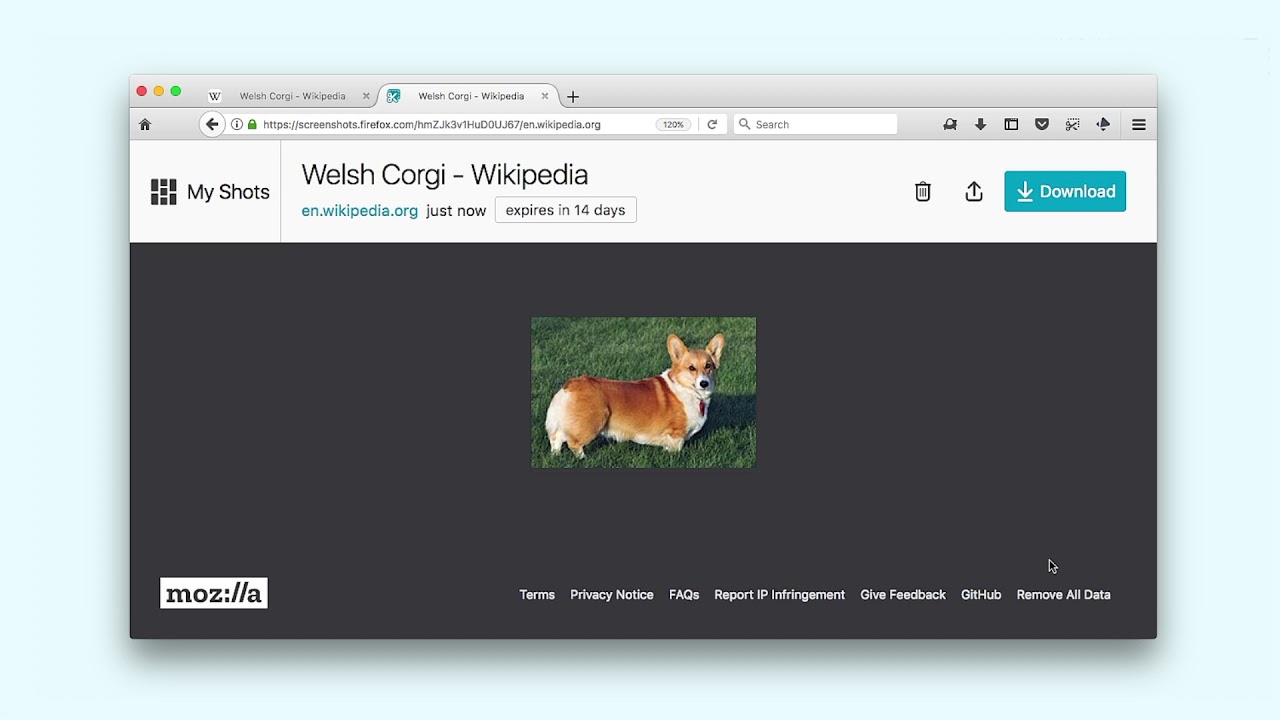

You can save the screenshot to the web and generate a URL for easy sharing, or download the file to your computer. Firefox will also keep track of all the screenshots in a new "My Shots" folder, saving images automatically for two weeks.

"Send Tabs" allows you to two-finger click on a tab open on Mac and select "Send tab to..." and choose between synced iPhone and iPad devices, which will then have the same tab ready for you in the mobile Firefox app. The same function can be repeated in reverse, and is supported by PCs and Android smartphones as well. Firefox also ensured that Send Tabs is encrypted end-to-end, so "even Mozilla can't decrypt it."


The last new feature is coming to the United States first and aims to make filling out address forms easier, allowing you to complete online forms on shopping sites and relief organizations through a dropdown menu.

After you fill out the relevant information once on Firefox, the browser will ask to automatically save the field information to "Saved Addresses," which will then resurface when another website asks for similar data. You can save multiple addresses, which Firefox said should be useful for information like where you work, your home, and addresses of family members when you send gifts.

These updates are available in the latest version of Firefox, which you can download now from the Firefox website.


Tag: Firefox

Top Rated Comments

palebluedot Avatar
114 months ago
....no one cares about Firefox, it died in like 2009, let it rest
Wrong. I care. FF is the only non-corporate, trustworthy browser. Especially for Windows. Plus they invest in a lot of pro-Internet advocacy.

Score: 16 Votes (Like | Disagree)
Vanilla35 Avatar
114 months ago
Wrong. I care. FF is the only non-corporate, trustworthy browser. Especially for Windows. Plus they invest in a lot of pro-Internet advocacy.
Despite how many shortcomings Firefox may have, I'll always support it. Much respect is given for their efforts in regards to this.
Score: 4 Votes (Like | Disagree)
EdT Avatar
114 months ago
You don't know many browsers if you think that's only one.
So what are a few non corporate browsers that people actually use? Opera? Dolphin? Brave? You get beyond Chrome, Edge/I.E. and Safari (all commercial products) then Firefox is probably the only remaining browser most people have heard of, let alone used.
Score: 2 Votes (Like | Disagree)
114 months ago
....no one cares about Firefox, it died in like 2009, let it rest
Score: 2 Votes (Like | Disagree)
nvmls Avatar
114 months ago
I'm using the latest 57 beta that will come out in November. It has a full page screenshot feature (and shows pixel dimensions for free size screenshots). At first sight the screenshot feature looks like a gimmick, but it's actually useful. You can also extract background image from any page just with a right-click, a nifty feature. Also it's much faster than previous Firefox releases. Overall, while the UI isn't as slick as Safari's one, the user experience feels better than Safari, I like it.
Thanks, just tried it and it's excellent! pretty retarded my previous comment after fully checking it, it's a very well done and very welcome tool, I highly recommend it. FF is definitely back on track!
Score: 1 Votes (Like | Disagree)
114 months ago
If it would just stop slowing my system down so much. This latest version was supposed to speed up browsing. Nope...
No it's dreadfully slow on my mid 2014 macbook. Almost unusable when you compare it to safari or anything else come to that. On my hack it's just about OK with its extra oomph.
[doublepost=1506720928][/doublepost]
So what are a few non corporate browsers that people actually use? Opera? Dolphin? Brave? You get beyond Chrome, Edge/I.E. and Safari (all commercial products) then Firefox is probably the only remaining browser most people have heard of, let alone used.
Are you saying brave, vivaldi etc are corporate browsers that you can't trust unlike ff? News to me and I'd image them. Vivaldi especially is getting a very decent following and I'd imagine when ff users find a chunk of their extensions no longer work they'll grab quite a few more.

Also one of the big things about ff was they manually reviewed extensions so didn't have the problems that often popup with rogue chrome ones. That's now changed and in the first instance it's now also an automated process, and guess what the first extensions with hidden miners have just been found
Score: 1 Votes (Like | Disagree)

Popular Stories

iCloud iPhone 17 Pro

iPhone Users Who Pay for iCloud Storage Get Two New Perks on iOS 27

Thursday July 2, 2026 6:10 am PDT by
If you pay for certain iCloud+ storage plans beyond the 5GB that Apple offers for free, you will receive two more perks on iOS 27 at no additional cost. A summary of the two new iCloud+ perks on iOS 27:Increased daily usage limits for some new Apple Intelligence features, including image generation in the revamped Image Playground app. HomeKit Secure Video cameras receive generated video...
American Express Gold Apple Pay Feature

American Express Announces New Apple Pay Feature

Tuesday June 30, 2026 10:27 am PDT by
American Express today announced that you can now redeem Membership Rewards points when checking out with Apple Pay on the web and in apps on the iPhone and iPad. When checking out with Apple Pay on iOS 18 or iPadOS 18 or later, tap on your eligible American Express card (Platinum, Gold, Green, and others) and select the Membership Rewards points option. You can use points to cover all or...
series 10 apple watch titanium digital crown

Report: Apple Watch Redesign Coming Next Year With New Band System

Tuesday June 30, 2026 8:45 am PDT by
A "major overhaul" of the Apple Watch's design is due to arrive next year with a new system for connecting bands, according to a known Weibo leaker. In a set of recent posts, the leaker known as "Instant Digital" linked the new claim to older rumors about an "Apple Watch X" model, which was said to introduce a fresh design and break compatibility with the existing watch band system. Citing...







































