

Since the iPhone became available for purchase on September 25, a growing number of former iPhone 5, 5c, and 5s users who transferred their content to their new devices via iCloud are experiencing a display bug that causes certain apps to look zoomed in on the iPhone 6s screen.
Users on both the Apple Support communities and the MacRumors forum have run into this issue, and we've also received a number of emails from customers who are affected. The problem appears to be primarily associated with the Wallet, Weather, Watch, Calculator, and Health apps, causing some data to be cut off at the edges of the screen. It seems to happen when an iPhone 5/5c/5s running iOS 9 is backed up to iCloud and then restored to an iPhone 6s.
I just got my iPhone 6s today and tried loading credit cards into the Wallet app only to find that the view (for lack of a better word) is zoomed-in, essentially cutting the sides off of my cards and passes. While this does not affect the functionality of the credit cards and ApplePay, it does create a problem managing passes. It cuts off the toggle button for each pass, allowing me to delete it.
I've tried restarting and nothing. I don't feel like restoring the software on a phone I just got moments ago. Anyone else seeing this problem?
As can be seen in the screenshots below, credit cards and passes stored in the Wallet app are cut off at the sides, preventing them from being displayed properly. Wallet is one of the apps where the zoom problem is most prevalent because it prevents people from deleting cards.
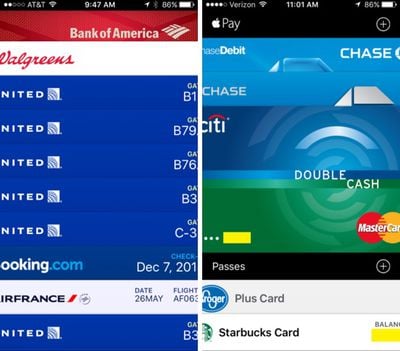
Turning on the Display Zoom feature in the Settings app causes Wallet to appear normal, but it leaves the rest of the iPhone zoomed in. It works as a temporary solution to give users the ability to manage their cards in the app, but it is not a suitable permanent fix. Quitting apps and restarting the iPhone do not appear to solve the problem.
Several users who have contacted Apple have been told that the company is working on a fix, but the problem was not resolved in either iOS 9.0.1 or iOS 9.0.2. One thread from the MacRumors forum suggests this is potentially an iOS 9 bug that has existed since before the operating system was released. Some users running the iOS 9.1 beta 3 update say the problem is fixed, so a solution may be coming with iOS 9.1.
Ahead of a fix, Wallet can be accessed using the Display Zoom feature as outlined above. Apple Store employees appear to be suggesting customers set their iPhones up as new devices as a solution, but users who do not want to have go through the hassle of setting up a new device might want to hold off until iOS 9.1 is released.














































Top Rated Comments
Once you've set up your phone there is no official way to merge whatever happened on that new phone after setup and what you may have in an old backup.
Say you get 20 messages post new iPhone, but you want to get your old messages back as soon as the issue is fixed somehow.
You end up having to decide between either the old backup or the new messages.
Of course there are unofficial ways to merge this by hand (!), but as long as it isn't something Apple will give you an official approach for, I refuse to accept the statement that they have an intermediate "solution".
Glassed Silver:mac
When you buy a new house, do you move your furniture into the house or just throw it away?
A better comment would be... When you buy a new car, do you remove and transfer your personal belongings from the old car? Or are you expected to leave your stuff behind (maps, notes, messages (see what I did there?)) and start fresh?
The new car has its own oil, why would anyone bring their own? You're simply trying to move your stuff, and then, you find out the car has a broken glovebox - so you're told you'll need to repair it yourself to store your things.
There's the correct analogy. ;)