

Back in November, I took a look at Fiat Chrysler's Uconnect infotainment system and CarPlay integration in the Chrysler Pacifica Hybrid minivan, discovering a quite positive user experience that nearly seamlessly incorporates CarPlay into Uconnect. That seamlessness comes thanks to an 8.4-inch Uconnect display that keeps a top status bar and a bottom menu bar visible at all times for easy navigation.
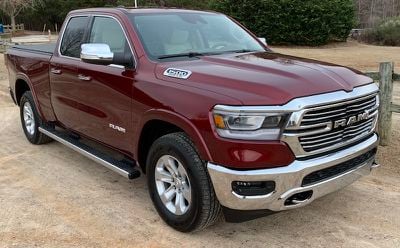
FCA isn't stopping at an 8.4-inch display, however, with the company's 2019 Ram 1500 offering a gigantic 12.3-inch portrait display as an optional upgrade. I've had a chance to spend some time with a Ram 1500 Laramie, so I thought I'd share my impressions of this large portrait display.
Uconnect on the Big Screen
Given my previous look at Uconnect 4, I'm not going to spend much time looking at the infotainment system in general, other than differences unique to the larger display. Suffice it to say, I've found Uconnect to be one of the better infotainment systems out there, and its persistent status and menu bars at the top and bottom of the screen make it easy to shift between functions. The interface is relatively clear and easy-to-use, and the various functions perform well.
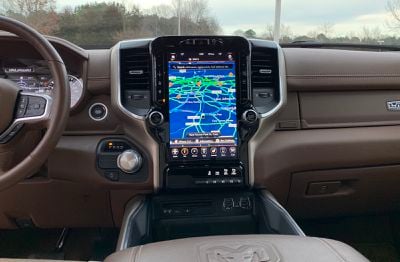
When it comes to hardware on the Ram 1500, it's impossible to miss the gorgeous 12.3-inch portrait display with rich, vibrant colors. It simply dominates the entire center stack in the car, with a selection of hardware knobs, buttons, and switches framing it.
You might think a giant 12-inch rectangle of glass could generate a significant amount of glare, and that can be a bit of an issue in certain situations with direct sunlight. It's really not enough to make it difficult to see the screen, but it is noticeable at times. The display is also a bit of a fingerprint magnet as you might expect, but again, they're generally not too noticeable in person unless you're in the right light.
What the large portrait display allows for Uconnect is a choice between a unified single app interface or what is essentially a pair of 7.5-inch displays stacked on top of each other. Regardless of which setup you choose, the status and menu bars at the top and bottom remain visible.
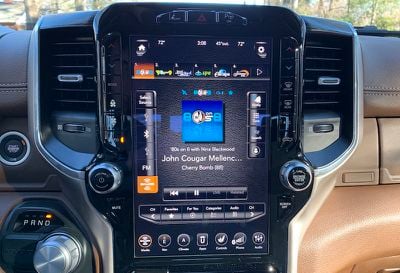
The single app view can be a bit of overkill for some functions, but it allows for large, easy-to-hit buttons and an impressively broad map view. I generally found the split-screen interface to be more useful, allowing a full view of navigation and audio functions simultaneously, for example.
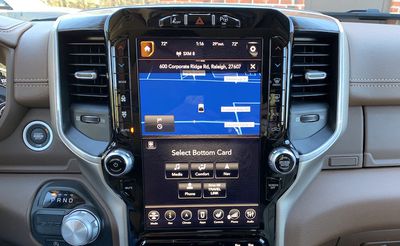
Configuring the split-screen display is as easy as hitting the Home icon in the top left corner and then choosing what you want displayed on the top and bottom cards from five available options: Media, Comfort, Nav, Phone, and Sirius XM Travel Link, which offers data such as nearby gas prices, sports scores for your favorite teams, and more.
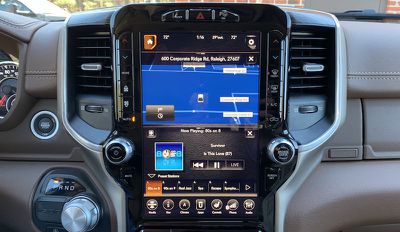
If you want to swap the positions of your two screens, there's an icon in the top left corner of the bottom card that will do that. And the menu bar at the bottom remains active to easily jump into a full-screen app, for example.
CarPlay
CarPlay isn't designed to be used on a large portrait display by itself, so you're limited to the split-screen Uconnect interface when using CarPlay, which allows you to display a Uconnect app simultaneously for convenient access to vehicle systems outside of CarPlay. While Uconnect normally lets you swap the top and bottom app cards, CarPlay is restricted to the top card, so you won't be able to customize that layout.
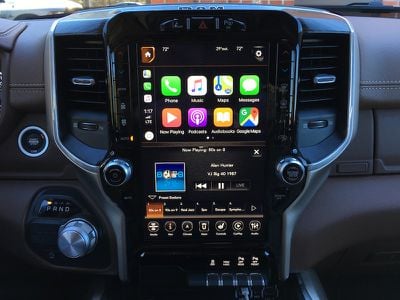
The CarPlay interface, particularly maps, can start to feel a bit cramped on smaller screens, but thankfully the Ram 1500's display is big enough that even in split-screen mode you still have a roughly 7.5-inch screen devoted to CarPlay, which is in the range of normal infotainment displays.
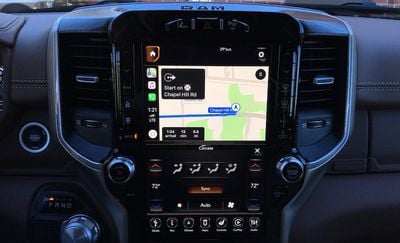
There are a few quirks with the integration of CarPlay and Uconnect in this setup, driven largely by the fact that the systems are designed to only allow one of each app type to be open simultaneously. For example, you understandably can't run Apple Maps and Uconnect navigation at the same time, as you'd end up with confusing conflicts of information. Similarly, the system is designed to prevent you from accessing your phone through both CarPlay and the Uconnect Bluetooth setup at the same time.
These restrictions are present on all vehicle infotainment systems, but they stand out a bit more on the Ram 1500's portrait display because it's one of the few systems that allows you to view CarPlay and a full native infotainment app at the same time.
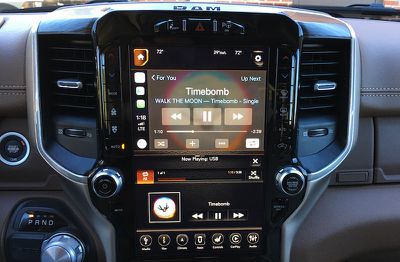
The upshot of this is that if you activate CarPlay, it populates the top app card on the system and still offers the full set of app options for the bottom card, but if you tap navigation or phone, it simply activates Apple Maps or the Phone app up in the CarPlay screen rather than bringing up the Uconnect versions in the bottom card. It's not a huge deal, but it takes a little getting used to when things don't necessarily react as you'd expect.
As on the Pacifica Hybrid and other Uconnect vehicles, there is no "Ram" icon on the CarPlay home screen to take you back to the Uconnect system, thanks to Uconnect's bottom menu bar that lets you easily hop in and out of CarPlay controls from wherever you are in the system.
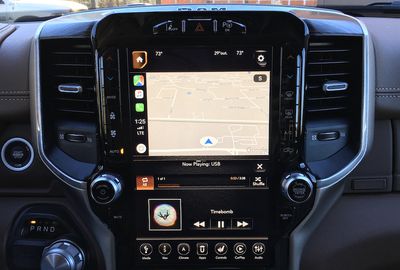
Both Uconnect and CarPlay can of course also be controlled via voice using a button on the steering wheel, with a short press bringing up the Uconnect voice assistant or a long press bringing up Siri.
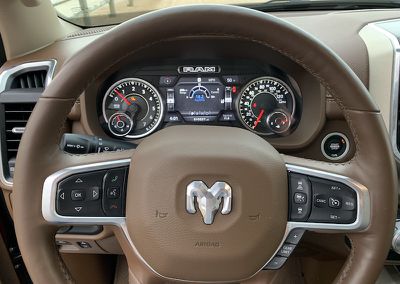
Finally, while CarPlay is best controlled via the touchscreen, you can also control it using the hardware scroll/enter knob to the right of the display. As with other knob-based control systems, it's not as easy to navigate the CarPlay system as it is through direct touch manipulation, but the option is there if you prefer a more tactile input method.
Climate Control
While Uconnect offers access to extensive climate controls via the touchscreen, FCA has thankfully retained hardware buttons along the left and right sides of the display to control the most commonly used climate control options.
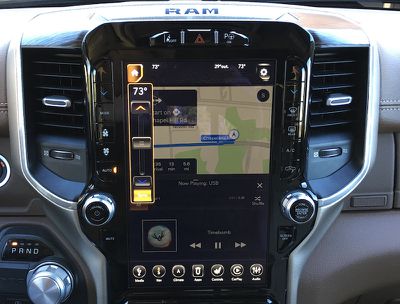
Adjusting the temperature via the hardware buttons, for example, briefly pops up a temperature display over top of your existing screen content rather than completely exiting to Uconnect's full climate control app.
Ports and Charging
As a work truck, the Ram 1500 unsurprisingly has a number of available power ports scattered throughout the cabin, including a 12V power port on top of the dash and two 115V traditional power outlets, one at the bottom of the center stack and one on the rear of the center console.
The Ram 1500 also has no shortage of USB ports, including both USB-A and USB-C variants. The center stack has two easily accessible sets of ports, with each set including both a USB-A and a USB-C port. Either set can be used to connect to the Uconnect system, including for CarPlay.
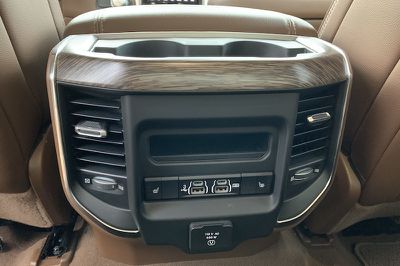
Rear passengers will find two more sets of USB-A and USB-C ports, with one set allowing Uconnect/CarPlay access while the second is for charging only. There's also a single USB-A port with Uconnect/CarPlay access inside the lid compartment of the center console if you want to keep your phone and cable completely hidden away.
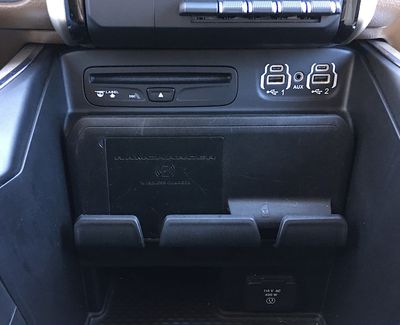
My test vehicle also included a Qi wireless charger down near the bottom of the center stack. A rubbery holder keeps the phone upright and pressed against the vertical charger, with a blue light letting you know that your phone is charging. Its location low on the center stack means you won't really be able to see the screen of your phone while you're driving, but it's best to not be looking at your phone anyway.
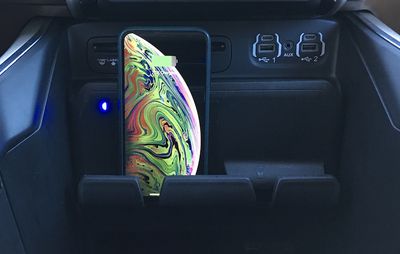
Wireless CarPlay is not supported in the Ram 1500 or in any Uconnect system, so you'll need to have a Lightning to USB (Type-A or Type-C) cable on hand to hook things up. The rubbery phone holder in the center stack can hold a second phone to the right of the Qi charger, although larger phones with a cable sticking out may get in the way of the some of the toggle switches for parking sensors.
Wrap-up
The available 12-inch portrait display on the Ram 1500 is a rare feature among automotive infotainment systems, and it strikes an impressive look when you first encounter it. It's certainly handy being able to see two full-size app screens simultaneously, although some other manufacturers have been able to get away with nearly as much functionality packed into a split 75/25 widescreen display.
I appreciated that Ram maintained hardware buttons for the most important climate control options, as well as volume and tune/scroll knobs for those times you want to make changes by feel. And I really like the way Uconnect makes it easy to access frequently used functions through the customizable menu bar at the bottom of the screen.
Even more so, as with the Pacifica, I love the way CarPlay feels so integrated into Uconnect, making it incredibly easy to jump back and forth between the two systems. The split-screen portrait display even helps integrate things further by giving you access to both systems without even needing to switch.
Yes, there are a few quirks introduced by the fact that CarPlay usurps some of the traditional infotainment system functions, quirks made more obvious by that double app screen that lets you interact with both systems simultaneously. But overall, it's a net positive.
I do also still have some concerns about the shift toward increasingly large touchscreens in vehicles, which can make it harder to make changes by feel and end up taking your eyes off the road for longer. A portrait display magnifies these issues by bringing significant portions of the display lower on the center stack and away from the driver's line of sight. I would have appreciated it if the display could have been moved all the way to the top of the stack to minimize this issue as much as possible.
Pricing
The 2019 Ram 1500 starts at $31,795 for the Tradesman trim, but that only comes with a 5-inch Uconnect 3 infotainment system that doesn't support CarPlay. If you want CarPlay, you'll need to step up to at least the second-level Big Horn/Lone Star trim with the Level 1 Equipment Group that bumps up to an 8.4-inch Uconnect 4 system, bringing the total up to at a bit over $40,000.
The 12-inch portrait display reviewed here requires a minimum of the Laramie trim plus the Level 1 Equipment Group and the 12-inch display upgrade, which tips the scales at a little over $44,000. You can of course add all sorts of other upgrades to the Ram 1500, with my tester approaching $55,000 and a maxed out Limited model coming in at over $65,000.
Pickup trucks like the Ram 1500 have to serve a wide range of needs, so they're generally highly customizable with a variety of options across all different price ranges, and the Ram 1500 is certainly no exception. It would be nice if the 12-inch display system could be an option on lower-tier trims for tech-heavy users who may not have a need for some of the other upgrades you get as you move up the trim chart, but it's certainly not unusual for top-end technology to be limited to higher vehicle trims.









































Top Rated Comments
Truck looks good though.