

As part of my continuing series of articles looking at how car manufacturers have integrated CarPlay into their infotainment systems, I've taken a look at the 2019 Acura RDX, the popular crossover SUV from Honda's luxury brand. Acura has been gradually rolling out CarPlay support across its lineup over the past few model years, and the new 2019 RDX is the first of this model to support the feature.
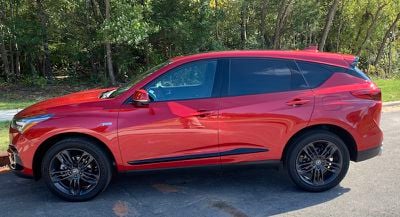
My test vehicle was a well-equipped RDX with Acura's Super Handling All-Wheel Drive (SH-AWD), Technology package, and an A-Spec trim designed for those who want a bold look.
The Technology package adds a premium ELS Studio audio system that offers 12 speakers, Acura's navigation system, two rear USB charging ports, parking sensors, and blind spot and rear cross traffic warning systems.
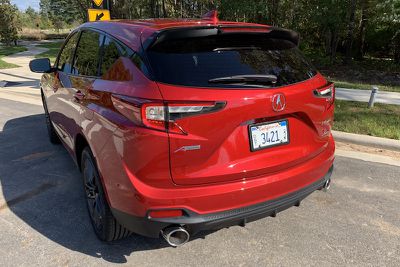
The A-Spec package adds larger 20-inch wheels in "Shark Gray," special exterior accents like a unique front bumper with LED fog lights, dual oval exhaust, and prominent badging. Inside, the A-Spec package adds a sport steering wheel that feels great in the hands, and leather seats in either full black or red with black inserts, including heated and ventilated front seats. Regardless of seating color, red is a prominent highlight color in other areas of the A-Spec cabin, including on the instrument panel and nighttime ambient lighting. The audio system is also upgraded to 16 speakers, including four embedded in the roof of the vehicle.
There's an additional Advance package that includes some other nice features such as rain-sensing windshield wipers, a heads-up display, a surround-view camera system, and 16-way power front seats including thigh extensions and side bolsters, but interestingly that package is not available on models equipped with the A-Spec package.
Acura tells me it's received some feedback from customers who would have liked to add some of these Advance package features to an A-Spec vehicle, so it's potentially something Acura will be taking a look at for the future as it weighs customizability against the simplicity of minimal trim packages.
Infotainment System Overview
Acura's built-in infotainment system handles all of the usual functions, including radio, SiriusXM, Bluetooth phone connectivity, voice control, optional navigation and more. A beautiful 10.2-inch widescreen center display is standard, as is CarPlay support, which is a welcome decision compared to some other manufacturers that offer it only with certain trims or as a standalone option for an extra charge.
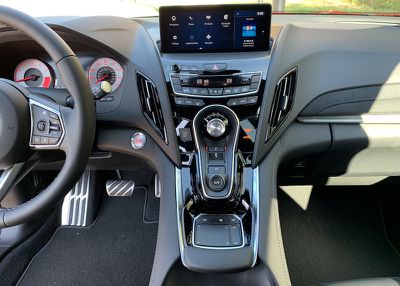
As part of its research, Acura's product development team determined that the optimal placement for a large infotainment display is mounted high on the dashboard and pushed back from the driver, minimizing the distance the driver's eyes need to travel from the road to glance at the display. What that means, however, is that touchscreen operation is infeasible, as it requires a stretch to reach even the near side of the display.
Manufacturers have come up with various solutions to the infotainment control issue, with some keeping the display close enough for touchscreen operation while others use some form of control knob to allow for scrolling through and selecting onscreen options.
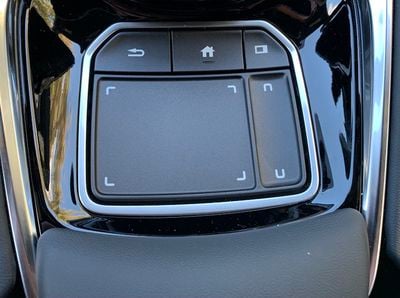
In the RDX, Acura has launched a new True Touchpad Interface (TTI) within easy reach in the center console, and while it's not the only car to offer touchpad control of the infotainment system, it does offer a unique absolute positioning design where the small touchpad maps directly to the display above – pressing the top left corner of the touchpad activates the icon or menu option at the top left of the display, for example.
The TTI system takes a little bit of getting used to, but once you get the hang of it and stop trying to swipe around to the button you want on the display, it's a simple and natural way to navigate through various options, and the RDX has a comfortable palm rest below the touchpad to support your hand.
The touchpad is surrounded by a raised border that makes it easy to tell where your finger is by feel, and as your finger rests on various areas of the touchpad, the corresponding function on the display highlights to let you know where you are. Once the desired function is highlighted, a press on the touchpad in that location registers your selection.
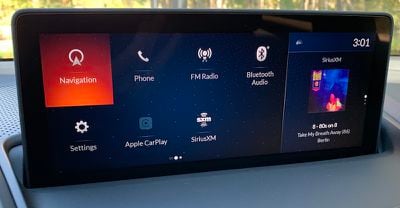
Similar to some other widescreen infotainment systems, Acura's system in the RDX allows for two separate content windows, a large primary one taking up the majority of the screen, and then a smaller one off to the right side that can show options such as a clock or a secondary function of the system.
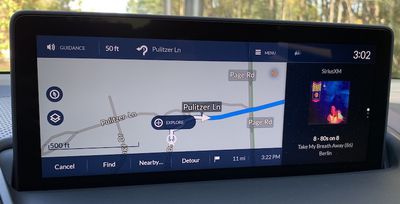
For example, if you have navigation up on the main part of the screen, the secondary portion of the display can show your current audio selection, whether it be radio, SiriusXM, or another source.
The TTI system includes a secondary touchpad, a thin strip along the right side that corresponds to the secondary content zone of the display above. Swiping up or down on this portion of the touchpad scrolls through the available content screens like clock or audio information, and pressing this strip swaps the two content zones, such as bringing the audio content over to the primary zone of the display while pushing navigation off to a small map on the right side. It's a handy system that makes it easy to manage multiple functions of the infotainment system.
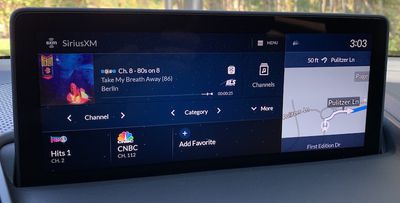
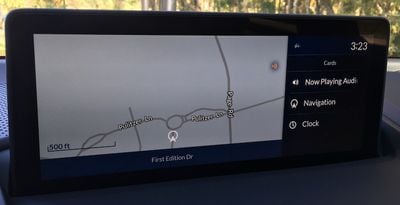
Above the TTI touchpad is a set of three physical buttons: a Back button, a Home button, and a Cards button that lets you quickly access the available content for the secondary zone of the display without needing to scroll through the options one by one.
The TTI touchpad can also be used to input handwriting for operations such as spelling out a destination or a phone number. In practice, I found this to be quite finicky and generally had a hard time getting the system to recognize the characters I was intending to draw.
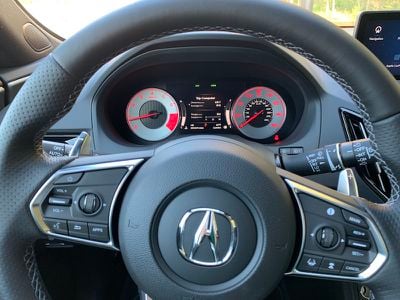
(Voice control button is at lower left on steering wheel)
Of course, the TTI is only one way to control the infotainment system, with voice being the other primary system. The new RDX includes a revamped natural language voice recognition system, meaning you don't need to use specific phrasing for the system to recognize your requests. I found the system to be quite good at recognizing requests using a variety of wordings, while a fairly natural-sounding voice offered audio feedback and navigation prompts.
Interface
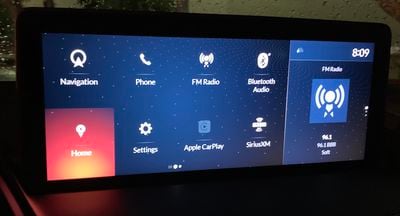
One of the great features of Acura's infotainment system is the customizability of the home screens. Much like an iPhone, the system supports multiple pages of "apps," such as navigation, radio, SiriusXM, Bluetooth, Aux, Hotspot controls, CarPlay, and more.
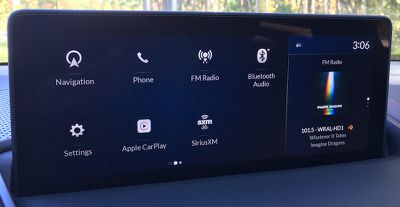
By pressing and holding on an app icon using the touchpad, you can enter an edit mode that lets you move the icon around the home screen or to a different page. This lets you put your most frequently used functions on the front page and in the most easily accessible locations such as in the corners.
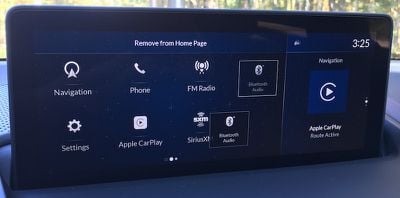
These home screen icons aren't limited to just general functions like navigation or radio. Various "Favorites" like frequently used destinations, specific phone contacts, and radio stations can be added directly to the home screen with their own icons, allowing for one-touch access. And for apps you know you'll never use, you can delete them entirely from the home screen.
Built-in Navigation
I found Acura's built-in navigation to be quite powerful, easily recognizing a variety of addresses and POIs while providing accurate directions and estimated arrival times, as well as helpful voice prompts. The system makes it easy to set favorite destinations or select from recent ones, or you can quickly search for nearby POIs in various categories.
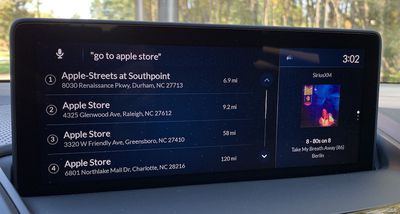
Several different views are supported, including 2D and 3D views with available "north up" and "heading up" options for 2D mode. The system also shows helpful information like distance to next maneuver, direction and street name of the next turn, follow-up maneuvers, and lane guidance. You can also easily add waypoints if you need to make a stop on the way to your final destination.
Aside from the standard navigation mode, the system also offers an exploration mode, which lets you easily zoom and pan around the map for an overview of routes and traffic conditions, and you can select locations and POIs directly from the map.
CarPlay
As with nearly every other car manufacturer, Acura's CarPlay implementation is a wired one, so you'll need to plug your phone into a USB port in the center console in order to get CarPlay up and running.
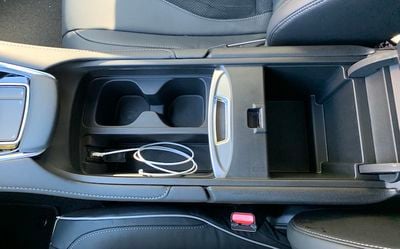
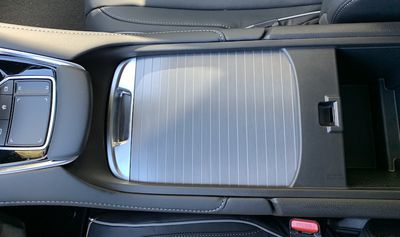
Fortunately, the center console in the RDX includes a convenient slot housing the required USB port and providing simple and space-saving storage of your phone and cable while connected to the system. A sliding metal cover can hide away your phone and other small items in the neighboring cup holders.
CarPlay shows up as its own app on the RDX's home screen, making it easy to hop into CarPlay as needed. And as with other apps, you can customize its location on the home screen.
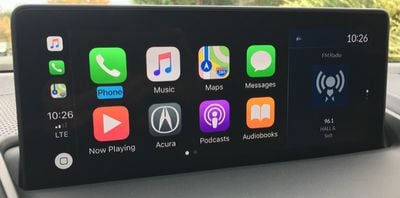
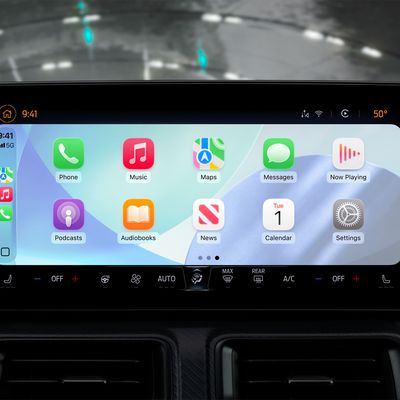
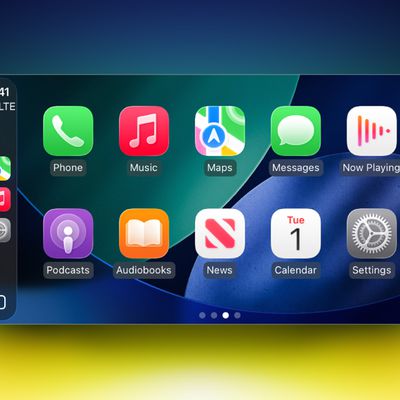
Once you enter CarPlay, you'll be greeted with the familiar 4x2 grid of app icons from your iPhone, taking up the primary zone on the RDX's display. The secondary display zone is not dedicated to CarPlay, so it can show content from the native system such as a navigation route in progress or the current audio information.
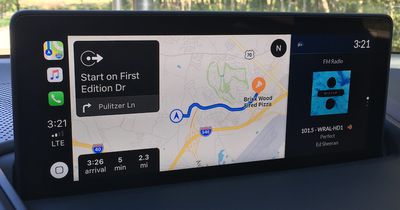
As usual, I won't delve too much into the specifics of CarPlay itself, as that's generally a consistent experience from vehicle to vehicle, but the one aspect that does vary is system control. CarPlay can support both direct touchscreen manipulation and selection highlighting via off-screen control methods such as knobs and jog wheels. But as you'll quickly find when you enter CarPlay for the first time on the RDX, it doesn't support absolute touchpad positioning, and that's a disappointing realization.
You can certainly control CarPlay using the touchpad, but it's a traditional trackpad mechanism where you have to swipe in various directions to move the highlights on the user interface to the desired function. You can't just tap on the touchpad in the location where your intended CarPlay icon or menu option is displayed.
What this means is that the method of controlling your infotainment system differs depending on whether you're in the native Acura system or in CarPlay, and that takes a bit of brain processing power to remember as you rapidly switch back and forth between the systems. Here's hoping that Acura and Apple are working together to bring absolute touchpad positioning to CarPlay, as it's a handy control mechanism.
In fact, Android Auto isn't supported at all on the RDX at the moment, as Acura says it's still working with Google on developing the ability for Android Auto to recognize absolute touchpad positioning, and so Android Auto support won't be coming until a future software update.
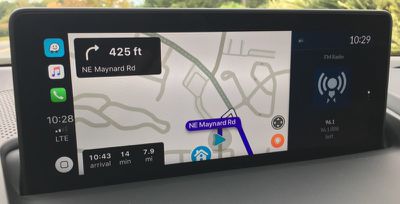
The hardware Back and Home buttons on the RDX do work with CarPlay to some degree, although the integration could be improved a bit. The Back button does typically reverse through your previous actions, backing up through menus and even moving out of apps back to the CarPlay home screen. I did find a few apps such as Google Maps and Waze, however, where pressing the Back button yielded a chime but didn't actually step back to the previous action.
The hardware Home button always takes you back to the Acura home screen, even if you're in CarPlay, and it would be nice if the system could intelligently take you back to either the CarPlay or Acura home screen depending on which system you're currently in, with perhaps a second press of the button in CarPlay mode taking you all the way out to the Acura home screen.
CarPlay can of course also be controlled via voice, and that functionality is accessible through the same steering wheel button used for Acura's built-in voice assistant. A short press on the button brings up Acura's system, while a long press brings up Siri.
I mentioned earlier that the dual-zone display lets you quickly swap back and forth between different functions in the Acura infotainment, but CarPlay is a bit limited in that regard. If you're using Acura's navigation and listening to music via CarPlay, the integration works fine and the secondary display zone will say "Apple CarPlay" and show the currently playing track and artwork, whether you're using Apple's Music app or another service like Pandora or Spotify.
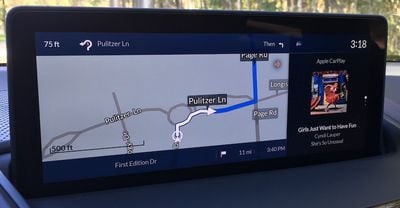
Pressing the right-side strip on the TTI will then conveniently bring your CarPlay audio over to the primary zone and slide the Acura navigation over to the right side.
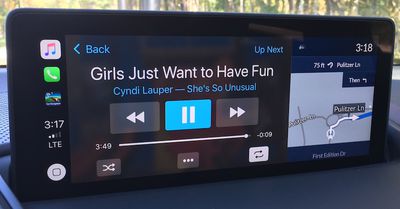
With the cards options for the secondary display zone, you can even assign audio to both zones, displaying the traditional CarPlay "Now Playing" interface in the primary zone and album artwork in the secondary zone.
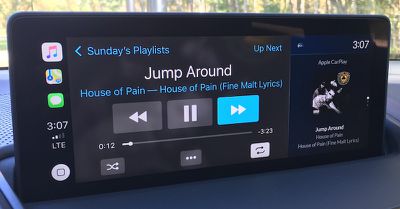
Things don't work quite as well when you're using other functions. For example, if you're using CarPlay navigation in the primary display zone and SiriusXM in the secondary zone, swapping the zones will move the SiriusXM controls to the primary zone, but there's no "mini" mode for CarPlay's maps apps to show in the secondary zone.
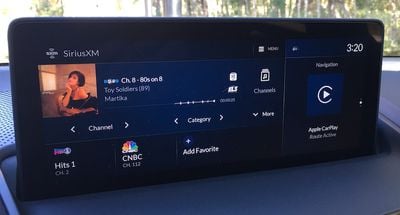
As a result, all you'll see on the right is a CarPlay-like icon and text saying "Apple CarPlay" and "Route Active" with no details on the navigation in progress. You will, however, still receive navigation voice prompts.
Ports and Connectivity
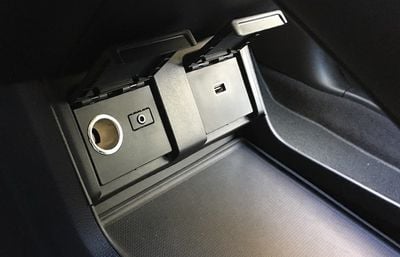
If you're looking to charge your devices in the RDX, you'll find several options, including the prominent USB port in the center console that gives your device access to the infotainment system. Another USB port is located underneath the center stack adjacent to a large storage space.
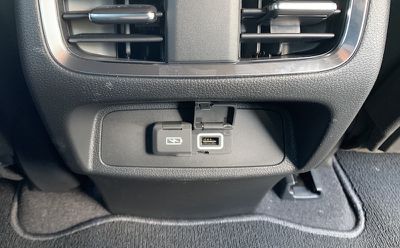
If you have the Technology package, you'll get two more USB ports on the rear of the center console, giving your rear passengers convenient accessing to charging. All of the USB ports in the RDX offer 2.5A charging, so even devices like iPads with demanding charging loads will refuel fairly quickly.
Hotspot capabilities come standard on the 2019 RDX, although you'll have to subscribe to an AT&T data plan. Conversely, you can tether the car to your phone's cellular connection to support internet-connected features of the infotainment system.
Wrap-up
I came away impressed with the overall driving experience of the 2019 Acura RDX, and the infotainment system is one of the best I've tested with a powerful navigation system, a terrific widescreen center display, and a unique but natural-feeling touchpad control interface. CarPlay works well, and I appreciate the ability to use the secondary display zone to show details on apps from the built-in system while using CarPlay. It's a handy way to take advantage of CarPlay navigation and SiriusXM radio simultaneously, for example, and keep tabs on everything at once. It's a welcome enhancement to CarPlay's one-app-at-a-time experience.
The most significant negative is the lack of full True Touchpad Interface support in CarPlay, and hopefully that's something Apple will address at some point. TTI is a solid control mechanism, but I feel like CarPlay hampered my ability to become fluent with it simply because I was constantly switching between CarPlay and Acura's system.
As a result, I still found myself dragging my finger around on the touchpad even when using the native Acura system rather than heading straight for the area corresponding to my desired target. I have no doubt the interface would have become second nature more quickly without CarPlay and the built-in system constantly fighting to retrain my brain.
The 2019 Acura RDX starts at an MSRP of $37,300 with CarPlay supported on all vehicles including the entry-level Standard trim. The Technology package adds $3,200 to the total cost, and if you want even more you can opt for either the A-Spec package for a further $3,000 or the Advance package for $4,900, both on top of the Technology package. SH-AWD is an additional $2,000 on all levels.











































Top Rated Comments
Much better to get a RAV4 or Prius at this point. Even a Corolla now has Apple CarPlay.
Acura never feels like a luxury car nor do the implement features fully or usefully. There are just so many things I hate about my 2016 TLX.
However, the engine is solid and maintenance costs are low.