

Apple's Vision Pro is one of the most sophisticated pieces of hardware that the company has ever launched. However, even the most advanced devices can encounter hiccups, necessitating a simple restart or, in more stubborn cases, a force restart. This article explains how it's done.
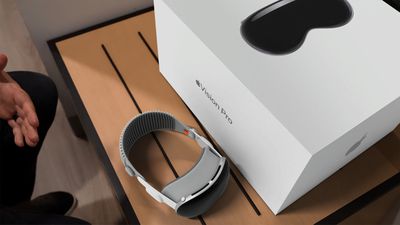
If you're Vision Pro is not responding, glitching out, or presenting other unusual behavior, you can try a simple restart by following these steps.
How to Restart Apple Vision Pro
Shutting Down Vision Pro
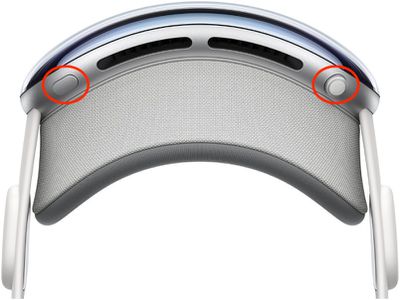
- Press and hold the Digital Crown and the top button at the same time. The Force Quit Applications window will appear after a couple of seconds. Keep holding the Digital Crown and the top button until the Power button slider appears, then let go.

- Look at the onscreen Power button to select it. Then hold your thumb and index finger together to pinch and drag the button to the right.
- Wait until the screen turns black, indicating that Apple Vision Pro has shut down. Then take off the device.
Powering on Vision Pro
Press and hold the top button for three seconds to turn Apple Vision Pro back on. After about a minute, Apple Vision Pro makes a tone that means it's ready to use.
How to Force Restart Apple Vision Pro
If the above steps didn't work for you, don't disconnect the battery on Apple Vision Pro to shut it down. Instead, try a force restart. You can take off Apple Vision Pro while it restarts. Note that you should force restart Apple Vision Pro only as a last resort and only if it's not responding. Also, be sure not to force restart the headset if it's in the middle of updating visionOS.
- Press and hold the Digital Crown and the top button at the same time.
- Keep holding the Digital Crown and the top button until the screen turns black, then let go.
As Apple Vision Pro is restarting, the Apple logo will appear on the front display.






















![Apple Pulls Keynote, Pages and Numbers From App Store [Update: Back]](https://images.macrumors.com/t/Okb7kitB_gNr6qe5Pex9nQIysD8=/112x112/article-new/2026/01/Apple-Creator-Studio-iWork-suite.jpg)























