AirPods Pro 3: How to Pair With Non-Apple Devices - MacRumors
Skip to Content

AirPods Pro 3: How to Pair With Non-Apple Devices

by

AirPods Pro 3 are designed to connect instantly with Apple devices, but they still work as standard Bluetooth earbuds. That means you can pair them with virtually any device that supports Bluetooth audio – from Samsung Galaxy phones to gaming consoles. Here's how to set up the connection in seconds.
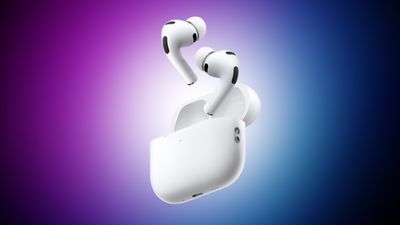
airpods pro 3 purple
Note that this manual pairing method also comes in handy if your AirPods Pro 3 don't show the automatic setup animation on your iPhone, iPad, or Mac.

How to Put AirPods Pro 3 in Manual Pairing Mode

AirPods Pro 3 have a new Charging Case design that adopts the AirPods 4 pairing gesture, making it different from previous AirPods Pro models:

  1. Place your AirPods inside the charging case.
  2. Hold the case next to the device you want to pair with.
  3. Double-tap the front of the case until the status light flashes white.
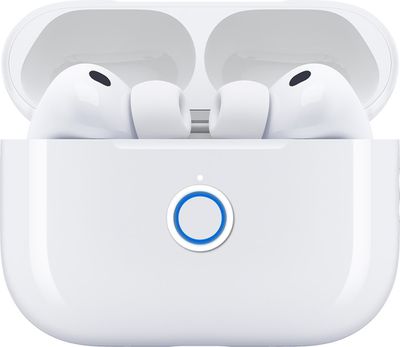
airpods pro 3 pairing double tap case white status led

That's it – your AirPods Pro 3 are now discoverable to any nearby device. Once the status light is flashing white, complete the connection on your device. Open your device's Bluetooth settings, look for your AirPods in the list of available devices, then tap or click them to connect.

Your AirPods Pro 3 will now work with your device for audio playback and calls, though some Apple-exclusive features like automatic device switching and Spatial Audio won't be available on non-Apple hardware.


Popular Stories

Four iPhone 18 Pro Colors Mock Feature

iPhone 18 Pro Launching Later This Year With These 10 New Features

Tuesday May 26, 2026 6:32 am PDT by
While the iPhone 18 Pro and iPhone 18 Pro Max are not launching until September, there are already plenty of rumors about the devices. It was initially reported that the iPhone 18 Pro models would have fully under-screen Face ID, with only a front camera visible in the top-left corner of the screen. However, the latest rumors indicate that only one Face ID component will be moved under the...

Apple Watch Blood Glucose Monitoring Feature 2

Apple Watch for Diabetes: The Latest on Apple's Plans for Non-Invasive Blood Sugar Monitoring

Tuesday May 26, 2026 9:30 am PDT by
For many years now, it has been rumored that the Apple Watch will eventually gain non-invasive blood sugar monitoring capabilities, which would enable millions of people with diabetes to track their blood glucose levels without needing to prick their skin with a needle or wear a dedicated continuous glucose monitor. According to Bloomberg's Mark Gurman, Apple recently shifted oversight of...
apple wallet drivers license feature iPhone 15 pro

Apple Just Expanded iPhone Driver's License Feature to Arkansas

Wednesday May 27, 2026 9:41 am PDT by
In select U.S. states, residents can add their driver's license or state ID to the Apple Wallet app on the iPhone and Apple Watch, and then use it to display proof of identity or age at select airports and businesses, and in select apps. Starting today, the feature is available in Arkansas, which is the 14th state to offer it. However, it may take some time to roll out to all users. To...