In macOS Sonoma, Apple has made its stock Notes app significantly more useful by adding the simple yet powerful ability to link notes and connect related notes together on your Mac. Here's how it works.
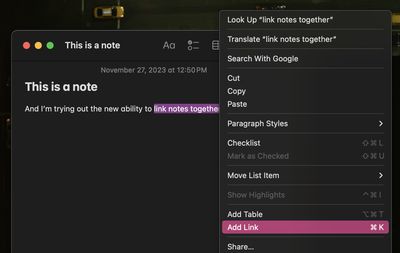
With just a few clicks, you can create links between notes in the Notes app in macOS Sonoma, making it easy to jump from one idea to another. To add a new link to another note, right-click on a space in any note and choose Add Link from the contextual menu. (You can also use the Command-K shortcut.) Alternatively, select a word by double-clicking it, or highlight a phrase with your cursor, then right-click and choose Add Link.
The window that appears will let you link to another note by searching its title or entering a URL. If you didn't select an existing word or phrase as the link, you can use the "Name" field, to a title for the link.
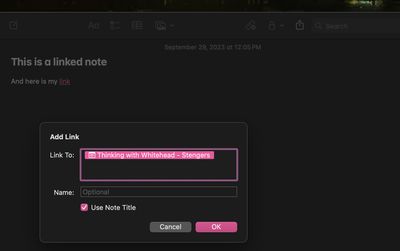
Once you're done, the link appears as hyperlink-style underlined text in your note, and clicking it snaps you straight into the note you linked to. This feature doesn't just work for links between notes — you can add URLs of any sort, just like you can with the Edit -> Add Link command in Mac apps.
How to Create Links Faster
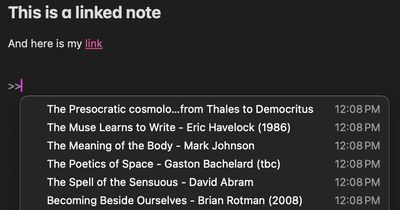
The Notes app also offers an additional, quicker way to add links: Typing two greater-than symbols (>>) into a note invokes a list containing your six most recently modified notes, and selecting one instantly adds a link to that note.
The same feature can be found in iOS 17 and iPadOS 17, so you can create and keep wiki-style collections of interlinked notes synced across your Apple devices, allowing you to organize your thoughts or discover new connections and associations between ideas.