Update December 13: This change did not make it into the final release of iOS 15.2, but may reappear in a future update.


In iOS 15.2, which is available in beta right now, Apple introduced new features for the Find My app, including a new way to search for items that might be lost so that you can help return them to their rightful owner.

FindMy Feature
The new Unknown Items feature is called "Help Return Lost Items" and when activated, it will scan for anything that's nearby that belongs to someone else and let you know about it.

If anything is detected, such as an AirTag or other Find My-enabled item, Apple can provide you with the contact details of the owner so that you can return it to them.

The following steps show you how to activate the feature in iOS 15.2. Note that items can only be found if they are not in range of their owner's device, up to 50 meters.

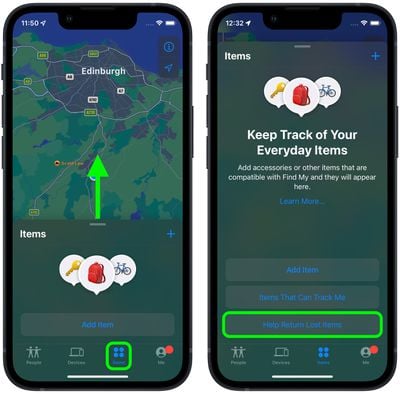
  1. Launch the Find My app on your iPhone.
  2. Tap the Items tab at the bottom of the screen.

  3. Drag the items card further up onto the screen using the small pill-shaped handle to reveal more options.
  4. Tap Help Return Lost Items.
    find my

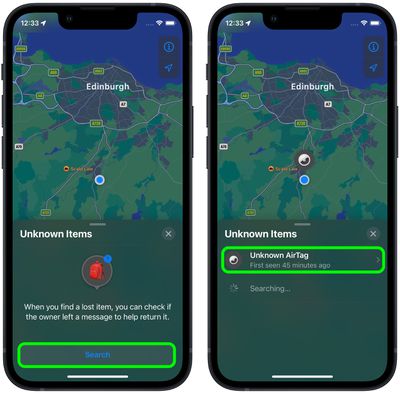
  5. Tap the Search button.
  6. Look at the list titled "Unknown Items." If a device is discovered, tap it for more information.
    find my

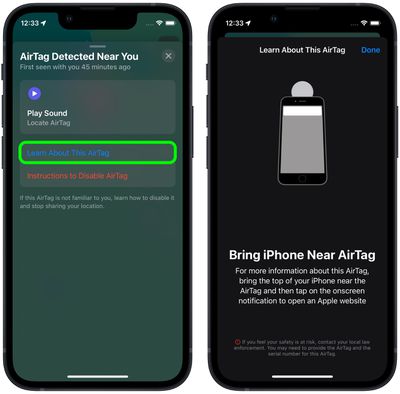
  7. If it's an ‌AirTag‌, you can optionally tap Play Sound to more exactly locate it. Tap Learn More About This AirTag to see if its owner has added contact details in case the item is lost.
  8. Bring your ‌iPhone‌ near the ‌AirTag‌ and then tap the onscreen notification to open an Apple website, where you should find contact information for the owner.
    Find My

Even if an ‌AirTag‌ isn't in Lost Mode, if it's been separated for a period of time from its owner then it will make a sound to alert anyone nearby.

AirTags can only be used to track items via an ‌‌iPhone‌‌ or iPad with the ‌‌Find My‌‌ app. Apple sells individual ‌AirTags‌ for $29 or a pack of four for $99. For more details on ‌AirTag‌ item trackers, check out our dedicated guide.

Related Forum: iOS 15

Popular Stories

iPhone Top Left Hole Punch Face ID Feature Purple

10 Reasons to Wait for This Year's iPhone 18 Pro

Thursday January 8, 2026 2:56 am PST by
Apple's iPhone development roadmap runs several years into the future and the company is continually working with suppliers on several successive iPhone models at the same time, which is why we often get rumored features months ahead of launch. The iPhone 18 series is no different, and we already have a good idea of what to expect for the iPhone 18 Pro and iPhone 18 Pro Max. One thing worth...
Touchscreen MacBook Feature

Apple Is Expected to Launch These Four MacBooks in 2026

Friday January 9, 2026 8:17 am PST by
2026 could be a bumper year for Apple's Mac lineup, with the company expected to announce as many as four separate MacBook launches. Rumors suggest Apple will court both ends of the consumer spectrum, with more affordable options for students and feature-rich premium lines for users that seek the highest specifications from a laptop. Below is a breakdown of what we're expecting over the next ...
iOS 27 Mock Quick

Five New iPhone Features Rumored for iOS 27

Wednesday January 7, 2026 2:51 pm PST by
Though it's been just a few months since iOS 26 launched, we're already hearing rumors about the next-generation version of iOS, iOS 27. iOS 27 will be introduced at Apple's June WWDC 2026 event before it launches in September 2026. We don't know all of the details about iOS 27 yet, but we do have some information about what to expect. "Snow Leopard" Update iOS 27 will apparently focus...
samsung crease less foldable display ces 2026%402x

Foldable iPhone's Crease-Free Display Tech Spotted at CES 2026

Tuesday January 6, 2026 3:04 am PST by
CES 2026 has just provided a first glimpse of the folding display technology that Apple is expected to use in its upcoming foldable iPhone. At the event, Samsung Display briefly showcased its new crease-less foldable OLED panel beside a Galaxy Z Fold 7, and according to SamMobile, which saw the test booth before it was abruptly removed, the new panel "has no crease at all" in comparison. The ...


safari icon blue banner

Apple Loses Safari Lead Designer to The Browser Company

Thursday January 8, 2026 10:50 am PST by
Apple has lost another senior figure from its Safari team as a lead designer departs for The Browser Company, extending a pattern of high-profile exits from Apple's browser team amid intensifying competition around AI-driven browsing. Marco Triverio was a lead designer for Safari and has now joined The Browser Company, the developer of the Arc and Dia browsers. The move was confirmed by The...
iOS 26 Glass Feature

iOS 26 Shows Unusually Slow Adoption Months After Release

Thursday January 8, 2026 3:44 pm PST by
iOS 26 is showing unusually slow adoption among iPhone users months after release, according to third-party analytics. Usage data published by StatCounter (via Cult of Mac) for January 2026 indicates that only around 15 to 16% of active iPhones worldwide are running any version of iOS 26. The breakdown shows iOS 26.1 accounting for approximately 10.6% of devices, iOS 26.2 for about 4.6%, and ...
proposed unicode emoji 18%402x

Squinting Face, Pickle, and Lighthouse Among New Emoji Coming to iOS

Friday January 9, 2026 4:24 am PST by
The Unicode Consortium has published a draft list of emoji that could come to smartphones and other devices in the future. The list shared by Emojipedia outlines 19 emoji candidates under consideration for Emoji 18.0, which is expected to be finalized in September 2026. Among the proposed additions are a squinting face emoji, left- and right-pointing thumb gestures, a pickle, a lighthouse, a ...