

iOS 16: How to Change the Lock Screen Clock to Arabic Indic - MacRumors
Skip to Content

iOS 16: How to Change the Lock Screen Clock to Arabic Indic

by

In iOS 16, Apple has introduced a variety of customization options for the iPhone Lock Screen, including the ability to add widgets and style the look of the digital clock.
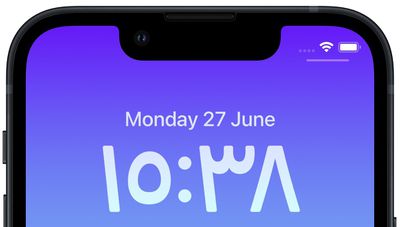
Lock Screen
Among the new changes you can make to the digital clock readout on the Lock Screen, Apple now allows you to switch the time display from Arabic numerals to Arabic-Indic symbols. The following steps show you how it's done in iOS 16.

  1. Unlock your iPhone with Face ID or Touch ID.
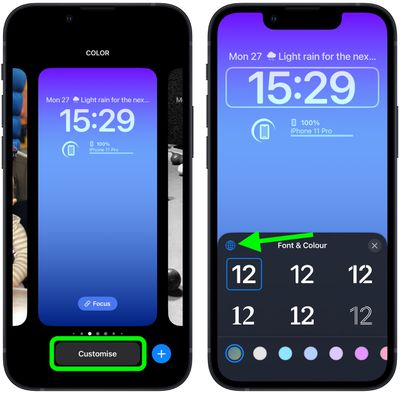
  2. Press and hold on the Lock Screen to activate the gallery view.
  3. If necessary, swipe to the Lock Screen wallpaper you want to edit, then tap Customize.
  4. Tap within the frame surrounding the time to bring up the editor panel.
  5. Tap the globe icon in the top-left corner of the Font & Color panel.
    Lock Screen

  6. Select Arabic Indic from the options.
  7. When you're finished editing, tap Done in the top-right corner of the screen.
  8. Tap the Lock Screen in the wallpaper gallery to activate it.
    Lock Screen

Note that you can customize the current Lock Screen at any time by invoking the gallery view from the Lock Screen with a long press, or by going into Settings -> Wallpapers.


Popular Stories

Apple Wallet

iOS 27 Will Add Two New Apple Wallet Features to Your iPhone

Monday June 1, 2026 12:15 pm PDT by
Apple is set to unveil iOS 27 during its WWDC 2026 keynote on Monday, June 8, and the update will reportedly include two new Apple Wallet features. First, iOS 27 will reportedly let users create their own digital passes by scanning items like movie tickets, concert passes, and gym membership cards. Many apps already offer Apple Wallet passes, but now users will be able to create a custom...


Dynamic Island iPhone 18 Pro Feature

iPhone 18 Pro Battery Capacities Allegedly Leaked

Tuesday June 2, 2026 1:54 am PDT by
Battery capacities for Apple's upcoming iPhone 18 Pro have allegedly surfaced, and the numbers suggest only a modest increase over the iPhone 17 Pro. According to prolific Weibo-based leaker Digital Chat Station, Apple is testing the iPhone 18 Pro with different battery capacities for the China and U.S. versions of the device, similar to last year's iPhone 17 Pro models. The Chinese model is ...
macOS 27 on MacBook Pro

Apple Says macOS 27 Won't Be Compatible With These Macs

Wednesday June 3, 2026 8:29 am PDT by
During WWDC 2025, Apple revealed that macOS 26 Tahoe would be the final major macOS version for Intel-based Macs. macOS 27 will be compatible with Apple silicon Macs only, meaning that you will need a Mac with an M-series chip or a MacBook Neo with an A18 Pro chip in order to install the software update. Apple will unveil macOS 27 during its WWDC 2026 keynote this Monday, June 8, and the...







































