

Apple last week announced and debuted an attractive new iPad option -- a sixth-generation model with an affordable $329 price tag, an upgraded A10 Fusion processor, and support for the Apple Pencil, an accessory previously limited to the more expensive iPad Pro models.
For MacRumors readers who are upgrading to Apple's stellar new tablet from an older model, we've put together a video and guide covering features, accessories, and tips for getting the most out of the sixth-generation iPad.
Apple Pencil
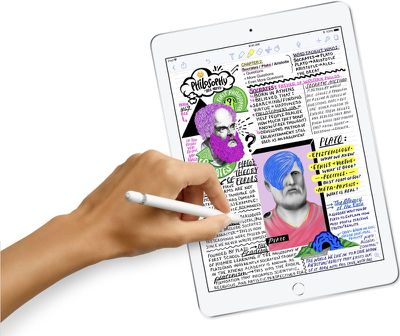
Apple Pencil support is the major new feature in the sixth-generation iPad, and there are a ton of useful tricks you need to know if you're new to the accessory.
Pairing
Pairing the Apple Pencil to the iPad is as simple as uncapping it and plugging the Lightning connector into the Lightning port on your iPad. You'll see a popup that asks you to confirm to pair, and once you accept, the Apple Pencil is successfully connected to the iPad.
Charging and Battery
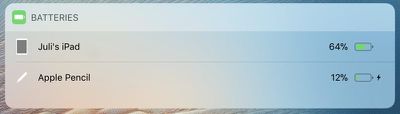
When you connect your Apple Pencil to your iPad, it'll let you know the battery level. You can also check using widgets accessed by swiping to the right of the Home screen. Scroll down to the "Batteries" section where your iPad and its connected devices (including Apple Pencil) are listed.
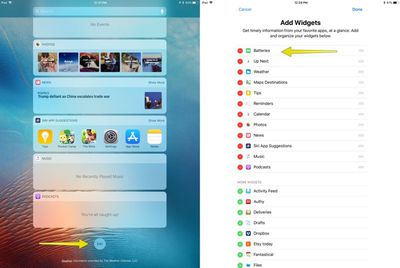
Don't see a battery widget? Tap on "Edit" at the bottom of the list and tap on the "+" icon next to the "Batteries" option.
The Apple Pencil's battery lasts for approximately 12 hours, and it charges through the Lightning connector on the iPad or with any Lightning cable using an adapter that ships with the accessory.
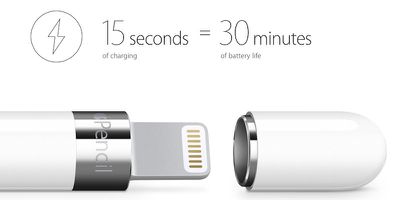
If your battery is dead and you need your Apple Pencil in a hurry, just plug it in for 15 seconds. That'll get you enough juice to use it for a half hour, so it's never out of power when you need it.
Apple Pencil Capabilities
The Apple Pencil is a sophisticated device that does quite a lot when paired with the sixth-generation iPad. A new touch sensor in the iPad allows for the Apple Pencil to work, enabling a lag-free writing and drawing experience that's identical to using the Apple Pencil on the more expensive iPad Pro.
Your iPad knows when you're using your Apple Pencil and it blocks out other touch input. That means there's built-in palm rejection, so feel free to rest your hand on the iPad while you write or sketch.
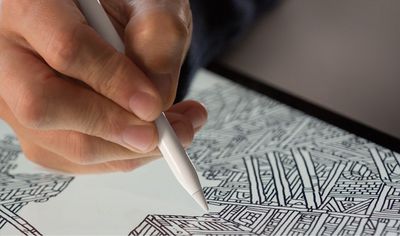
There are pressure and positioning sensors included in the Apple Pencil, which let it detect a range of forces to enable pressure-sensitive drawing and writing in supported apps. When you press lightly, you'll get a thin line. Press harder, and you'll get a thicker line.
On the same note, there are two tilt sensors that determine the orientation and angle of the Apple Pencil while you're holding it, a feature that lets you add shading to drawings and sketches by using the side of the tip.
Replacing the Tip
The Apple Pencil has a replaceable tip, so when it wears down, you can swap in a new one. An extra tip comes with the Apple Pencil, and you can purchase an additional package of four from Apple for $19.99.
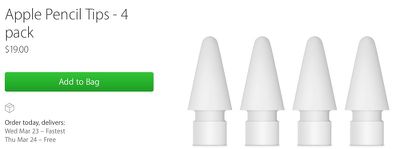
How often you'll need to change the tip will depend on how much you're using the Apple Pencil, but on average, a tip should last for multiple months to a year or more. To swap it out, turn the tip counterclockwise to unscrew it and then screw on a new one.
Apple Pencil Apps
The Apple Pencil is ideal for taking notes, writing, sketching, drawing, and other similar tasks on the iPad, and because it's been around for several years now, there are tons of apps that offer full support for the Apple Pencil's features. We've listed some of our favorites below:
- GoodNotes 4 ($7.99) - GoodNotes 4 is a comprehensive note-taking app that offers a range of writing and sketching tools, along with OCR for searching through your written notes. You can also use it to annotate documents and PDFs with the Apple Pencil.
- Notability ($9.99) - Notability is another app that offers all of the features you need for taking detailed, concise notes with the Apple Pencil. It's simple, easy to use, and offers tons of writing and sketching tools, but it's not quite as feature rich as GoodNotes 4.
- PDF Expert ($9.99) - If you're going to be editing and annotating a lot of PDFs, it may be worth investing in PDF expert.
- Pigment (Free) - Pigment is a coloring book app that lets you color in intricate designs using the Apple Pencil. Kids love it, and it's relaxing for adults too.
- Affinity Photo ($19.99) - Affinity Photo is a lot like Photoshop - you can use it for drawing, sketching, editing photos, and more. It has full support for Apple Pencil, including pressure sensitivity and tilt. Use it to apply editing effects to photos or create paintings with its extensive brush library and brush tools.
- Procreate ($9.99) - For sketching and drawing on the iPad, you won't go wrong with Procreate, an app that many iPad artists prefer. Procreate supports high-definition canvases, offers tons of brushes, and has full support for Apple Pencil.
Tracing Through Paper
Want to digitize a drawing that's on traditional paper? The Apple Pencil works through paper, so just place the sheet over the iPad's display, where it will be illuminated by the screen, and then trace the design in your favorite sketching app.
Other Apple Pencil Tidbits
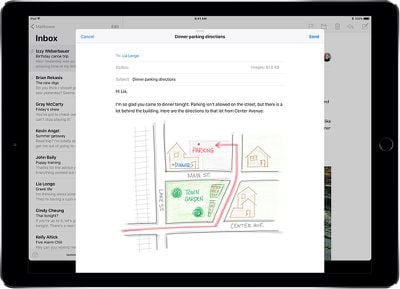
Apple Pencil support is built into apps throughout the iOS 11 operating system. Inline Apple Pencil drawings, for example, can be inserted into Notes and Mail, while a useful Instant Notes feature lets you tap your Apple Pencil on the display of the iPad to automatically open a new note in the Notes app without having to unlock the iPad or manually open the app.
If you use the document scanner in the Notes app to scan a piece of paper, you can then sign it or annotate it with Apple Pencil. It's a useful feature for documents that you need to sign and return to someone. You can also sign standard PDFs, either in the Mail app or right in the Files app.
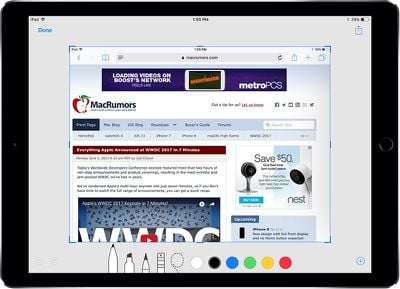
With the sixth-generation iPad, Apple also added Apple Pencil support to all of its iWork apps, so you can use Apple Pencil with Pages, Keynote, and Numbers. You can also use the Apple Pencil for drawing on and annotating screenshots and photos with Instant Markup, a feature available in the Photos app or whenever you take a screenshot (just tap on the screenshot icon in the lower left corner).
The Apple Pencil is, of course, designed for note taking and sketching, but you can also use it for navigation just like your finger.
Augmented Reality
The sixth-generation iPad includes an A10 Fusion chip, and while it's not as speedy as the A10X Fusion in the iPad Pro, it's still able to run any app or game in the App Store. Apple specifically said the more powerful A10 Fusion, which was first introduced in the iPhone 7, was added to the sixth-generation iPad to support augmented reality content.
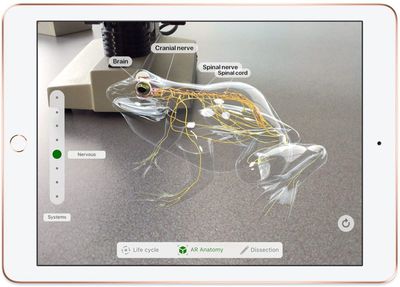
There are now tons of augmented reality apps built using ARKit in the App Store, and you can download everything from Pokémon Go to apps that let you preview furniture to educational apps, all of which have AR content. In the iOS App Store, you'll want to check out the specific AR categories in the apps and games sections.
iOS 11 on the iPad
iOS 11 introduced a whole slew of iPad-specific features that make using an iPad as a computer replacement a much more pleasing experience. The new sixth-generation iPad, with its A10 Fusion processor, supports all of these features.
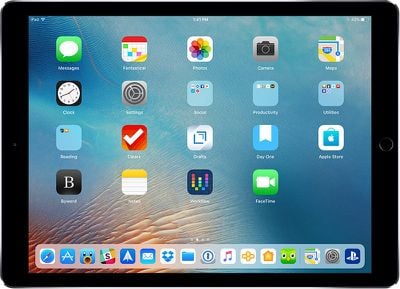
A persistent dock, for example, houses all of your apps and makes it easier to use the built-in multitasking features for accessing two apps side by side. Using simple drag gestures that are easy to learn, you can use multiple apps in a variety of ways with Slide Over and Split View arrangements, as demoed in the video.
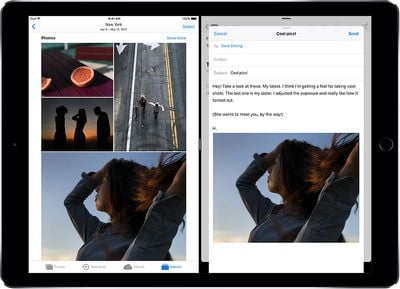
Picture-in-picture, another multitasking feature in iOS 11, lets you watch a video on YouTube or another source while continuing to use other apps, which is super handy, and drag and drop features make it simple to move files and content from one app to another.
Control Center has been merged with a useful new App Switcher, accessible by swiping up from the bottom of the iPad. With the App Switcher, you can access all Control Center options and quickly switch between open apps with just a tap.
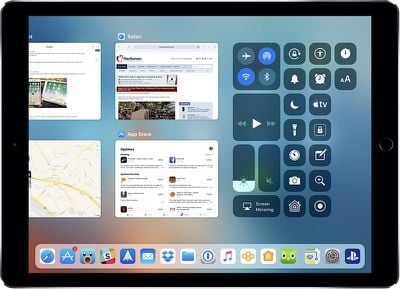
You can find more detail on all of these iPad features in our iOS 11 roundup, which is complete with tons of how tos that are worth checking out for learning even more about iOS 11 and the new iPad.
Adding Accessories
While the new iPad supports the Apple Pencil, it doesn't have a Smart Connector and there's no option for a Smart Keyboard. Bluetooth keyboards are supported, though, and if you want to use your iPad for writing, coding, or other keyboard intensive tasks, it's worth picking one up.
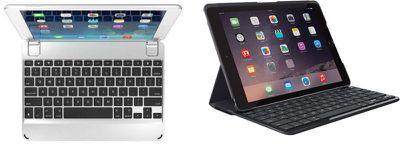
The sixth-generation iPad's design is the same as the fifth-generation iPad's design, so all existing iPad keyboards will work with the new model, and there are tons of options out there. Brydge, for example, makes a highly rated $99 iPad keyboard, and there are multiple options from Logitech, like the $99 Slim Folio. You can also use Apple's own Magic Keyboard for a Mac-like typing experience.
Did you get a new iPad? Are there tips and tricks worth knowing that we haven't covered here? Let us know in the comments.


















Top Rated Comments
The one qualm I had was the lack of anti-reflective coating on the screen. As you can tell from my many sequences in this video, where the reflection of the camera is annoying. Only an issue if you use it in daylight. For evening/night usage, this is perfect. I don't use the pencil.
Overall a great device. And thanks macrumors for posting this video, very useful.
"It's just a rounded square. Big deal."
2) Use the iPad that you already have because it's almost exactly the same