

iOS 18: New Control Center Features Multiple Customizable Screens - MacRumors
Skip to Content

iOS 18: New Control Center Features Multiple Customizable Screens

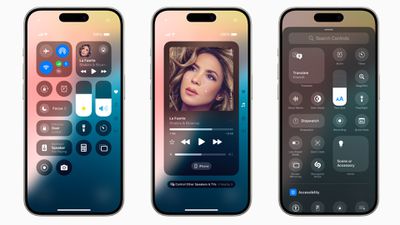
Apple at WWDC has announced iOS 18, which includes an overhauled Control Center interface with new customization features and the ability to add multiple control screens.
ios 18 control center
In iOS 18, Control Center has been redesigned to provide easier access to many of the things users do every day, and it gets new levels of customization and flexibility.

The redesign delivers quick access to new groups of a user's most-utilized controls, such as media playback, Home controls, and connectivity, as well as the ability to easily swipe between each.

In iOS 18, when you invoke Control Center with a swipe down from the top-right of your iPhone's screen, you can continuously swipe to get to more control center screens. There's a new controls gallery that lets you customize the controls you see, and you can change the size of buttons to emphasize priority. Additionally, developers can include controls from their own apps, enabling quick access to controls like remotely starting a car, for example.

The new Controls API from Apple also allows you to switch up the controls on your iPhone's lock screen, so you can replace the traditional flashlight and camera buttons with something more convenient to you. And if you have an iPhone 15 Pro, you can also assign Control Center buttons to the physical Action button.


Related Forums: iOS 18, iPadOS 18

Popular Stories

macOS 27 on MacBook Pro

Apple Says macOS 27 Won't Be Compatible With These Macs

Wednesday June 3, 2026 8:29 am PDT by
During WWDC 2025, Apple revealed that macOS 26 Tahoe would be the final major macOS version for Intel-based Macs. macOS 27 will be compatible with Apple silicon Macs only, meaning that you will need a Mac with an M-series chip or a MacBook Neo with an A18 Pro chip in order to install the software update. Apple will unveil macOS 27 during its WWDC 2026 keynote this Monday, June 8, and the...
MacBook Neo on Yellow Feature

MacBook Neo is So Popular That Apple Reportedly Doubled Production

Wednesday June 3, 2026 9:24 am PDT by
On an earnings call in late April, Apple's CEO Tim Cook said that customer response to the MacBook Neo was "off the charts," and the popularity of the laptop has reportedly led the company to significantly boost production. Apple supply chain analyst Ming-Chi Kuo this week said he believes that MacBook Neo shipments to Apple were doubled from an initial target of 5 million units to 10...


iphone 18 pro blue%402x

iPhone 18 Pro: Dark Cherry, Light Blue, and Dark Gray Chassis Leaked [Update]

Thursday June 4, 2026 5:18 am PDT by
Update: Since publication, new information has come to light suggesting the images have been AI-manipulated and are not in fact iPhone 18 Pro chassis parts. The original article follows. The color options Apple is reportedly planning for the upcoming iPhone 18 Pro and ‌iPhone 18 Pro‌ Max have appeared online today in the form of images of chassis parts of unknown authenticity....

Top Rated Comments

26 months ago
Makes all of these things easier to access… as long as you first open it by swiping from the absolute hardest corner to reach on these grotesquely-sized phablets 🙄
Score: 11 Votes (Like | Disagree)
sniffies Avatar
26 months ago
Out of all iOS 18 updates, this one is the most exciting.

Oh and finally being able to customize Lock Screen icons.
Score: 5 Votes (Like | Disagree)
Westside guy Avatar
26 months ago
As Apple has done their best to kill jailbreaking, it's nice to see they're finally adopting at least some of the features I used to jailbreak for. A truly customizable Control Center is very useful.
Score: 3 Votes (Like | Disagree)
Slix Avatar
26 months ago
Ah, iOS 10's Control Center, how we missed you. :P
Score: 3 Votes (Like | Disagree)
2016 Avatar
26 months ago
best iOS update in years?
Score: 3 Votes (Like | Disagree)
Apple Mac Daz Avatar
26 months ago
Wish there was a Bluetooth on and off not just disconnect
Score: 2 Votes (Like | Disagree)






































