

Apple Inviting Developers to Online Events on Building Widgets, Creating App Clips and Bringing iPad Apps to Mac - MacRumors
Skip to Content

Apple Inviting Developers to Online Events on Building Widgets, Creating App Clips and Bringing iPad Apps to Mac

Apple today sent out email invitations to developers inviting them to join various events focused on specific iOS, iPadOS, and macOS features like widgets and App Clips.
ios 14 third party home screen widgets 1
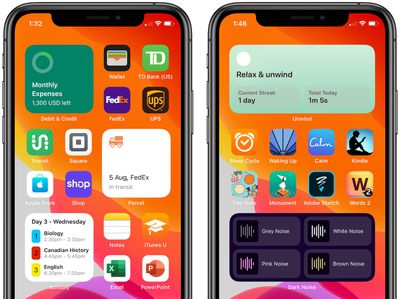
A widget-centric event called "Building Great Widget Experiences" is set to take place on February 1, 2021, and will provide developers with opportunities to learn new techniques for creating useful widgets for their apps.

We'd like you to join us for Building Great Widget Experiences on Monday, February 1, 2021. This event will be conducted online.

Useful and delightful, widgets let you elevate key content from your app and display it where users can see it at a glance on iPhone, iPad, and Mac. They can also help users personalize their Home screens in unique ways. Join us for an in-depth look at building great widget experiences.

There's a separate event on Monday, February 15 titled "Bring Your iPad App to Mac," and another event called "Building Great App Clip Experiences" that's focused on the App Clips feature introduced in iOS 14.


Developers who have been invited to these sessions are able to ask Apple employees questions, much like the online events that Apple held last year for WWDC.


Apple occasionally hosts these special session events focused on different iOS and macOS features. Last year, for example, Apple hosted an event focused on accessibility features.


Popular Stories

WWDC26 Stickers Feature

Apple Developer App Gets Liquid Glass Makeover and New WWDC 2026 Stickers

Monday May 11, 2026 10:47 am PDT by
Apple today updated its Apple Developer app, introducing a Liquid Glass redesign and giving developers some WWDC-themed stickers that can be used in the Messages app. The Apple Developer app has a revamped Liquid Glass icon that reintroduces some older design elements while adopting the translucent Liquid Glass aesthetic. The icon has a pencil, paintbrush, and ruler that form the "A" shape,...
macOS 27 on MacBook Pro

Apple Says macOS 27 Won't Be Compatible With These Macs

Wednesday June 3, 2026 8:29 am PDT by
During WWDC 2025, Apple revealed that macOS 26 Tahoe would be the final major macOS version for Intel-based Macs. macOS 27 will be compatible with Apple silicon Macs only, meaning that you will need a Mac with an M-series chip or a MacBook Neo with an A18 Pro chip in order to install the software update. Apple will unveil macOS 27 during its WWDC 2026 keynote this Monday, June 8, and the...


MacBook Neo on Yellow Feature

MacBook Neo is So Popular That Apple Reportedly Doubled Production

Wednesday June 3, 2026 9:24 am PDT by
On an earnings call in late April, Apple's CEO Tim Cook said that customer response to the MacBook Neo was "off the charts," and the popularity of the laptop has reportedly led the company to significantly boost production. Apple supply chain analyst Ming-Chi Kuo this week said he believes that MacBook Neo shipments to Apple were doubled from an initial target of 5 million units to 10...

Top Rated Comments

70 months ago
i wonder if someone can build a Widget for Big Sur called "Calculator" I am sure it would be a great success!
Score: 12 Votes (Like | Disagree)
Spock Avatar
70 months ago

Apple needs to empower the devs. They can start by allowing 1x1 widgets. I sure would like to fit 4 bits of information in the space of a single 4x4 widget. Also adding a transparency option would be nice too. Thats the big problem with Apple though. They always give us 80% and always withhold the other 20%.
I just want to be able to place my icons anywhere that’s not a grid.
Score: 10 Votes (Like | Disagree)
Zaft Avatar
70 months ago
Hopefully Apple adds interactive widgets in iOS 15.
Score: 9 Votes (Like | Disagree)
70 months ago

My friend you are preaching to the Choir.

You know why Apple doesn't do this? GREED.
Apple wants to make sure the person next to you can easily identify the device you're using is an iPhone. They don't want there to be any confusion. Which is why they are so OCD over the HomeScreen and why we fail year and year to see innovation. I mean we got half baked widgets so at least thats something but Apple could very very easily give us more control there and they refuse.
“Apple greed” is so overused and worn out. Your point was lost.
Score: 8 Votes (Like | Disagree)
tgwaste Avatar
70 months ago

Hopefully Apple adds interactive widgets in iOS 15.

“Apple greed” is so overused and worn out. Your point was lost.
but "Apple Sheep" isnt.
Score: 4 Votes (Like | Disagree)
GtrDude Avatar
70 months ago
I find the Apple widgets are mostly completely useless.
Gray noise, pink noise, white noise, brown noise?
Oh yeah...that'll come in real handy for a quick access.
Apple could learn a thing or two from Android on this one.
Score: 4 Votes (Like | Disagree)








































