Function101 Offering Alternative Apple TV Remote Control for $30

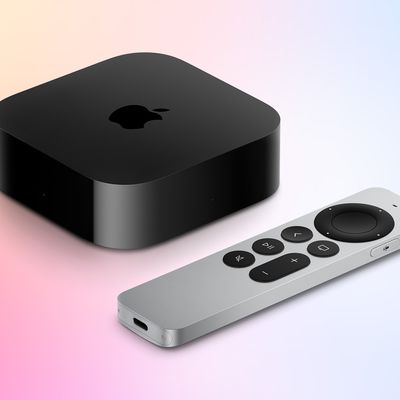
Apple unveiled its ‌Siri‌ (or ‌Apple TV‌) Remote with touch surface in 2015 alongside the fourth-generation ‌Apple TV‌, and it's never been a particularly popular accessory.
101 Function Feature
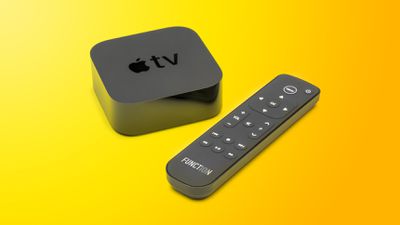
Last year we saw Swiss telco Salt launch an alternative remote control for the Apple TV 4K set-top boxes that it includes in its domestic broadband TV bundle, and yesterday AppleInsider surfaced another potential alternative for anyone frustrated with Apple's native Remote.

Function101's "Button Remote for Apple TV" costs $30 and looks very similar to the Swiss model, but this one will be available in the U.S. later this month, providing another option for anyone watching one of the Salt models on eBay, where they sell at a hefty premium.

The Button Remote includes directional arrows in place of the Siri Remote's glass Touch surface, a power button in addition to a Menu button, along with separate volume and channel rockers and traditional media playback buttons. There's no Siri button included, however.

If that omission is a deal breaker but you can't live with Apple's own remote, you could always control your Apple TV using an iPhone or via your Apple Watch.

Related Roundup: Apple TV
Buyer's Guide: Apple TV (Don't Buy)

Popular Stories

maxresdefault

iPhone Fold: Launch, Pricing, and What to Expect From Apple's Foldable

Friday February 20, 2026 3:21 am PST by
Apple is expected to launch a new foldable iPhone this year, based on multiple rumors and credible sources. The long-awaited device has been rumored for years now, but signs increasingly suggest that Apple will release its first foldable device in 2026. Subscribe to the MacRumors YouTube channel for more videos. Below, we've collated an updated set of key details that have been leaked about ...

Apple Watch 15 Tips Every Owner Needs to Know Feature

Apple Watch: 15 Tips Every Owner Needs to Know

Thursday February 19, 2026 7:38 am PST by
Apple Watch is now eleven generations in, and packed with useful features that are easy to miss at first glance. To help you get more out of your new device, we've rounded up 15 practical tips you might not have discovered yet, including a few that long-time users often overlook. Bounce Between Two Apps On your Apple Watch, double-press the Digital Crown to see a deck of all currently...

Apple Announces Special Event in New York Feature 1

Apple Reportedly Plans to Unveil at Least Five New Products Next Week

Sunday February 22, 2026 9:48 am PST by
In his Power On newsletter today, Bloomberg's Mark Gurman said Apple will have a three-day stretch of product announcements from Monday, March 2 through Wednesday, March 4. In total, he expects Apple to introduce "at least five products." A week ago, Apple invited selected journalists and content creators to an "Apple Experience" in New York, London, and Shanghai on Wednesday, March 4 at 9...

Low Cost A18 Pro MacBook Feature Pink

Three Upcoming Apple Products Seemingly Spotted in macOS 26.3 Code

Friday February 20, 2026 7:36 am PST by
macOS 26.3 hints at Apple's rumored lower-cost MacBook, and two new Studio Display models, according to Macworld's Filipe Espósito. Espósito found the following codenames within macOS 26.3's source code, and he revealed the upcoming products that they likely correspond with, based on previous reporting from Bloomberg's Mark Gurman and others. The codenames:J700: Lower-cost MacBook J427:...
Dynamic Island iPhone 18 Pro Feature

10 Reasons to Wait for Apple's iPhone 18 Pro

Wednesday February 18, 2026 5:12 am PST by
Apple's iPhone development roadmap runs several years into the future and the company is continually working with suppliers on several successive iPhone models at the same time, which is why we often get rumored features months ahead of launch. The iPhone 18 series is no different, and we already have a good idea of what to expect for the iPhone 18 Pro and iPhone 18 Pro Max. One thing worth...

Top Rated Comments

73 months ago
The Apple TV remote is honestly the worst invention Apple invented. Seriously bad user experience design. Too much overthinking, not enough practicality.

Hey Apple: Buttons were invented for a reason. USE THEM.

Also, the first immediate problem is the lack of any directionality in the ergonomics. You NEVER know if you're holding it upside down or not, until you actually look at it, because physically, it's just a flat rectangle.

A good remote should be able to let you know what you're doing with it without even looking at it.
Score: 40 Votes (Like | Disagree)
73 months ago
Seems like this is only IR control. That’s a deal breaker for me since my AppleTV is hidden behind my television.
Score: 20 Votes (Like | Disagree)
vidjahgamz Avatar
73 months ago
Well folks -- this may be an instant purchase for me. Great alternative for when my Apple TV remote drives me up a wall.
Score: 18 Votes (Like | Disagree)
73 months ago
Useless without a CC button. It'd spend good money on a CC button, wife loves them and I can't stand them. Constantly getting toggled.
Score: 13 Votes (Like | Disagree)
73 months ago
This seems to be just the right occasion to say that I totally love the Siri Remote... :)
Score: 10 Votes (Like | Disagree)
73 months ago
OR you could just do what every power user does... add the TV device control into your existing Logitech Harmony universal remote and customize any button you like.
Score: 9 Votes (Like | Disagree)